
Why Your W-9 Fillable Form Matters More Than You Think

The W-9 fillable form is a critical document for anyone working as an independent contractor, freelancer, or small business owner. While you might be searching for a specific year’s version, like the 2023 w9 fillable form, use the most current revision. If you need quick access to the form right now, here’s what you need to know:
Quick Access Guide:
- Official Source: Download the latest IRS Form W-9 (Rev. March 2024) directly from IRS.gov/FormW9
- Purpose: Provides your Taxpayer Identification Number (TIN) to clients who will report payments to the IRS
- Who Needs It: U.S. persons including freelancers, contractors, sole proprietors, LLCs, and corporations
- Fast Online Solution: Complete your secure W-9 at https://fillablew9.com/apply/
Every year, millions of freelancers and small business owners face the same challenge: a client requests a W-9 form, and suddenly you’re navigating IRS documents, wondering if you’re filling it out correctly. The stakes are real—incorrect information can lead to penalties of $50 per mistake, and more serious errors can result in backup withholding at 24% of your payments.
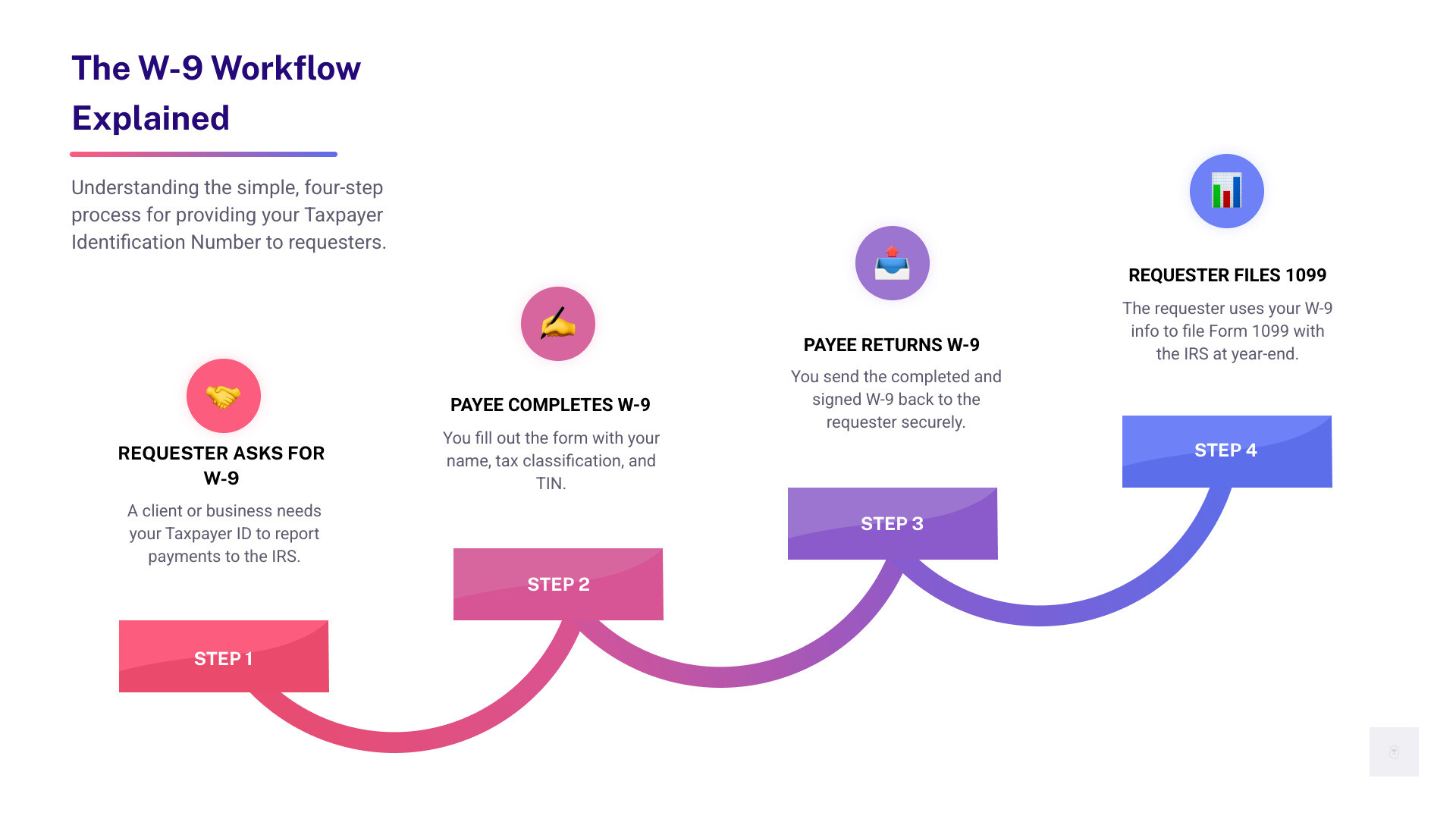
Form W-9 serves a straightforward purpose. When someone pays you $600 or more for services, they need to report that payment to the IRS using forms like 1099-NEC. To do that, they need your correct Taxpayer Identification Number and certification that you’re a U.S. person. That’s where the W-9 comes in—it’s not filed with the IRS, but given directly to the person or business paying you.
The most recent version was updated in March 2024, adding a new line 3b for partnerships, trusts, and estates to indicate if they have foreign partners, owners, or beneficiaries. This change reflects the IRS’s ongoing efforts to improve tax compliance and international reporting under FATCA (Foreign Account Tax Compliance Act).
The good news? You don’t need to be a tax expert to get this right. Whether you’re a graphic designer landing your first client, a small business owner collecting forms from contractors, or an accountant managing multiple client W-9s, the process is simpler than it looks once you understand the basics.
I’m Haiko de Poel, and throughout my career helping companies with compliance and business operations—from rebranding major corporations to streamlining digital processes—I’ve seen how proper documentation like the W-9 fillable form creates smoother business relationships and prevents costly errors. The key is having the right guidance and tools to complete forms correctly the first time.
Your Simple Solution for Tax Forms
We understand that tax forms can feel like a labyrinth of complex jargon and endless checkboxes. But completing your W-9 doesn’t have to be a chore. With the right tools and a clear, step-by-step guide, you can handle it in minutes, ensuring you’re compliant and ready for your next payment. Our goal at Fillable W9 is to make this process as simple and stress-free as possible, so you can focus on what you do best – running your business or pursuing your passion.

Start filling your W9 now at https://fillablew9.com/apply/.
What is Form W-9 and Who Needs to Fill It Out?
At its heart, Form W-9, officially titled “Request for Taxpayer Identification Number and Certification,” is a simple yet crucial document. Its primary purpose is for you, a U.S. person, to provide your correct Taxpayer Identification Number (TIN) to another person or entity (the “requester”) who is required to file an information return with the IRS. Think of it as your way of saying, “Here’s my tax ID, so you can properly report the money you pay me to the government.”

Who are these “U.S. persons” we’re talking about? The IRS defines a U.S. person broadly for federal tax purposes. This includes:
- U.S. citizens or resident aliens: If you’re an individual, this typically applies to you.
- Partnerships, corporations, companies, or associations: These must be created or organized in the United States.
- Estates: (other than a foreign estate).
- Domestic trusts.
Essentially, if you’re an independent contractor, a freelancer, a sole proprietor, an LLC, or any other type of U.S.-based business receiving payments for services, interest, dividends, or other reportable income, you’ll likely be asked to complete a Form W-9. This ensures the payer can accurately report these amounts to the IRS on various information returns, such as Form 1099-NEC for nonemployee compensation, Form 1099-INT for interest, or Form 1099-DIV for dividends. Without a properly completed W-9, the payer might be legally obligated to withhold a portion of your payments, a process known as backup withholding, which we’ll dig into later. You can find more official information directly from the IRS on About Form W-9, Request for Taxpayer Identification Number and Certification.
Key Differences in the Latest W-9 Version
The IRS is constantly refining its forms to ensure accuracy and adapt to new tax laws. While the core purpose of the W-9 remains consistent, it’s important to be aware of the latest revisions. The previous standard revision of Form W-9 was dated October 2018. Even if you’re looking for a 2023 w9 fillable form, the most current version you must use is the (Rev. March 2024).
The most notable update in this latest version is the addition of Line 3b. This new line is specifically for partnerships, trusts, or estates that are providing the form to another flow-through entity in which they have an ownership interest. If your entity has any foreign partners, owners, or beneficiaries, you’ll need to check this box. This seemingly small change is a big deal for ensuring proper reporting, especially concerning international tax compliance and the Foreign Account Tax Compliance Act (FATCA). It helps flow-through entities satisfy their reporting requirements more effectively.
Staying updated with the latest forms isn’t just about compliance; it’s about efficiency. Using an outdated form can lead to delays or requests for a new submission, costing you valuable time. We pride ourselves on keeping our platform updated with the latest IRS changes, so you don’t have to worry about using a superseded version. Learn more about how we stay current with IRS updates and features at More info about our features.
How to Complete Your W-9 Fillable Form: A Line-by-Line Guide
Filling out your W-9 fillable form doesn’t have to be a guessing game. We’ll walk you through each section, ensuring you understand what information is required and why it’s important.
Step 1: Accessing the Correct W-9 Fillable Form
First things first: ensure you’re working with the correct form. As we mentioned, the most recent revision of Form W-9 is (Rev. March 2024). While you might be searching for a “2023 W9 fillable form,” this March 2024 revision is the one you should be using for current reporting, as it supersedes previous versions. Always download the form directly from the IRS website to guarantee you have the official, most up-to-date document.
You can find the official, fillable PDF directly from the IRS here: [PDF] Form W-9 (Rev. March 2024) – IRS.
Using an outdated or unofficial form can lead to your submission being rejected, delaying your payments and potentially causing headaches for both you and the requester. We make sure you always have access to the most current forms, updated promptly whenever the IRS makes a change.
Don’t waste time with paper forms — complete your secure W9 online at https://fillablew9.com/apply/.
Once you have the form, let’s go line by line:
Part I: Taxpayer Identification Number
- Name (as shown on your income tax return): This is crucial. Enter your full legal name exactly as it appears on your federal income tax return. For sole proprietors, this is typically your individual name. For corporations or partnerships, it’s the legal business name.
- Business name/disregarded entity name, if different from above: If you’re a sole proprietor or a single-member LLC that is a disregarded entity for tax purposes, you’ll enter your business name here. Otherwise, leave this blank.
- Federal tax classification: This section asks you to check one box that describes your federal tax classification.
- Individual/sole proprietor or single-member LLC: Check this if you operate as a sole proprietor or a single-member LLC that is disregarded as separate from you for tax purposes.
- C Corporation: For businesses taxed as a C corporation.
- S Corporation: For businesses taxed as an S corporation.
- Partnership: For entities taxed as a partnership.
- Trust/estate: For trusts or estates.
- Limited liability company (LLC): If you check this box, you must also enter the tax classification of the LLC (C=C corporation, S=S corporation, or P=Partnership) in the space provided. If your LLC is a single-member LLC and is disregarded from its owner, you would check “Individual/sole proprietor or single-member LLC” instead.
- Other: If none of the above apply, describe your entity type.
- Line 3b (New in March 2024 revision): This new box is for partnerships, trusts, or estates that have any foreign partners, owners, or beneficiaries, and are providing this form to another partnership, trust, or estate in which they have an ownership interest. Check this box if it applies to your situation.
- Exemptions (Optional, but important):
- Exempt payee code: If you are exempt from backup withholding, enter the appropriate code here. Common exempt payees include corporations, tax-exempt organizations, and government entities. Most individuals filling out a W-9 will leave this blank.
- Exemption from FATCA reporting code: If you are exempt from FATCA reporting, enter the appropriate code here. This generally applies to certain U.S. persons with accounts maintained outside the U.S. Most individuals will leave this blank.
- Address (number, street, and apt. or suite no.): Your complete mailing address.
- City, state, and ZIP code: Your city, state (e.g., Texas), and ZIP code.
- List account number(s) here (optional): You can include any account numbers relevant to the payments you’ll receive from the requester. This helps the requester track your W-9.
Step 2: Providing Your Taxpayer Identification Number (TIN)
Your Taxpayer Identification Number (TIN) is the cornerstone of the W-9. It’s how the IRS identifies you for tax purposes. Without a correct TIN, the requester cannot properly report your income, which can lead to problems for both parties.
There are several types of TINs, and the one you use depends on your tax classification:
- Social Security Number (SSN): This is typically used by individuals, sole proprietors, and single-member LLCs that are disregarded from their owner for tax purposes. You’ll find this on your Social Security card.
- Employer Identification Number (EIN): Also known as a Federal Tax Identification Number, an EIN is used by businesses, corporations, partnerships, multi-member LLCs, and some sole proprietors who have employees or operate under a business name. You’ll find this on your EIN confirmation letter from the IRS.
- Individual Taxpayer Identification Number (ITIN): This is a tax processing number issued by the IRS to individuals who are required to have a U.S. taxpayer identification number but who do not have, and are not eligible to obtain, an SSN. ITINs are issued regardless of immigration status.
- Adoption Taxpayer Identification Number (ATIN): A temporary TIN issued by the IRS for a child who is being adopted and does not yet have an SSN.
How to get a TIN:
- For an SSN: Apply using Form SS-5 with the Social Security Administration (SSA).
- For an ITIN: Apply using Form W-7 with the IRS.
- For an EIN: Apply using Form SS-4 with the IRS, or apply online directly at www.irs.gov/EIN.
On the W-9 form itself, you will find two boxes for your TIN:
- Social Security Number: If you’re an individual, sole proprietor, or single-member LLC (disregarded entity), enter your SSN here.
- Employer Identification Number: If you’re a corporation, partnership, multi-member LLC, or a sole proprietor using an EIN, enter your EIN here. Only fill in one of these boxes.
It’s vital to ensure the TIN you provide is accurate and matches the name on Line 1. A mismatch is a common reason for IRS notices and potential backup withholding.
Step 3: Understanding Exemptions and Certifications
This section is where you confirm the accuracy of your information and your status regarding certain tax regulations.
Exemptions:
Lines 4a and 4b relate to exemptions.
- Exempt payee code: This section is generally for entities that are exempt from backup withholding. Examples include corporations, tax-exempt organizations, the U.S. government, and certain financial institutions. If you are an individual or sole proprietor, you will typically leave this blank unless you receive specific instructions from the requester.
- Exemption from FATCA reporting code: The Foreign Account Tax Compliance Act (FATCA) requires certain foreign financial institutions to report U.S. account holders. If you are exempt from FATCA reporting, you would enter the appropriate code here. This is usually applicable to specific types of entities or accounts held outside the U.S. Most individuals and domestic businesses will leave this blank.
Part II: Certification
This is where you sign on the dotted line, affirming that the information you’ve provided is correct. By signing, you certify four key things:
- Correct TIN: That the Taxpayer Identification Number you’ve provided is correct.
- No Backup Withholding: That you are not subject to backup withholding, either because you’re exempt or the IRS hasn’t notified you that you are. (If the IRS has notified you that you are subject to backup withholding, you must cross out item 2 in the certification.)
- U.S. Person Status: That you are a U.S. citizen or other U.S. person (as defined earlier).
- FATCA Exemption (if applicable): That the FATCA code entered (if any) is correct.
Signing and Dating: Always sign and date the form. An unsigned W-9 is considered incomplete and invalid, and the requester cannot use it. This is your promise that the information is true and accurate to the best of your knowledge. Penalties exist for providing false or misleading information.
W-9 Best Practices and Key Distinctions
Understanding the W-9 fillable form is often made easier when we compare it to other commonly encountered tax documents. Let’s look at how the W-9 differs from Forms W-4 and 1099, and then dive into best practices for handling your W-9.
| Feature | Form W-9 (Request for TIN and Certification) | Form W-4 (Employee’s Withholding Certificate) | Form 1099 (Information Return) |
|---|---|---|---|
| Purpose | Provides your TIN to a payer for income reporting. | Tells employer how much tax to withhold from pay. | Reports various types of income paid to non-employees. |
| Who Fills It Out | Independent contractors, freelancers, vendors. | Employees. | The payer (client, business) sends it to you and the IRS. |
| Who Receives It | The payer (client, business). | Your employer. | You (the recipient of income) and the IRS. |
| When Needed | Before receiving payments as a non-employee. | When starting a new job, or changing withholding. | Annually by January 31st (from the payer). |
| IRS Filing | Not sent to the IRS by you. | Not sent to the IRS by you. | Sent to the IRS by the payer. |
As you can see, while all three are vital for tax compliance, they serve distinct roles. The W-9 sets the stage for the payer to eventually issue you a 1099, while the W-4 dictates how your employer handles your payroll taxes.
Best Practices for Your W-9 Fillable Form
Getting your W-9 right the first time saves everyone a lot of trouble. Here are our top best practices for handling your W-9 fillable form:
- Use the Latest Form: Always ensure you’re using the most current revision (Rev. March 2024). Outdated forms can be rejected.
- Fill Out Online: Ditch the pen and paper! Using a fillable W9 online ensures legibility and often guides you through the process, reducing errors. Our platform, for example, is designed to be intuitive and user-friendly.
- Digital Signatures: Accept digital signatures. They’re legally binding, convenient, and speed up the process.
- Secure Storage: Your W-9 contains sensitive information (your TIN!). If you save a copy, ensure it’s stored securely, preferably encrypted, and not on a publicly accessible cloud drive.
- Double-Check Everything: Before sending, review every line. Does your name match your tax return? Is your TIN correct? Is your tax classification accurate? A small error can trigger big problems.
- Understand Your Tax Classification: This is a common sticking point. If you’re an LLC, remember to specify how it’s taxed (C, S, or P). If you’re a single-member LLC, you’ll generally check “Individual/sole proprietor or single-member LLC.”
- Keep a Copy: Always keep a copy of every W-9 you submit for your records. This can be invaluable if questions arise later.
We’ve built our platform with these best practices in mind, making it simple to complete, sign, and manage your W-9s securely. Find out more about how our system works to simplify your compliance at More info about how it works.
FATCA, Backup Withholding, and Penalties Explained
These terms might sound intimidating, but understanding them is key to avoiding issues with your W-9 fillable form.
Backup Withholding:
Imagine you’re expecting a payment, but a chunk of it is held back. That’s backup withholding. The IRS mandates that payers withhold a percentage of certain payments if you fail to provide a correct TIN, make proper certifications, or have been notified by the IRS of underreporting interest or dividends. The current backup withholding rate is 24%.
- When does it apply?
- You don’t provide your TIN to the payer.
- The IRS notifies the payer that the TIN you provided is incorrect.
- The IRS notifies the payer that you are subject to backup withholding due to underreported interest or dividends.
- You fail to certify that you are not subject to backup withholding.
- How W-9 relates: By correctly completing and certifying your W-9, you prevent backup withholding. You’re telling the payer, “My TIN is correct, and I’m not subject to backup withholding,” which allows them to pay you the full amount.
FATCA Reporting:
The Foreign Account Tax Compliance Act (FATCA) is a U.S. law aimed at preventing tax evasion by U.S. citizens and residents holding accounts with foreign financial institutions. While primarily impacting foreign entities, FATCA reporting codes on the W-9 apply to certain U.S. persons who are exempt from FATCA reporting on accounts maintained outside the United States. Most individuals and purely domestic businesses will not need to worry about this section, but it’s important for those with international financial connections.
Penalties for Providing Incorrect Information:
The IRS doesn’t take kindly to inaccurate information. Here’s a quick rundown of potential penalties:
- Failure to Furnish TIN: If you don’t give the requester your correct TIN, you could face a $50 penalty for each failure, unless your failure was due to reasonable cause and not willful neglect.
- False Information with Respect to Withholding: If you make a false statement with no reasonable basis that results in backup withholding not being collected, you could face a civil penalty of $500.
- Falsifying Information: Willfully falsifying certifications or information on your W-9 can lead to even more severe consequences, including criminal penalties (fines and/or imprisonment).
The takeaway? Take your W-9 seriously! Accuracy is your best defense against these penalties. For more detailed insights, especially if you’re a payer, we recommend consulting the official Instructions for the Requester of Form W-9 (Rev. March 2024).
Frequently Asked Questions about the W-9 Form
We know you’ve got questions, and we’re here to help clarify some of the most common ones about the W-9 fillable form.
Where can I find official IRS instructions for Form W-9?
The most current instructions and the form itself are always available on the official IRS website. This is your go-to source for authoritative information. You can find the main page for the form at About Form W-9 and the detailed instructions for requesters, which are also incredibly helpful for filers, directly from the IRS publications page. We always recommend cross-referencing with the IRS for any specific or complex situations.
When should I provide an updated Form W-9?
You should provide a new Form W-9 to any requester whenever your critical information changes. Think of it as keeping your tax identity fresh and accurate. This includes changes to:
- Your legal name: For example, after marriage, divorce, or a legal name change.
- Business name: If your business name changes.
- Tax classification: For instance, if your LLC elects to be taxed differently (e.g., as an S-corp) or if you change from a sole proprietorship to a corporation.
- Address: If your mailing address changes.
- Taxpayer Identification Number (TIN): In rare cases where your SSN or EIN changes.
It’s good practice to proactively update requesters, especially those you have an ongoing relationship with, to ensure they always have your most current and correct information.
What is the penalty for providing incorrect information on a W-9?
Providing incorrect information on your W-9 fillable form can lead to several penalties from the IRS. It’s not just a minor oversight; it can have real financial consequences.
- Failure to furnish a correct TIN: There is a $50 penalty for each instance where you fail to provide your correct TIN to a requester, unless you can show reasonable cause for the failure.
- False statement with respect to withholding: If you make a false statement (with no reasonable basis) that leads to backup withholding not being properly collected, you could face a civil penalty of $500.
- Criminal penalties: For more severe cases, if you willfully falsify certifications or provide intentionally incorrect information, you could be subject to criminal penalties. This can include substantial fines and even imprisonment.
These penalties underscore the importance of accuracy and diligence when completing your W-9. Always double-check your information before submitting the form.
Conclusion: Finalize Your W-9 in Minutes
Navigating tax forms, including the W-9 fillable form, can seem daunting at first. However, with the right knowledge and tools, it’s a straightforward process. Completing your W-9 correctly is crucial for ensuring smooth payments, avoiding backup withholding, and maintaining proper tax compliance. By following our line-by-line guide and understanding the nuances of TINs, classifications, and certifications, you can confidently fulfill your obligations.
We believe that managing your tax paperwork should be simple, secure, and efficient. That’s why we’ve dedicated ourselves to providing a user-friendly platform that streamlines the W-9 process. Using an online solution helps you avoid common errors, ensures you’re always using the latest form, and keeps your sensitive information protected.
Ready to Get Started?
✅ Ready to complete your W9 in minutes? Apply here now.