
Why W9 Tax Forms Are Essential for Freelancers and Businesses

W9 tax forms are one of the most common—and misunderstood—documents in the U.S. tax system. If you’re a freelancer, independent contractor, or small business owner, you’ve likely been asked for a W9. But what is it, and why does it matter?
Quick Answer: What You Need to Know About W9 Tax Forms
- What it is: Form W-9, “Request for Taxpayer Identification Number and Certification,” is used to collect your name, address, and Taxpayer Identification Number (TIN).
- Who uses it: Independent contractors, freelancers, and other U.S. entities fill it out when they receive certain payments. Businesses that hire them request it.
- Where it goes: The W9 is given to the requester for their records. It is not sent to the IRS.
- Why it matters: A correct W9 ensures accurate tax reporting and helps you avoid backup withholding, where 24% of your payment is sent directly to the IRS.
The confusion around W9s often comes from mixing them up with W-4s (for employees) or 1099s (which report income). This guide will walk you through what a W9 is, who needs one, and how to fill it out correctly—step by step.
I’m Haiko de Poel, and through my work at Fillable W9, I’ve helped countless businesses and freelancers steer tax compliance. I understand the importance of getting these forms right the first time.
Start filling your W9 now at https://fillablew9.com/apply.
What is a W9 Form and Who Needs One?
A W9 tax form, officially the “Request for Taxpayer Identification Number and Certification,” is a simple document used to provide your tax information to a person or business that pays you. Think of it as a formal way to share your legal name, address, and Taxpayer Identification Number (TIN).
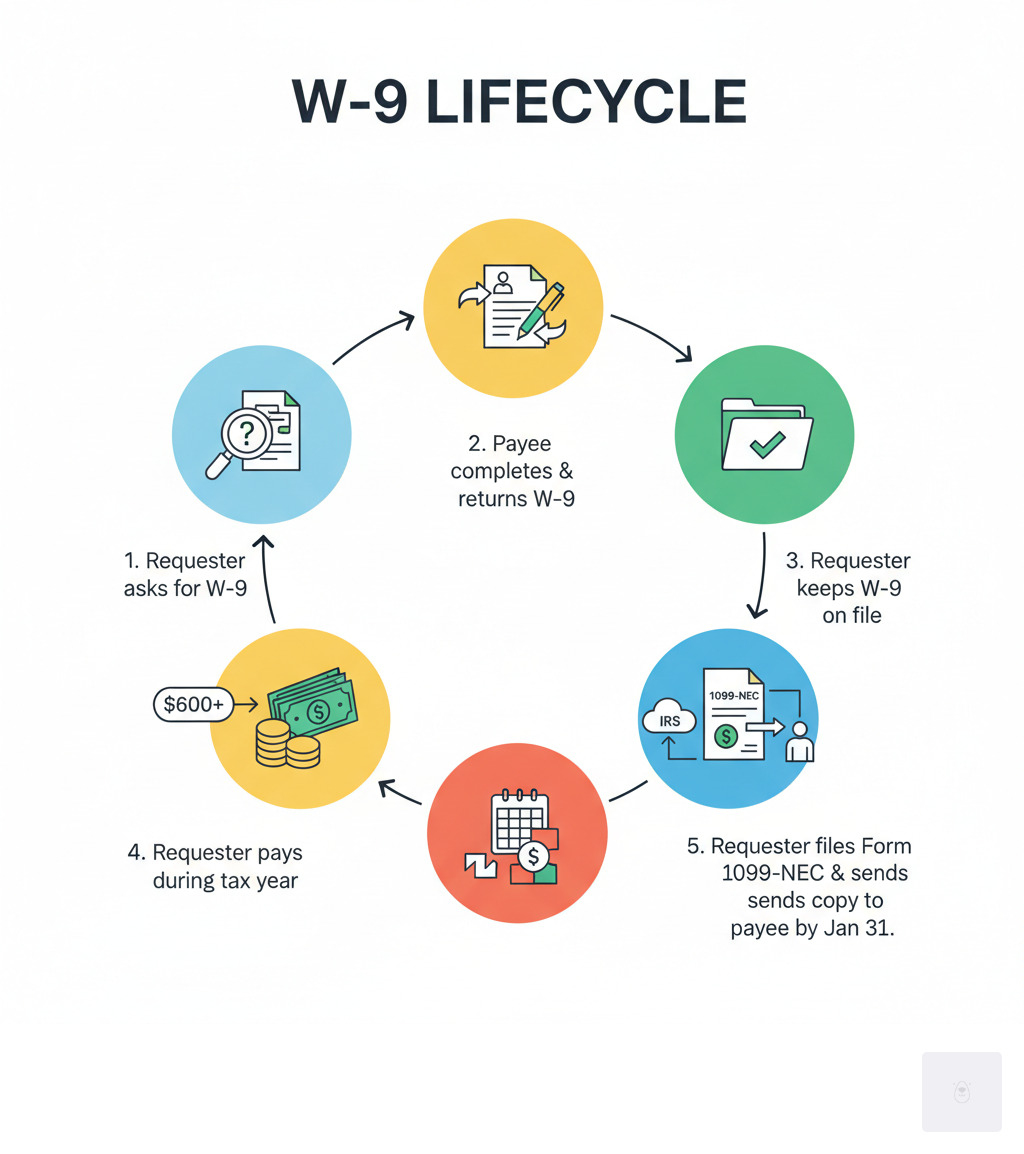
This information is crucial for accurate tax reporting. The business that pays you (the “requester”) uses your W9 to prepare an information return, like Form 1099-NEC, which reports your earnings to the IRS. The requester keeps your W9 for their records; it does not get sent to the IRS. A correct W9 ensures the IRS can match the income you report with the payments businesses report, preventing audits and penalties.


Who is Required to Fill Out a W9?
If you are a U.S. person receiving reportable income, you will likely need to fill out a W9 tax form. This includes:
- Independent contractors and freelancers
- Sole proprietors
- Limited liability companies (LLCs), corporations, and partnerships
- Individuals receiving payments for rent, royalties, legal settlements, or interest and dividends.
The W9 is exclusively for U.S. citizens and resident aliens. Foreign persons use the W-8 series of forms. Importantly, employees do not use W9s; they fill out Form W-4 for their employers.
✅ Ready to complete your W9 in minutes? Apply here now.
Understanding the Role of W9 Tax Forms in Business
The W9 tax form is the foundation of compliant business relationships with non-employees. When a business pays a contractor $600 or more in a tax year, it must report those payments to the IRS. The W9 provides the necessary data—your name, address, and TIN—to file Form 1099-NEC (for nonemployee compensation) or Form 1099-MISC (for other income like rent or royalties).
This process protects both parties: the business documents a deductible expense, and the IRS can verify your reported income. The W9’s role also extends to financial institutions reporting interest, property managers reporting rent, and parties involved in real estate transactions or legal settlements.
Failing to provide an accurate W9 can have serious consequences. The payer may be required to implement backup withholding, sending 24% of your payments directly to the IRS. A correct W9 is your ticket to getting paid in full and on time, ensuring smooth and professional business operations.
A Deep Dive into W9 Tax Forms: Information, TINs, and Backup Withholding
Knowing what information goes on a W9 tax form is key to getting it right. While it’s just a single page, each field serves a specific purpose for IRS reporting.
The form collects your legal name (as it appears on your tax return), business name (if any), and tax classification (e.g., sole proprietor, LLC, corporation). You’ll also provide your mailing address. The two most critical sections are Part I, where you enter your Taxpayer Identification Number (TIN), and Part II, where you sign to certify that the information is correct, you are a U.S. person, and you are not subject to backup withholding.
Providing false information can lead to penalties. The IRS can assess a $50 penalty for failing to provide a correct TIN and a $500 penalty for knowingly providing false information to avoid backup withholding. For official guidance, see the Instructions for the Requester of Form W-9 | IRS.
Choosing the Correct Taxpayer Identification Number (TIN)
Your TIN is the heart of your W9 tax form. The main question is whether to use a Social Security Number (SSN) or an Employer Identification Number (EIN).
- Social Security Number (SSN): Sole proprietors and single-member LLCs (treated as “disregarded entities”) can use their personal SSN. This is often the simplest option for solo freelancers.
- Employer Identification Number (EIN): Corporations, partnerships, and multi-member LLCs must use an EIN. Many sole proprietors also choose to get a free EIN from the IRS to protect their SSN and establish a more formal business identity. You will need an EIN if you ever plan to hire employees.
If you have applied for a TIN but haven’t received it, you can write “Applied For” on the form. However, you must provide the number once you receive it, typically within 60 days, to prevent backup withholding.
How the W9 Helps You Avoid Backup Withholding
Backup withholding is when a payer is required to withhold 24% of your payment and send it directly to the IRS. It’s not an extra tax, but a prepayment that can severely impact your cash flow. This typically happens if you provide an incorrect TIN or fail to report certain income to the IRS in the past.
Your W9 tax form acts as a shield against this. By signing and certifying your W9, you are formally stating that your TIN is correct and that you are not subject to backup withholding. This gives the payer the green light to pay you in full.
A properly completed W9 is your ticket to getting paid what you’ve earned without any surprise deductions. You can learn more from the IRS about Backup withholding | IRS.
W9 vs. Other Tax Forms: Key Differences Explained
It’s easy to confuse the W9 tax form with other documents like the W-4, W-2, or 1099. The key difference boils down to your work status: are you an employee or an independent contractor? This distinction determines which forms you use.
Don’t waste time with paper forms — complete your secure W9 online at https://fillablew9.com/apply.
W9 vs. W-4 and W-2
These forms are for employees, not contractors.
- Form W-4 (Employee’s Withholding Certificate): As an employee, you fill this out to tell your employer how much federal income tax to withhold from your paychecks.
- Form W-2 (Wage and Tax Statement): At year-end, your employer sends you this form summarizing your total wages and taxes withheld. You use it to file your personal tax return.
If you are a freelancer or independent contractor, you will not use the W-4 or receive a W-2. Instead, you provide a W9 tax form to your clients.
W9 vs. 1099-NEC and 1099-MISC
For independent contractors, the W9 and 1099 forms work together.
- The W9 is the setup: You complete a W9 for your client, providing your name, address, and TIN. The client keeps this form for their records.
- The 1099 is the follow-through: At the end of the year, if your client paid you $600 or more, they use the information from your W9 to file a Form 1099-NEC (Nonemployee Compensation) with the IRS. They also send a copy to you.
Form 1099-MISC is used for other types of income, such as rent or royalties. In short, your W9 provides the data your client needs to create your 1099. An accurate W9 is essential for proper reporting and avoiding backup withholding.
Here’s a quick comparison:
| Form | Purpose | Who Fills It Out | Who Receives It (from whom) | Relationship Type |
|---|---|---|---|---|
| W9 | Provides TIN and certification for reporting | Payee (you) | Payer (your client) | Independent Contractor |
| W-4 | Determines income tax withholding for employees | Employee | Employer | Employee |
| W-2 | Reports annual wages and taxes withheld | Employer | Employee | Employee |
| 1099-NEC | Reports nonemployee compensation ($600+) | Payer (your client) | Payee (you) & IRS | Independent Contractor |
| 1099-MISC | Reports other miscellaneous income ($600+) | Payer (your client) | Payee (you) & IRS | Various (e.g., rental income) |
Understanding these differences is crucial for tax compliance and ensuring you get paid correctly.
The W9 Process: Submission, Deadlines, and Special Cases
Understanding the logistics of the W9 tax form process is just as important as filling it out correctly. This includes how to submit it, key deadlines, and special rules.

Deadlines, Penalties, and Electronic Signatures
You do not send your W9 to the IRS. You give the completed form to the person or business paying you.
- Deadlines: There is no official IRS deadline for you to submit a W9. However, payers will request it before issuing payment or by year-end to meet their own January 31st deadline for filing 1099s. It’s best to submit it promptly to avoid payment delays.
- Penalties: Failing to provide a correct TIN can result in a $50 penalty per instance. Knowingly providing false information to avoid backup withholding can lead to a $500 civil penalty.
- Electronic Signatures: The IRS permits electronic submission and signatures for W9 tax forms, provided the system meets security and verification standards. Services like Fillable W9 offer a secure, compliant way to handle W9s online, as detailed in IRS guidelines like Electronic Submission of Forms W-9 and W-9S | IRS.
Special Rules: Minors, Foreign Persons, and FATCA
Certain situations have specific rules for the W9 tax form:
- Minors: The W9 should be filled out with the minor’s name and TIN. A parent or guardian can sign on their behalf.
- Foreign Persons: Do not use Form W-9. Instead, use the appropriate Form W-8 (e.g., W-8BEN or W-8BEN-E) to certify your foreign status.
- FATCA (Foreign Account Tax Compliance Act): A foreign financial institution might ask you for a W9 to confirm your U.S. status for their own reporting requirements under FATCA.
When in doubt about special circumstances, it’s always wise to consult a tax professional.
Step-by-Step Guide: How to Fill Out Your W9 Form Online
Filling out your W9 tax form online can save you time and reduce errors. With services like Fillable W9, the process is streamlined and secure. Here’s a simple checklist to guide you:
- Download the latest W9 form or use a secure online W9 tool: Always ensure you’re using the most current version. As of our last update, the IRS Form W-9 (Rev. March 2024) is the latest. You can find the fillable PDF version directly from the IRS.
- Enter your legal name (Line 1): This should be the name that appears on your federal income tax return.
- Enter your business name (Line 2) (if applicable): If you operate under a business name, trade name, or as a disregarded entity (like a single-member LLC), enter that name here.
- Select your federal tax classification (Line 3a): Check the box that accurately describes how you’re taxed (Individual/sole proprietor, C Corporation, S Corporation, Partnership, Trust/estate, or LLC). If you check LLC, you’ll also indicate if it’s taxed as a C, S, or P.
- Complete Line 3b (if applicable): If you checked Partnership, Trust/estate, or LLC (taxed as a Partnership), and you’re giving the form to another flow-through entity, check this box if you have foreign partners, owners, or beneficiaries.
- Provide exemption codes (Line 4) (if applicable): If you are exempt from backup withholding or FATCA reporting, enter the appropriate codes. Most individuals and small businesses won’t need to fill this in.
- Provide your address (Lines 5 and 6): Enter your complete mailing address.
- Enter your correct TIN (Part I): This is your Taxpayer Identification Number. For individuals/sole proprietors, this is usually your SSN. For corporations, partnerships, or multi-member LLCs, it’s your EIN.
- Certify the information is correct and sign electronically (Part II): Read the certification statements carefully. By signing, you’re confirming the accuracy of your TIN, that you’re a U.S. person, and that you’re not subject to backup withholding (or that you’ve been notified by the IRS that you are subject to it). Use a valid electronic signature.
- Save a copy for your records: It’s always a good practice to keep a copy of every tax form you submit.
Tip: For a fast, secure experience, use Fillable W9’s online application. Our platform guides you through each step, helping you avoid common errors and ensuring your form is compliant and ready to send.
Frequently Asked Questions about W9 Tax Forms
Here are answers to some of the most common questions about W9 tax forms.
Does Form W9 get sent to the IRS?
No. This is a common myth. You provide the completed W9 tax form to the person or business paying you (the requester). They keep it for their records and use the information to file Form 1099 with the IRS. The IRS never receives your actual W9.
What is the role of Form W9 in preventing identity theft?
Because the W9 tax form contains your sensitive Taxpayer Identification Number (TIN), handling it securely is critical to preventing identity theft. Always:
- Verify the Requester: Only provide a W9 to legitimate businesses that will be paying you.
- Use Secure Submission Methods: When sending a W9 electronically, use a secure, encrypted platform. Services like Fillable W9 are designed to protect your data.
- Beware of Phishing: The IRS will never request your W9 via email or text. Be cautious of unsolicited requests.
What happens if I provide incorrect information on my W9?
Incorrect information on your W9 tax form can cause significant problems. For you, the payee, it can lead to:
- Backup Withholding: The payer may be required to withhold 24% of your payments and send it to the IRS.
- Penalties: You could face a $50 penalty for failing to provide a correct TIN or a $500 civil penalty for deliberately providing false information.
For the payer, it can lead to their own penalties for filing incorrect 1099s and administrative burdens from the IRS. Accuracy is essential for everyone involved.
Conclusion: Master Your W9 and Take Control of Your Taxes
You’ve made it through the maze of W9 tax forms, and hopefully, what once seemed daunting now feels manageable—even straightforward. This seemingly simple document plays an outsized role in independent work and business transactions. It’s the essential bridge between your hard-earned income and proper IRS reporting, keeping everything transparent and compliant for both you and the businesses that pay you.
Understanding your W9 tax form goes beyond just filling in boxes and signing your name. It’s about taking ownership of your financial responsibilities, protecting yourself from unnecessary complications like backup withholding, and building professional, trustworthy relationships with your clients. When you know what you’re doing with a W9, you project confidence and competence—qualities that matter whether you’re a seasoned freelancer juggling multiple clients, an entrepreneur launching your first venture, or a small business owner bringing on contractors for the first time.
The good news? You don’t need to steer this alone or struggle with confusing paper forms. With the right knowledge in your back pocket and secure online tools at your fingertips, completing your W9 tax form can be quick, painless, and error-free. You’ve learned what a W9 is, who needs one, how it differs from other tax forms, and exactly how to fill it out correctly. You’re now equipped to handle this crucial piece of tax compliance with confidence.
Tax forms don’t have to be intimidating. They’re just part of the business landscape, and mastering them—starting with the W9—puts you firmly in control of your financial future. So take that knowledge, put it to work, and keep your tax compliance on track.
✅ Ready to complete your W9 in minutes? Apply here now.