
1040 Schedule C for Independent Contractors (and your W9 form)

Confused about filling out a W9 form? You’re not alone. If you’re a freelancer or sole proprietor, you provide a W9 to clients so they can pay you and issue a 1099-NEC, and you file Schedule C (Form 1040) to report that income and your business expenses.
For a fast, accurate, and secure experience, Fillable W9 is the easiest way to complete a fillable W9 online in minutes.
- Start filling your W9 now: https://fillablew9.com/apply
The 1040 Schedule C for independent contractors is the tax form you attach to your Form 1040 to report business income and expenses. It’s used by anyone operating as a sole proprietor or single-member LLC, including freelancers, consultants, and rideshare drivers. If you received a 1099-NEC or earned any self-employed income, Schedule C is how you report what you made and what it cost to earn that money. You’ll usually provide a W9 to clients before they pay you, so they have your legal name and TIN.
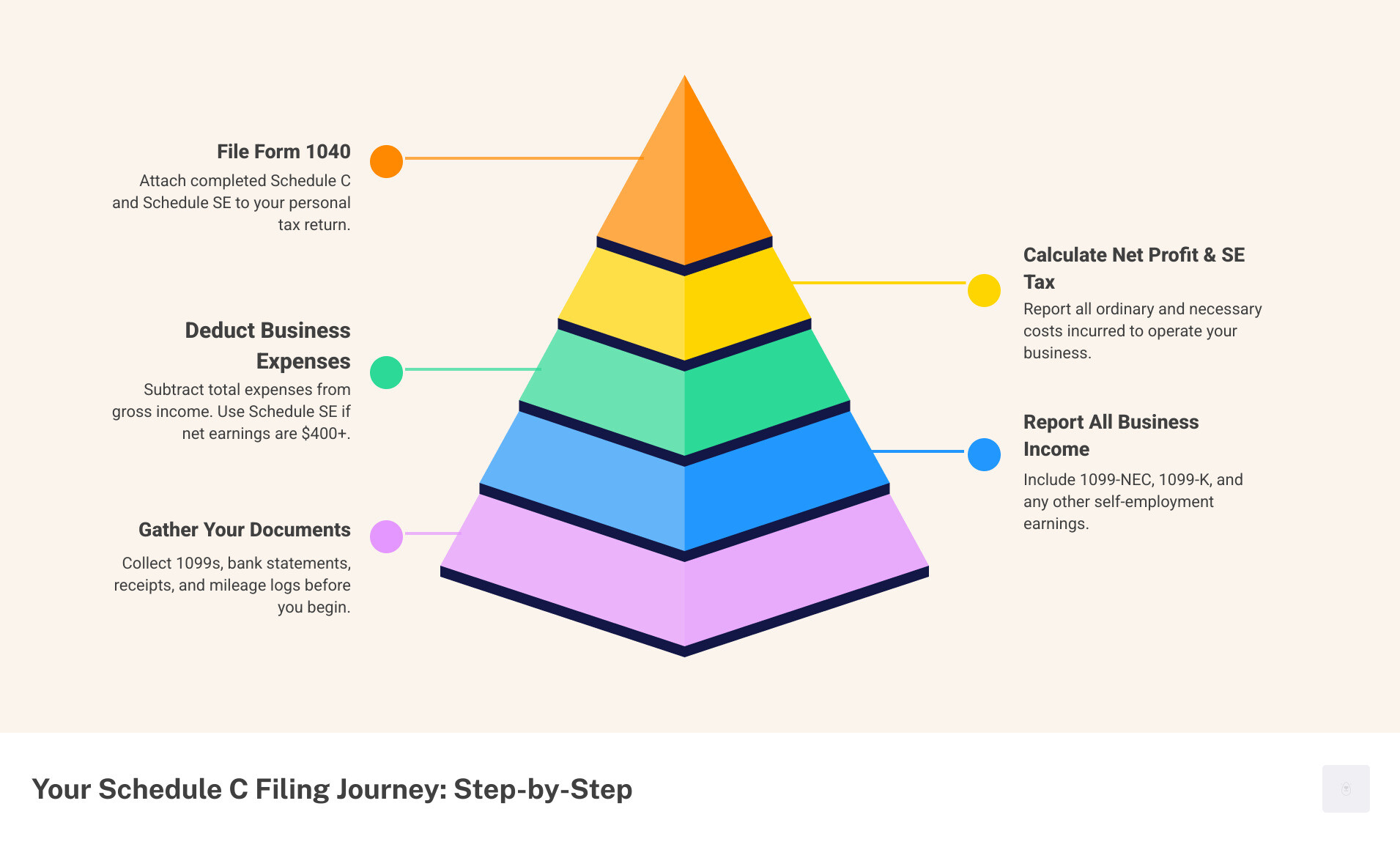
Quick Answer for Filing Schedule C:
- Report all business income – Include amounts from 1099-NEC forms, 1099-K forms, and any other payments received
- Deduct eligible business expenses – Track and report costs like advertising, supplies, travel, home office, and vehicle expenses
- Calculate net profit or loss – Subtract total expenses from gross income
- Attach to Form 1040 – Include Schedule C with your personal tax return
- File Schedule SE – If net earnings are $400 or more, also complete Schedule SE for self-employment tax
If your net earnings from self-employment are $400 or more, you’ll also need to file Schedule SE to calculate Social Security and Medicare taxes. Unlike employees who have these taxes withheld, independent contractors pay both the employer and employee portions themselves—totaling 15.3% of net earnings.
The process starts when you receive payment for services. Your clients may send you a Form 1099-NEC if they paid you $600 or more. You report this income on Schedule C along with any other business income, then subtract your ordinary and necessary business expenses to determine your taxable profit.
I’m Haiko de Poel, and I’ve guided countless entrepreneurs through the complexities of the 1040 schedule c for independent contractors. Understanding this form—and keeping your W9 accurate—is essential for minimizing your tax liability and avoiding costly mistakes.
Schedule C (Form 1040), Profit or Loss from Business, is your official declaration to the IRS about your business’s financial health. It provides a clear picture of your earnings and the legitimate costs incurred to generate them. For official details, refer to the About Schedule C (Form 1040) page on the IRS website.

Before You File: Gathering Your Tax Information (and your W9)
Before tackling your 1040 schedule c for independent contractors, gather all your financial records. Keep an up-to-date W9 form ready for any new client so payments aren’t delayed and your 1099-NEC info stays accurate. A secure, fillable W9 helps you avoid errors and rework.

What’s the Difference Between an Independent Contractor and an Employee?
Understanding if you’re an independent contractor or an employee is crucial, as it determines how you report income on the 1040 schedule c for independent contractors.
An independent contractor controls how they work, while an employee works under an employer’s direction. This affects your tax forms: contractors receive a Form 1099-NEC for payments of $600 or more, while employees get a W-2. A W-2 shows taxes already withheld; a 1099-NEC shows gross pay with no tax withholding. Contractors are typically asked to provide a W9 before payment so the client can report correctly.
As a contractor, you’re responsible for paying your own taxes. The upside is you can deduct business expenses, which employees generally cannot. The IRS takes this classification seriously. If you’re unsure of your status, consult the IRS guidance at Topic No. 762 Independent Contractor vs. Employee.
Gathering Your Documents for the 1040 Schedule C (plus your W9 form)
To file your 1040 schedule c for independent contractors, gather the following documents:
- Forms 1099-NEC and 1099-K: These report payments from clients and payment processors.
- Records of all other business income: You must report all income, even if you didn’t receive a 1099 form for it.
- Bank and credit card statements: Use separate business accounts to simplify tracking income and expenses.
- Categorized expense receipts: Keep documentation for every business purchase, such as software, supplies, or client meals.
- Vehicle mileage logs: If you use your vehicle for business, maintain contemporaneous logs of your business miles.
- Home office measurements: If you claim the home office deduction, you’ll need the square footage of your exclusive workspace and your home’s total square footage.
- Your current W9 form: Keep a signed, current W9 ready for new clients. Prefer a digital workflow? Complete a secure W9 online to speed onboarding.
Using bookkeeping software can automate much of this tracking. For more tips on record-keeping, see this guide on Better Bookkeeping for Home Services Companies. With these documents, you’re ready to fill out Schedule C.
A Step-by-Step Guide to the 1040 Schedule C for Independent Contractors
With your documents organized, it’s time to fill out your 1040 schedule c for independent contractors. The form can seem overwhelming, but it’s a manageable process.

Start with the basic details at the top: your name, SSN, and principal business. You’ll also select your accounting method—most contractors use the “cash method” (reporting income when received and expenses when paid). You’ll also confirm if you “materially participated” in your business, which is “yes” for most active contractors. For official forms and help, see the Schedule C (Form 1040) and its Instructions for Schedule C.
Part I: Reporting Your Gross Income
In Part I, you report all business income. You must report every dollar earned, even if you didn’t receive a Form 1099-NEC.
- Gross receipts or sales: This is the total amount you received. Include all payments, including those on 1099-NEC forms and any other business income.
- Returns and allowances: Subtract any refunds or discounts you gave to customers.
- Cost of Goods Sold (COGS): If you sell physical products, you’ll calculate COGS to determine the direct cost of those goods. This section is typically blank for service-based contractors.
After these calculations, you’ll have your total gross income, which is the starting point for determining your profit.
Part II: Deducting Your Business Expenses
Part II is where you reduce your taxable income by listing all “ordinary and necessary” business expenses. An expense is ordinary if it’s common in your industry and necessary if it’s helpful for your business.
Common deductible expenses include:
- Advertising: Costs for online ads, business cards, or your professional website.
- Car and truck expenses: You can deduct actual costs (gas, repairs, insurance) or use the standard mileage rate (67 cents per mile for 2024). A detailed mileage log is essential.
- Contract labor: Payments to other independent contractors who helped your business. Remember to issue a Form 1099-NEC for payments of $600 or more.
- Insurance: Business-specific policies like liability or professional indemnity coverage.
- Interest: Interest paid on business loans or credit cards.
- Legal and professional services: Fees for accountants, attorneys, or consultants.
- Office expenses: Everyday supplies like paper, ink, and postage.
- Rent or lease: Payments for office space, equipment, or vehicles used for business.
- Repairs and maintenance: Costs to keep business property in good working order.
- Supplies: Materials used in your business that aren’t part of inventory.
- Taxes and licenses: Business licenses, permits, and certain payroll taxes.
- Travel and meals: Travel expenses for business trips are deductible, while business meals are generally 50% deductible.
- Utilities: The business portion of your phone and internet service.
- Home office deduction: If you use a part of your home exclusively and regularly for business, you can deduct related expenses. Use the simplified method ($5 per square foot, up to 300 sq ft) or track actual expenses with Form 8829.
Meticulous records are essential. Digital tools can automate expense tracking. For more financial management tips, see resources like Better Bookkeeping for Home Services Companies.
Calculating Net Profit or Loss on the 1040 Schedule C for Independent Contractors
The final step on your 1040 schedule c for independent contractors is calculating your net profit or loss.
- Add up all your deductible expenses from Part II to get your total expenses.
- Subtract total expenses from your gross income (from Part I) to find your tentative profit or loss.
- Factor in your home office deduction (if applicable) to arrive at your final net profit or loss.
This final number flows to your Form 1040 (via Schedule 1) and becomes part of your Adjusted Gross Income (AGI). A net profit is subject to income tax and self-employment tax (if over $400). A net loss can potentially reduce your other taxable income.
If you have a loss, you must consider the at-risk rules, which may limit the amount of loss you can deduct. For most contractors, their investment is fully “at risk.” Schedule C provides a complete financial picture, helping you understand your business’s performance and ensure you pay only what you legally owe.
How to fill out W9 for freelancers (quick guide)
Follow this mini-checklist to complete your W9 form correctly:
- Step 1: Download the latest W9 from the IRS: https://www.irs.gov/pub/irs-pdf/fw9.pdf
- Step 2: Enter your legal name (and business name if different).
- Step 3: Check your federal tax classification (e.g., Individual/sole proprietor or single-member LLC).
- Step 4: Provide your address and TIN (SSN or EIN).
- Step 5: Sign and date the certification.
Tip: Prefer a digital workflow? Don’t waste time with paper forms — complete your secure W9 online at https://fillablew9.com/apply.
Beyond Schedule C: Self-Employment Tax and Estimated Payments
Completing your 1040 schedule c for independent contractors is a major step, but you’re not done. You still need to address self-employment tax and estimated payments. Unlike employees, you are responsible for paying your own taxes throughout the year.

This includes income tax and self-employment tax, which covers Social Security and Medicare. The rate is 15.3% of your net earnings (12.4% for Social Security and 2.9% for Medicare). You can find details on the IRS site: 12.4% and 2.9%. Understanding these obligations helps you avoid penalties.
The Link Between Schedule C and Schedule SE (Self-Employment Tax)
Your net profit from the 1040 schedule c for independent contractors is the starting point for calculating self-employment tax. If your net earnings are $400 or more, you must file Schedule SE (Form 1040).
As a contractor, you pay both the employer and employee portions of Social Security and Medicare taxes (totaling 15.3%). However, you can deduct one-half of your self-employment tax on your Form 1040. This valuable “above-the-line” deduction lowers your adjusted gross income. Schedule SE calculates the final tax amount, which is then added to your total income tax liability.
Estimated Taxes and Form 1040-ES
The IRS requires independent contractors to pay taxes throughout the year via estimated tax payments, as there is no withholding. You generally must make these payments if you expect to owe $1,000 or more in tax for the year.
The quarterly due dates are April 15, June 15, September 15, and January 15. Missing these deadlines can result in penalties. Use Form 1040-ES to calculate your estimated payments.
A good practice is to set aside 25-35% of every payment for taxes in a separate savings account. To avoid penalties, you can use a “safe harbor” rule: pay at least 90% of the current year’s tax or 100% of the prior year’s tax (110% if your AGI was over $150,000).
Common Mistakes to Avoid When Filing Schedule C (plus W9 tips)
Filing your 1040 schedule c for independent contractors can be tricky. Avoiding these common mistakes can save you money and prevent IRS issues.
- Mixing business and personal expenses: This is the most common error. Always use separate bank accounts and credit cards for your business to ensure clear records and avoid audit flags.
- Forgetting to report all income: You must report every dollar your business earns, whether or not you received a Form 1099-NEC. The IRS can cross-reference bank deposits.
- Misclassifying expenses: Deductions must be “ordinary and necessary” for your business. Claiming personal expenses is a major red flag for an audit.
- Choosing the wrong vehicle deduction method: You can use the standard mileage rate (67 cents per mile for 2024) or actual expenses. Be aware that if you choose actual expenses and claim depreciation, you generally can’t switch back to the standard rate for that vehicle later.
- Neglecting the home office deduction: If you use a part of your home exclusively and regularly for business, you can claim this valuable deduction. The simplified method makes it easy.
- Failing to file a separate Schedule C for each business: If you have multiple distinct businesses, file a separate Schedule C for each one to maintain clear records and track profitability.
- Ignoring estimated taxes: As a contractor, you must pay estimated taxes quarterly. Skipping them leads to underpayment penalties. Set aside 25-35% of your income for taxes.
- Delaying or omitting a W9 form for clients: Clients often cannot pay or issue a 1099-NEC without your W9. Keep a signed, current fillable W9 ready to avoid delays and errors.
Frequently Asked Questions: Schedule C and the W9 form
Q: Do I need a W9 form as an independent contractor?
A: Yes. Clients use your W9 to collect your legal name and TIN so they can issue a 1099-NEC. You don’t file the W9 with the IRS, but you should provide it to each client that requests it. Complete a secure W9 online here: https://fillablew9.com/apply.
Q: How to fill out W9 for freelancers?
A: Use the latest IRS W9 form and follow these steps: enter your legal name, select the correct tax classification (e.g., Individual/sole proprietor or single-member LLC), add your address, provide your SSN or EIN, then sign and date. For speed and accuracy, use a fillable W9 online: https://fillablew9.com/apply.
Q: Is a W9 the same as a 1099-NEC?
A: No. A W9 gives your information to the payer. A 1099-NEC reports the nonemployee compensation the payer paid you. You use the 1099-NEC amounts to report income on Schedule C.
Q: Where do W9 details show up on my tax return?
A: The W9 itself isn’t filed with your return. It enables the payer to issue a 1099-NEC. You report that income—and related expenses—on Schedule C (Form 1040) and calculate self-employment tax on Schedule SE.
Q: Can I use an EIN on my W9 instead of my SSN?
A: Yes. If you have an EIN, you may enter it on your W9 instead of your SSN. This can help with privacy when working with multiple clients.
Q: Can I use Schedule C if I have a side hustle or a hobby?
A: If you have a profit motive and operate with continuity and regularity, you generally file Schedule C. Hobby income is reported on Schedule 1, and expenses are not deductible. The IRS presumes a business if it shows a profit in three of the last five years.
Q: What if I have multiple independent contracting businesses?
A: File a separate Schedule C for each distinct business. Your W9 to a client should reflect the correct legal name and TIN for the activity that client is paying.
Q: How does filing Schedule C differ for sole proprietors versus single-member LLCs?
A: For federal tax purposes, both use Schedule C. A single-member LLC is a disregarded entity unless you elect otherwise. The difference is primarily legal liability, not tax reporting.
References: IRS About Schedule C and IRS W9 Form W-9.
Conclusion: Take Control of Your Contractor Taxes (and your W9)
Understanding the 1040 schedule c for independent contractors helps you report income accurately and claim every legal deduction. Keeping a current W9 form on hand ensures clients can pay you promptly and issue correct 1099-NECs.
Build a simple routine: maintain clean records, keep your fillable W9 current, and review your expenses monthly. You’ll reduce stress, avoid penalties, and keep more of what you earn.
For a fast, compliant workflow, complete your secure W9 online today with Fillable W9.
✅ Ready to complete your W9 in minutes? Apply here now.