
Why Finding a Secure Way to Send W9 Forms Matters More Than Ever

If you’re looking for a secure way to send w9 forms, here are your safest options:
Top Secure Methods for Sending W9 Forms:
- Secure Document Portals – Use encrypted platforms like FillableW9 with password protection and audit trails
- Password-Protected Email – Encrypt the PDF and send the password through a separate channel (phone or text)
- E-Signature Platforms – Services like Dropbox Sign offer encryption and legally binding signatures
- Traditional Mail – US Postal Service or registered mail for maximum offline security
- In-Person Delivery – Hand-deliver the form when practical
With nearly 86 million Americans expected to work as freelancers or contractors in the US by 2027, the W-9 form has become a routine part of doing business. But here’s the problem: your W-9 contains some of your most sensitive information—your Social Security Number or Employer Identification Number, full legal name, and address.
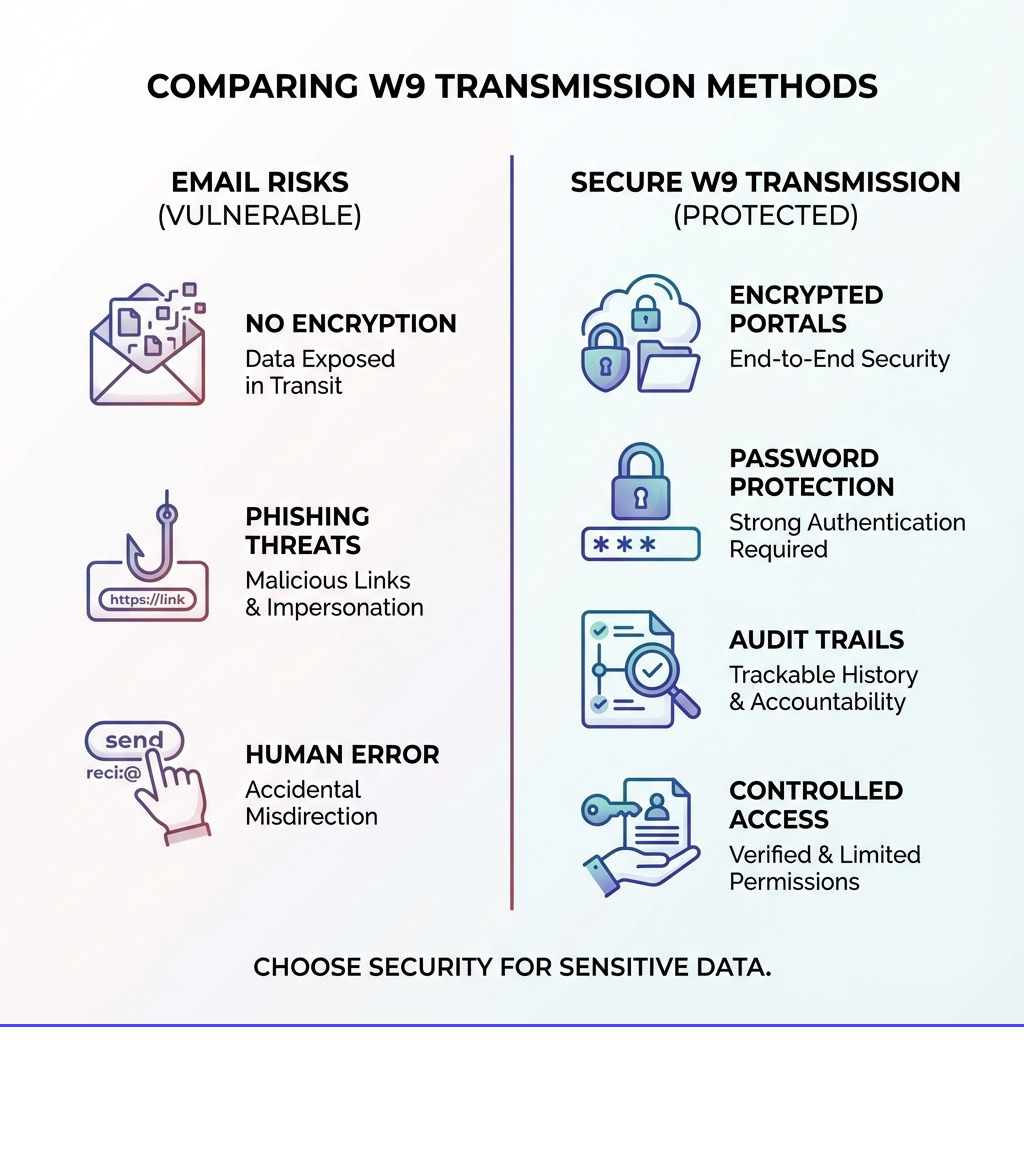
Regular email is like sending a postcard—anyone handling it along the way can read it. Email lacks end-to-end encryption, making it vulnerable to data breaches, phishing scams, and simple human error (like sending to the wrong recipient). Yet many freelancers and small business owners still hit “send” without a second thought.
The risks are real. If your W-9 falls into the wrong hands, you’re looking at potential identity theft, tax fraud, and serious financial headaches. Businesses that mishandle this information can face IRS penalties, including backup withholding at 24% of payments.
The good news? You don’t need to be a cybersecurity expert to protect yourself. There are simple, practical methods that work for freelancers, contractors, and small businesses alike.
Start filling your W9 securely now at https://fillablew9.com/apply.
I’m Haiko de Poel, and through my work in digital change and business consulting, I’ve helped companies implement secure processes for handling sensitive documents, including finding the most secure way to send w9 forms to contractors and vendors. In this guide, I’ll walk you through every practical option—from modern encrypted portals to old-school methods that still work.

What is a W-9 Form and Why is it So Sensitive?
At its core, a W-9 form, officially titled “Request for Taxpayer Identification Number and Certification,” is a tax document used by businesses to collect crucial tax information from individuals or entities they pay. This form isn’t sent to the IRS directly by you; rather, it’s for the business or person paying you, so they can accurately report those payments to the IRS.

The primary piece of information requested on a W-9 is your Taxpayer Identification Number (TIN). For individuals, this is usually your Social Security Number (SSN). For businesses, it’s typically an Employer Identification Number (EIN). Both SSNs and EINs are highly sensitive pieces of personal data. Along with your full legal name and address, this information is a goldmine for identity thieves.
Businesses rely on the W-9 to fulfill their tax reporting obligations, such as filing Form 1099-NEC (for nonemployee compensation) or Form 1099-MISC (for miscellaneous income). Without a completed W-9, a business might be required to engage in “backup withholding,” which means they would withhold a flat 24% from your payments and send it directly to the IRS. This isn’t ideal for anyone, as it can lead to cash flow issues for you and extra administrative work for the payer.
The IRS explicitly states that Form W-9 is used to provide your correct Taxpayer Identification Number (TIN) to the person who is required to file an information return with the IRS to report various financial activities, such as income paid to you, real estate transactions, or mortgage interest you paid. You can find more details directly from the source at About Form W-9, Request for Taxpayer Identification Number and Certification.
The Dangers of Emailing Your W-9 Form
Sending your W-9 via email might seem like the easiest and fastest option—and it often is. Emailing offers speedy delivery, instant confirmation, easy tracking, and convenience over traditional mail. However, this convenience comes with significant security risks that are often overlooked.

Think of email as a digital postcard. Unless specific encryption measures are taken, your email and its attachments travel across various servers in plain text. This means that anyone with access to these servers—from malicious hackers to unintended third parties—could potentially intercept and read your sensitive information. This inherent lack of end-to-end encryption makes standard email a risky choice for documents containing SSNs or EINs.
Here are the main security risks associated with emailing W-9 forms:
- Data Breaches: Email servers are frequent targets for cyberattacks. If a server hosting your email gets breached, your W-9 could be exposed.
- Phishing Scams: Sophisticated phishing attacks can trick you into sending your W-9 to a fraudulent recipient, leading directly to identity theft.
- Human Error: It’s easy to accidentally type the wrong email address or attach the wrong file. Sending your W-9 to an unintended recipient is a common, yet devastating, mistake.
- Unauthorized Access: Even if the email reaches the correct inbox, if that inbox isn’t properly secured (e.g., weak password, unencrypted device), the W-9 remains vulnerable.
- Long-Term Storage Risks: Once sent, copies of the W-9 may reside indefinitely in your sent folder, the recipient’s inbox, and various email servers, creating multiple points of vulnerability over time.
While emailing is convenient, it poses significant risks like data breaches and phishing scams. This perfectly encapsulates the dilemma: convenience versus security. For a document as sensitive as a W-9, security should always take precedence.
How to Find a Secure Way to Send W9 Forms
Given the inherent risks of standard email, finding a truly secure way to send w9 forms is paramount. The good news is that the IRS actually provides guidelines for electronic submissions, emphasizing data integrity, user authentication, and electronic signatures. This means there are legitimate and secure digital options available.
Let’s explore the essential safety measures and specific tools that offer improved security.
Method 1: Using a Secure Document Portal or E-Signature Platform
This is arguably the most modern and most secure way to send w9 forms electronically. Secure document portals and e-signature platforms are designed with robust security features specifically for handling sensitive documents.
- End-to-End Encryption: These platforms encrypt your W-9 form from the moment you upload it until it’s securely stored and accessed by the authorized recipient. This means your data is unreadable to unauthorized parties, even if intercepted.
- User Authentication: Strong authentication methods (e.g., two-factor authentication) ensure that only authorized users can access the document.
- Audit Trails: Every action taken on the document—who accessed it, when, and from where—is logged, providing a clear record for compliance and accountability.
- Legally Binding E-Signatures: Reputable platforms offer legally compliant electronic signatures, making the process fully digital and recognized by law. This eliminates the need to print, sign, and scan.
- Centralized Management: For businesses, these platforms allow for systematic collection, storage, and management of W-9s. This streamlines compliance and reduces the risk of having scattered, insecure files across different systems.
Using a platform like FillableW9 ensures that your W-9 is handled with the highest security standards, from completion to transmission. We prioritize your data’s security with advanced encryption, regular security audits, and compliance with industry-standard data protection regulations.
Don’t waste time with paper forms — complete your secure W9 online at https://fillablew9.com/apply.
Method 2: A more secure way to send W9 forms via Email with Encryption
If a secure portal isn’t an option and you must use email, you can significantly improve security by encrypting the W-9 form itself. This isn’t as foolproof as a dedicated secure portal, but it’s far better than sending an unencrypted PDF.
Here’s how to do it:
- Password-Protect the PDF: Many PDF editors (including some free online tools) allow you to add password protection to a PDF file. This encrypts the document, requiring a password to open it.
- Use a ZIP file with Password: You can also place the W-9 PDF into a password-protected ZIP archive.
- Send the Password Separately: This is the crucial step. Never send the password in the same email as the W-9 form. Instead, send the password through a different communication channel, such as:
- A text message (SMS) to the recipient’s verified phone number.
- A phone call to the recipient.
- A separate email sent hours later, or from a different email address if possible (though this is less ideal than a text/call).
- This ensures that even if one communication channel is compromised, the W-9 remains protected by the password.
- Verify Recipient Email: Double-check, triple-check, and then check again that you have the correct email address for the recipient. A typo can lead to your sensitive data landing in the wrong hands.
- Secure Your Environment:
- Use Secure Wi-Fi: Avoid sending sensitive documents over public Wi-Fi networks (e.g., coffee shops, airports), which are often unsecured and vulnerable to eavesdropping.
- Avoid Public Computers: Never access or send W-9 forms from public computers. These machines can be infected with malware that captures keystrokes or copies files.
While these steps add layers of security, email itself is still inherently less secure than a dedicated platform. The onus is on both sender and receiver to maintain vigilance.
Method 3: Old-School but Secure Ways to Send a W9
Sometimes, the simplest methods are the most secure, especially when you need to avoid digital vulnerabilities.
- Faxing: While seemingly outdated, fax machines can be a surprisingly secure way to transmit documents, especially if you’re sending from a dedicated machine directly to another dedicated machine. However, be wary of online fax services, as they often convert documents to email, reintroducing digital risks. A computer fax can be an option if you are certain of its security.
- US Postal Service (USPS): The good old snail mail remains a viable and often secure option. For extra peace of mind, consider:
- Certified Mail with Return Receipt: This provides proof of mailing and proof of delivery, ensuring your W-9 reaches its intended destination.
- Registered Mail: This offers the highest level of security for mail, providing a chain of custody from sender to recipient. The Social Security Administration and banks use US mail for sensitive items like SSNs and credit cards, indicating its reliability.
- In-Person Delivery: If geographical proximity allows, hand-delivering your W-9 directly to the recipient is arguably the most secure method, as it completely bypasses any digital or postal vulnerabilities.
These traditional methods trade speed and convenience for a higher degree of physical security, making them excellent choices when digital options are unavailable or distrusted.
Compliance and Best Practices for Senders and Recipients
When dealing with a document as sensitive as a W-9, understanding compliance and implementing best practices is crucial for both the individual completing the form and the business requesting it.
Understanding Penalties and Compliance for a secure way to send w9
The IRS takes W-9 compliance seriously, and “the devil is in the details” when it comes to tax documents. Mishandling W-9 forms or the information they contain can lead to significant penalties for businesses, and issues for individuals.
- Backup Withholding: If a payee fails to provide a correct TIN, provides an incorrect TIN, or fails to certify their status, the payer may be required to withhold 24% of future payments and remit it to the IRS. This is known as backup withholding and can be a headache for both parties.
- Penalties for Businesses:
- Failure to File Correct Information Returns: Businesses can face penalties for not filing required 1099 forms or for filing them with incorrect information if they don’t have a valid W-9.
- Failure to Furnish Correct Payee Statements: Penalties apply if businesses don’t provide accurate 1099s to their contractors.
- Penalties for Mishandling Data: While not directly an IRS penalty, a data breach involving W-9s can lead to severe legal consequences, reputational damage, and financial losses under data privacy laws.
- Penalties for Individuals: While less common, individuals can face a $50 penalty for each failure to furnish a correct TIN to a requester without reasonable cause. Making a false statement with no reasonable basis regarding your TIN can incur a $500 penalty.
The penalties for non-compliance are varied and can include failure to file, failure to pay, accuracy-related penalties (20% of understatement), fraud penalties (75% of unpaid tax), and trust fund recovery penalties (100% of unpaid tax for payroll taxes). Interest also accrues on unpaid tax amounts. Ensuring a secure way to send w9 forms and manage them correctly is therefore a critical part of tax compliance.
Best Practices for Recipients: Handling W-9s Securely
If you’re a business collecting W-9 forms, you become the custodian of highly sensitive data. Protecting this information is not just good practice; it’s a legal and ethical imperative.
- Secure Storage: W-9s, whether digital or physical, must be stored securely.
- Digital: Store digital W-9s in encrypted, access-controlled systems (like secure document portals). Do not leave them on unsecured local drives or in easily accessible email folders.
- Physical: Store paper W-9s in locked cabinets in a secure location.
- Access Control Policies: Limit access to W-9s to only those employees who absolutely need it for tax reporting or payroll purposes. Implement user roles and permissions.
- Data Encryption at Rest: Ensure that any digital storage solution encrypts data when it’s not actively being used (data at rest).
- Proper Document Disposal: When W-9s are no longer needed (e.g., after the required retention period, typically 3-7 years depending on your state and specific tax situation), they must be securely destroyed. Shred paper documents and digitally wipe electronic files.
- Creating a Company Policy: Establish clear guidelines for how W-9s are requested, received, stored, accessed, and disposed of. Train all relevant employees on these procedures.
Official vs. Substitute W-9 Forms
You might encounter both official IRS W-9 forms and “substitute” W-9 forms. Both are generally acceptable, but there are important considerations.
- Official IRS Form W-9: This is the form directly available from the IRS website. You can download a free W-9 form from IRS’s site. Using the official form ensures all required fields and certifications are present.
- Substitute W-9 Forms: Many businesses, especially those using online platforms for onboarding, create their own versions of the W-9. These are acceptable as long as they meet specific IRS guidelines:
- Substantially Similar: The substitute form must contain all the information requested on the official IRS Form W-9.
- Certifications: It must include the same certifications regarding the accuracy of the TIN, status regarding backup withholding, U.S. person status, and FATCA code, and these certifications must be made under penalties of perjury.
- Clear and Conspicuous: The certifications must be clearly stated and stand out from other provisions on the form.
Whether you use an official or substitute form, the core requirements for providing accurate information and ensuring a secure way to send w9 forms remain the same.
Frequently Asked Questions about Sending W-9 Forms
Is it illegal to email a W-9 form?
No, it is not explicitly illegal to email a W-9 form. However, it is strongly discouraged due to the significant security risks involved. Standard email does not provide sufficient encryption for sensitive personal information like your Social Security Number (SSN) or Employer Identification Number (EIN). While the act of emailing itself isn’t illegal, the potential consequences of a data breach (identity theft, tax fraud) are severe. The IRS does allow for electronic submission of W-9 forms, but it specifies that such systems must ensure data integrity, user authentication, and electronic signatures under penalties of perjury, which standard email typically does not provide.
Can I use an EIN instead of my SSN on a W-9 as a freelancer?
Yes, if you operate as a sole proprietor or a single-member LLC, you have the option to use either your SSN or an EIN on your W-9 form. Using an EIN can provide an additional layer of protection against identity theft, as it means you are not constantly sharing your SSN. An EIN is primarily used for business tax purposes. If you are a sole proprietor and have an EIN, you can use it. However, if you are a single-member LLC that is disregarded for tax purposes, you would typically use the owner’s SSN or EIN. For multi-member LLCs or corporations, an EIN is required.
What should I do if a client insists I email my W-9?
If a client insists on receiving your W-9 via standard email, it’s important to advocate for your data security. Here are your best options:
- Educate Them: Politely explain the security risks of sending an unencrypted W-9 via email. Suggest alternative, more secure methods.
- Propose Alternatives: Offer to send it via a secure document portal (like FillableW9), a password-protected PDF (with the password sent separately via text or phone call), fax, or even certified mail.
- Use a Secure Platform: If the client has a secure portal or e-signature platform, request to use that.
- Confirm Identity: If you must email, ensure you are sending it to a verified, legitimate email address of the client. Call them directly to confirm the address and that they are truly requesting it.
- Consider the Risk: If the client is unwilling to use a secure method and you are uncomfortable, you may need to weigh the risk against the necessity of working with that client. Your personal data is too valuable to compromise.
Conclusion: Make Every W-9 Submission Secure and Simple
The W-9 form is a necessary part of the modern freelance and contract economy, but its sensitive nature demands a thoughtful approach to transmission. Relying on standard email is a gamble with your personal and financial security, opening the door to identity theft and potential tax complications.
We’ve explored several reliable methods, from the cutting-edge security of encrypted document portals and e-signature platforms to the time-tested reliability of certified mail and in-person delivery. Each method offers a more secure way to send w9 forms than a simple, unencrypted email, providing you with peace of mind.
For businesses, implementing secure W-9 collection and storage practices is not just about avoiding penalties; it’s about safeguarding your contractors’ trust and your company’s reputation. For freelancers and contractors, being proactive about how you send your W-9 protects you from potential fraud.
At FillableW9, we are committed to providing a secure, efficient, and compliant solution for all your W-9 needs. We simplify the process, ensuring your sensitive information is handled with the utmost care, so you can focus on what you do best.
✅ Ready to complete your W9 in minutes? Apply here now.