





Simplify Your 990: Easy E-Filing…
Simplify 990 electronic filing for your nonprofit. Learn forms, deadlines, and how to e-file easily for compliance. Get started today!
IRS-compatible PDF with instant email/SMS delivery.
No subscriptions, no account required, no confusing forms. Answer a few questions and receive your electronically completed W-9 (2025) PDF in minutes for only $4.99.
Official IRS info: About Form W-9 (Request for Taxpayer Identification Number and Certification) . Not affiliated with the IRS.
“Super easy to fill out my W-9 online and download the form in minutes!
“Faster and simpler than any IRS PDF I’ve ever used.
“Clean interface, instant download — exactly what I needed for tax season.
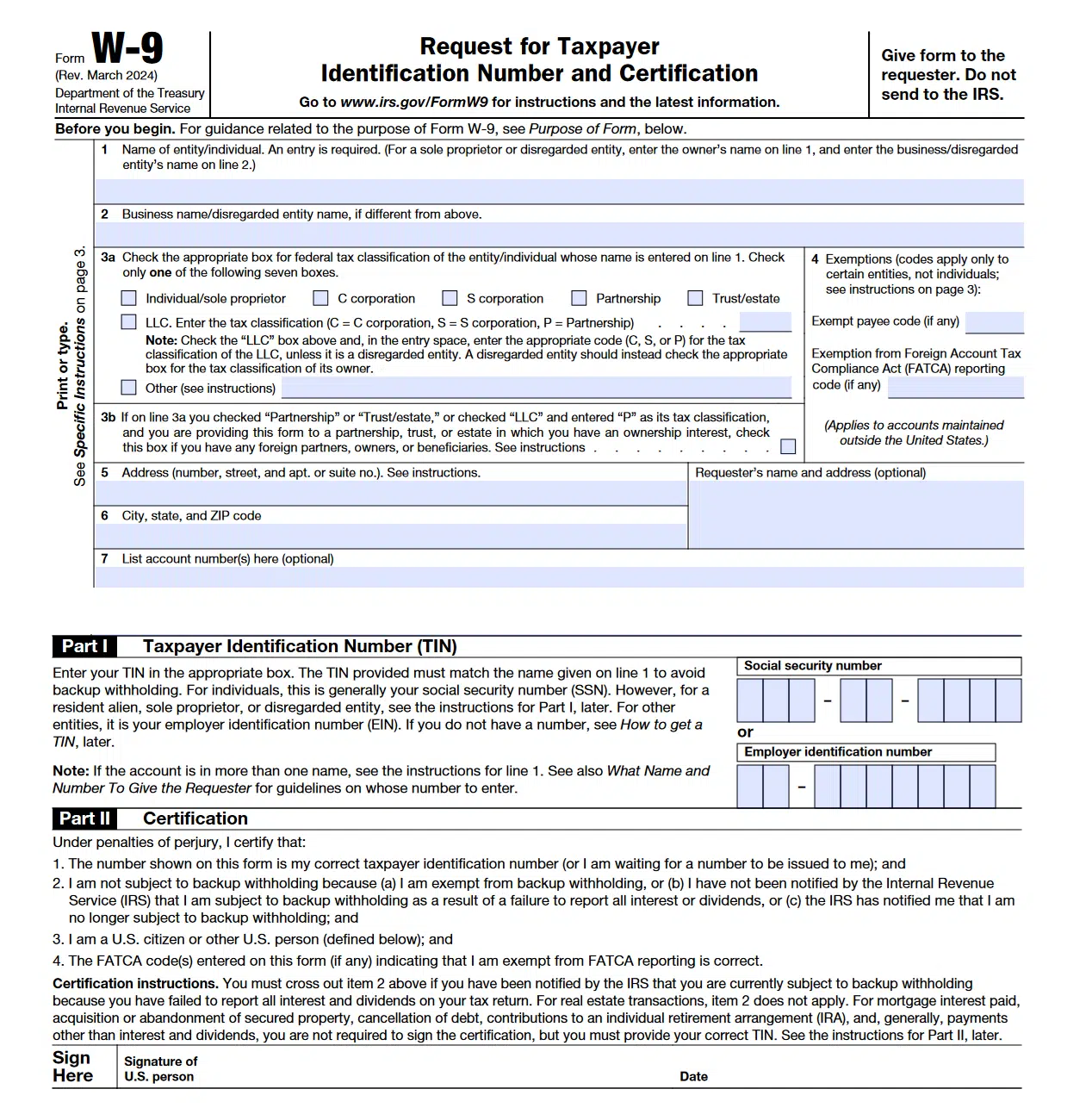
The IRS W-9 form is an official document used in the United States to request a taxpayer identification number (TIN). It helps businesses and individuals report income correctly to the IRS. Completing this form ensures your tax information matches your records with the Internal Revenue Service.
You’ll usually need to fill out a W-9 form if you’re a freelancer, contractor, vendor, or self-employed professional who receives payments from another business. Companies also use it when hiring independent contractors or paying rent, dividends, or interest.
Filling out a W-9 is simple. You’ll enter your name, business name (if applicable), address, taxpayer identification number (either your SSN or EIN), and your federal tax classification (such as individual, sole proprietor, or LLC). Once completed, sign and date the form before sending it to the requester — not to the IRS.
Using an online fillable W-9 form saves time and reduces mistakes. You can type your information, sign digitally, and download or print the completed form instantly. It’s faster, easier to read, and safer than handwritten forms — perfect for remote work and online submissions.
No ads. No data reselling. Instant IRS-compatible PDF with email/SMS delivery and auto-delete in 24 hours. If your payer rejects it, we’ll fix or refund—guaranteed.
Compared to “free” sites like TaxBandits or eForms, FillableW9.com never sells or stores your information—period.
Completing IRS forms—especially the W-9—can be stressful and confusing when dealing with tax details and income reporting.
Our step-by-step tool lets you fill out a W-9 in minutes—so you can focus on running your business.
Say goodbye to endless paperwork and hello to peace of mind with your completed W-9—ready to submit instantly.
Before signing your W-9, always confirm your federal tax classification and taxpayer information are accurate.
A simple 3-Step flow for Speed and accuracy.
“As a business consultant working with Fortune 500 companies, I need to onboard fast and professionally. Being able to send my W-9 to multiple departments at once saves hours. The Business plan is totally worth it — I’ve already recommended this W-9 platform to my entire network.”
— David P. Business Consultant“As a business consultant working with Fortune 500 companies, I need to onboard fast and professionally. Being able to send my W-9 to multiple departments at once saves hours. The Business plan is totally worth it — I’ve already recommended this W-9 platform to my entire network.”
— David P. Business Consultant
Compare our service with alternatives
A W9 form (officially “Request for Taxpayer Identification Number and Certification”) is an IRS tax document that independent contractors, freelancers, and businesses provide to their clients before receiving payments of $600 or more in a tax year. You need to send a W9 form when starting work with a new client, when requested by a company for vendor onboarding, or when any business asks for your taxpayer identification number for 1099 reporting purposes. Our fillable W9 form service makes it easy to complete, sign, and send your W9 electronically in under 5 minutes, ensuring IRS compliance and faster payment processing.
To fill out a W9 form correctly online using our service: First, enter your legal name or business name exactly as shown on your tax return. Second, check the appropriate tax classification box (individual/sole proprietor, LLC, corporation, etc.). Third, provide your taxpayer identification number (SSN for individuals or EIN for businesses). Fourth, enter your current address. Finally, digitally sign and date the form. Our fillable W9 form automatically validates your entries to prevent common errors that could delay your payments. The form can be completed on any device and sent instantly via email or text.
Yes, sending a W9 form through our secure service is safe when proper precautions are taken. Our platform uses 256-bit SSL encryption for all form transmission, the same security level used by banks. When you send a W9 via our email service, the PDF is password-protected and transmitted through encrypted channels. For text/SMS delivery, we provide a secure download link that expires after 72 hours. We never store your Social Security Number or EIN after form delivery, and all documents are permanently deleted from our servers after your selected retention period.
Absolutely! Our W9 form service allows you to send your completed W9 to multiple recipients simultaneously. With our Professional plan ($9.99), you can send to up to 3 email addresses and 1 phone number in a single transaction. Our Business plan ($19.99) offers unlimited email recipients and up to 3 text/SMS deliveries. This feature is perfect for contractors working with multiple clients or businesses needing to distribute W9 forms to various departments (accounting, HR, vendor management) at once. Each recipient receives the same validated, IRS-compliant W9 form instantly.
These are three distinct IRS tax forms serving different purposes: A W9 form is completed by independent contractors and vendors to provide their tax ID to clients who will pay them. A W4 form is completed by employees to tell their employer how much tax to withhold from their paycheck. A 1099 form is sent by businesses to contractors who earned $600+ to report income to the IRS. Think of it this way: contractors fill out W9s at the start of work, employees fill out W4s when hired, and contractors receive 1099s after the tax year ends. Our service handles explicitly W9 forms, making it easy to send your taxpayer information securely to clients. Read More Here
With our fillable W9 form service, you can complete and send your W9 in less than 5 minutes. The process is simple: spend 2-3 minutes entering your information into our smart form with auto-validation, 30 seconds to review and digitally sign, and instant delivery via email or text. Unlike downloading a PDF and manually filling it out, our online W9 generator eliminates the need for printing, scanning, or faxing. Your recipient receives the completed W9 immediately, and you get a confirmation receipt. For businesses needing physical copies, our mail service delivers printed W9 forms within 3-5 business days, or 2 days with express delivery.
No, you typically don’t need to send a new W9 form annually to the same client unless your information changes. The IRS requires you to submit an updated W9 only when: your name changes (due to marriage or business restructuring), your business structure changes (like converting from sole proprietor to LLC), you get a new EIN or tax ID number, or your address changes significantly. However, some companies request annual W9 updates as part of their vendor compliance policies. Our service stores your W9 information securely for easy updates—simply log in, modify any changed fields, and resend to clients in seconds. Pro tip: Send an updated W9 immediately if the IRS notifies you of backup withholding, as this affects your payment amounts.
You can download the official IRS W-9 Form (Request for Taxpayer Identification Number and Certification) from the Internal Revenue Service (IRS) website as a free fillable forms.
Download the official W-9 form (PDF) from IRS.gov
This is the only official and up-to-date version recognized by the IRS.
The IRS W-9 form is completely free to download and use. Many third-party websites (including FillableW9.com) provide fillable versions of the same form for your convenience — but all must use the official IRS format.
No — both the printed W-9 form and the fillable PDF version contain the exact same official content issued by the IRS. The difference lies only in how you complete the form:
Fillable W-9 PDF: Can be typed and digitally filled on your computer or mobile device before printing or signing. This option is ideal for online submission or e-signing.
Printed W-9 form: Must be printed first and completed by hand using pen and ink.
Both versions are equally valid as long as all required fields are accurately completed and signed. Many businesses and contractors prefer the fillable W-9 PDF because it is faster, more legible, and can be securely shared electronically.
Failing to provide a W9 form when requested by a client or business can result in serious financial consequences. The IRS requires payers to implement “backup withholding” of 24% on all payments to vendors who don’t provide valid W9 forms. This means instead of receiving your full payment, nearly a quarter is sent directly to the IRS. Additionally, many companies won’t process any payments or onboard new vendors without a completed W9 on file—delaying your income indefinitely. Some businesses may even terminate contractor relationships for non-compliance. Using our instant W9 form service ensures you never miss payment deadlines or face backup withholding, protecting your cash flow and professional relationships.
Yes! Our W9 form service is fully mobile-optimized, allowing you to create, fill out, sign, and send W9 forms from any smartphone or tablet (iPhone, iPad, Android devices). The mobile experience includes touch-friendly form fields, pinch-to-zoom for easy reading, mobile signature capture using your finger or stylus, and automatic screen adjustment for portrait or landscape viewing. The completed W9 PDF is perfectly formatted regardless of which device you use. This mobile capability is especially valuable for freelancers and contractors who need to send W9 forms immediately while meeting with clients, at job sites, or traveling. Save the PDF directly to your phone’s files or cloud storage for your records.
Yes, electronic signatures are completely valid and legally binding on W9 forms according to IRS guidelines and the ESIGN Act of 2000. The IRS accepts digitally signed W9 forms as long as the signature authenticates and verifies your identity as the signer. Our W9 service uses compliant e-signature technology that captures your typed or drawn signature, timestamps the signing event, records your IP address for authentication, and creates a tamper-evident PDF that shows if anyone tries to alter the form after signing. This digital signature is actually more secure than traditional pen-and-paper signatures because it creates an audit trail. Businesses across the US accept our electronically signed W9 forms, eliminating the need for printing, hand-signing, and scanning.
The W-9 form is primarily used by the IRS to collect taxpayer identification information. Freelancers, contractors, and businesses need to report income accurately. By providing this form, individuals allow companies to issue 1099 forms for tax reporting purposes, ensuring compliance with tax regulations.bbb
Not affiliated with the IRS. Official blank W-9 is free at IRS.gov.
Useful if you only need a blank form and prefer DIY.
Simplify 990 electronic filing for your nonprofit. Learn forms, deadlines, and how to e-file easily for compliance. Get started today!
If you pay or get paid across borders, the distinction between two short IRS forms can have outsized tax consequences. This guide clarifies Form W-9 versus W-8 so you know which form applies, why it matters, and how to get it right. Many professionals still mix them up, which can…
Discover when do employers have to send out w2s, understand deadlines, penalties, and W-2 essentials for a smooth tax season.
Get Your 100% IRS Compatible downloadable w9 form
Quick W-9 — Just a Few Clicks