
Why 990 Electronic Filing is Essential for Every Nonprofit
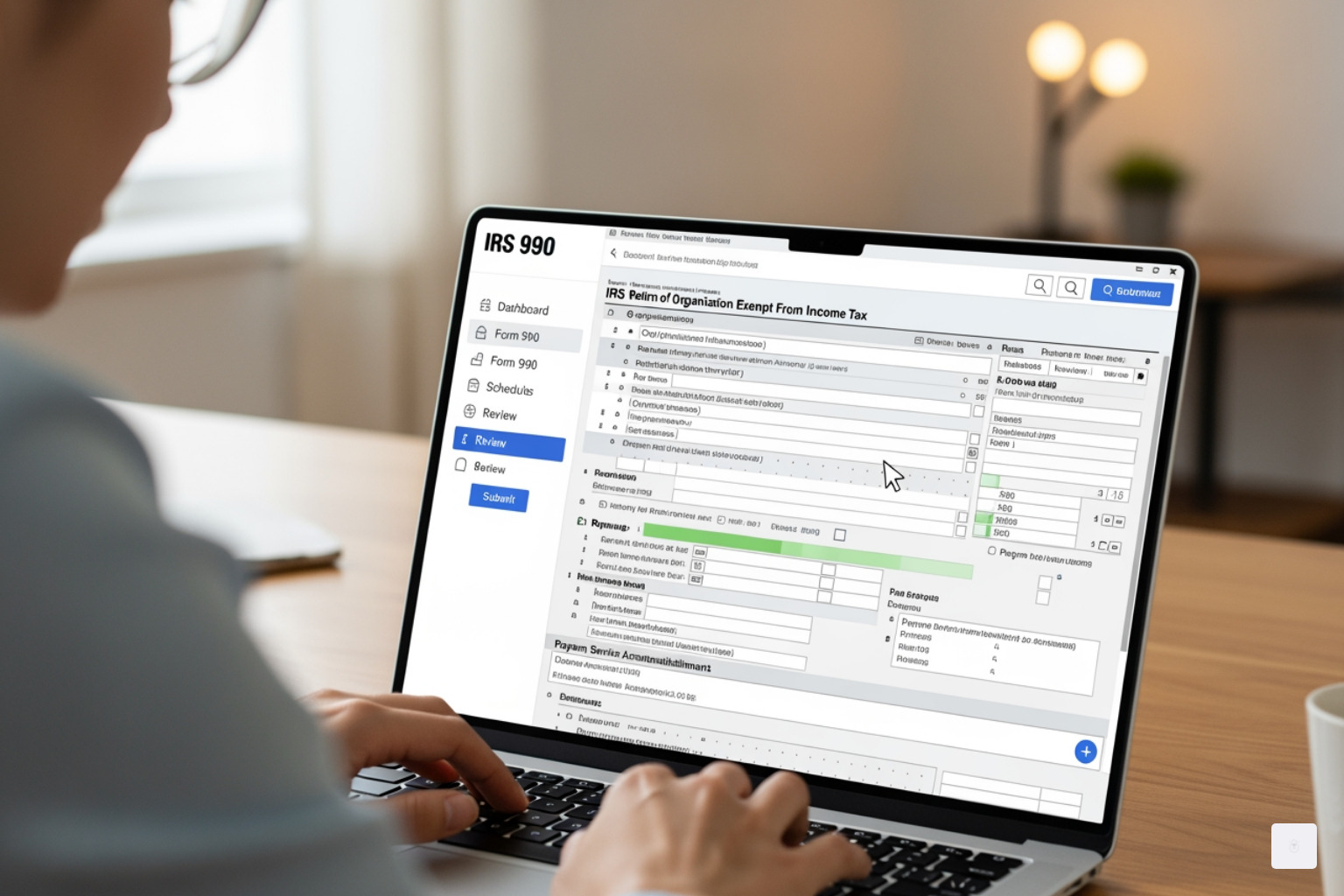
As a freelancer or small business owner, you are probably familiar with filling out a W9 form to get paid. But have you ever wondered about the tax compliance of the organizations that hire you, especially nonprofits? While you handle your fillable W9, they tackle a different IRS requirement: the Form 990.
990 electronic filing is the mandatory method for most tax-exempt organizations to submit their annual information returns to the IRS. Understanding their requirements can provide valuable insight into the business world you operate in.
Quick Answer: 990 Electronic Filing Essentials
- What it is: Online submission of Form 990 series returns to the IRS
- Who must file: Tax-exempt organizations, nonprofits, charities, and private foundations
- Key deadline: 15th day of the 5th month after your fiscal year ends (May 15 for calendar-year filers)
- Why it matters: Faster processing, instant confirmation, maintains tax-exempt status
- Forms covered: 990-N, 990-EZ, 990, 990-PF, and 990-T
- Mandatory since: July 1, 2019 (Taxpayer First Act)
The Taxpayer First Act of 2019 changed the process for nonprofit tax filing, requiring most organizations to file electronically. This shift to 990 electronic filing has actually made the process simpler and faster. Electronic filing provides fast acknowledgement that the IRS has received the return and reduces normal processing time, making compliance easier.
Why the push for electronic filing? It is about transparency and efficiency. E-filing cuts down on errors, speeds up processing, and makes a nonprofit’s financial data public. For the organization, it means instant confirmation and avoiding penalties that could jeopardize their tax-exempt status, the very status that defines their mission. While our expertise at Fillable W9 is centered on making your W9 form completion effortless, this guide explains what a nonprofit needs to know to file its Form 990 confidently.
While nonprofits handle their 990s, make sure your own paperwork is in order. Start filling your W-9 online now at https://fillablew9.com/apply/.
Which Form 990 Should Your Organization File?
Navigating the various Form 990 options can feel like solving a puzzle, but it is crucial to pick the right one for your organization. The specific form your tax-exempt organization must file depends largely on its gross receipts and total assets for the tax year. Choosing correctly is the first step toward successful 990 electronic filing. Just as a business needs to collect a W9 form from you, a nonprofit needs to select the correct 990 form for itself.
Here’s a quick overview to help you determine which form fits your nonprofit:


| Form Name | Who Files It (Gross Receipts/Assets Thresholds) | Key Characteristics |
|---|---|---|
| Form 990-N | Gross receipts normally $50,000 or less | Known as the “e-Postcard,” this is the simplest form. It is electronic-only and asks just 8 basic questions. It is ideal for small, eligible organizations to satisfy their annual reporting requirement. |
| Form 990-EZ | Gross receipts less than $200,000 AND total assets less than $500,000 | A shorter version of the full Form 990, this is a four-page form for smaller organizations that do not qualify for the 990-N but are not large enough for the full 990. |
| Form 990 | Gross receipts $200,000 or more OR total assets $500,000 or more | The standard, comprehensive 12-page return for larger tax-exempt organizations, nonexempt charitable trusts, and section 527 political organizations. It provides detailed financial and operational information. |
| Form 990-PF | Private foundations and certain nonexempt charitable trusts | Specifically designed for private foundations, regardless of their income or assets. This form helps ensure compliance with specific regulations applicable to private foundations. |
| Form 990-T | Organizations with Unrelated Business Income (UBI) of $1,000 or more during the tax year | Filed by tax-exempt organizations that have income from a trade or business regularly carried on that is not substantially related to their exempt purpose. It reports and calculates the tax on this unrelated business income. |
Form 990-N (e-Postcard)
The Form 990-N, often called the “e-Postcard,” is designed for the smallest tax-exempt organizations. If your organization’s annual gross receipts are normally $50,000 or less, you are likely eligible to file this simple, electronic-only form. It is a quick way to meet your annual reporting requirement.
The 990-N form is straightforward, asking just eight questions about your organization. There are no paper forms for the 990-N; it must be submitted electronically. This makes it efficient for small groups to stay compliant. The IRS provides detailed information on the annual electronic filing requirement for small exempt organizations.
Form 990-EZ
For organizations that are a step above the 990-N but not quite ready for the full Form 990, there is the 990-EZ. This form is typically filed by tax-exempt organizations with gross receipts less than $200,000 and total assets less than $500,000. It is a four-page form that requires more detail than the e-Postcard but is less extensive than the standard 990.
Form 990
The standard Form 990 is for larger tax-exempt organizations. If your organization has gross receipts of $200,000 or more, or total assets of $500,000 or more, you will generally be filing the 12-page Form 990. This form provides a comprehensive look at your organization’s finances, governance, and activities.
It is designed for transparency and accountability, offering detailed information for the public and the IRS. You can find more official information on the About Form 990, Return of Organization Exempt from Income Tax page.
Form 990-PF & 990-T
These forms address specific scenarios. Form 990-PF is exclusively for private foundations and certain nonexempt charitable trusts. Unlike other 990 forms, eligibility for the 990-PF is based on your organization’s classification as a private foundation, not its gross receipts or assets.
Form 990-T, on the other hand, is for organizations that generate Unrelated Business Income (UBI) of $1,000 or more during the tax year. If your nonprofit engages in activities that are not substantially related to its exempt purpose and generate significant income, you will need to file this form in addition to your regular 990-series return. You can learn more about this requirement on the IRS page for Form 990-T, Exempt Organization Business Income Tax Return.
Navigating the Requirements for 990 Electronic Filing
The world of tax compliance can feel like a maze, especially with changes to federal regulations. This section explains the specific requirements and deadlines for 990 electronic filing so your organization can stay on track.
The biggest shift came with the Taxpayer First Act of 2019. This legislation mandated that most tax-exempt organizations file their information returns and related forms electronically for tax years beginning after July 1, 2019. This means that for organizations in the United States, including those in Texas, paper filing is largely a thing of the past for these forms. The IRS highlights the benefits and requirements on its E-file for charities and nonprofits page.
Filing deadlines are critical. For most nonprofits, your Form 990 is due by the 15th day of the 5th month following the close of your organization’s tax year. If your organization operates on a calendar year (January 1 to December 31), your deadline is typically May 15. For fiscal year filers, this date will shift accordingly. It is important to mark your calendar and meet your deadline to avoid penalties.

Failing to file Form 990 on time or electronically when required can lead to significant consequences. The IRS may assess daily fines, which can add up quickly. Late filing penalties can range from $20 to $120 per day, depending on your organization’s gross receipts. You can find more details on the IRS page for Form 990 Series penalties.
Perhaps the most severe implication of not filing required Forms 990 is the automatic revocation of your tax-exempt status. If your organization fails to file its required Form 990 series return for three consecutive years, the IRS will automatically revoke its tax-exempt status. This means your organization would be treated as a taxable entity, potentially facing income tax liability and losing its eligibility to receive tax-deductible contributions. Reinstating your exempt status is a complex and time-consuming process. You can learn more about this consequence on the IRS page about automatic revocation of exemption for non-filing.
The Impact of the Taxpayer First Act on 990 Electronic Filing
The Taxpayer First Act was a mandate that changed how nonprofits approach their annual filings. This act requires tax-exempt organizations to electronically file information returns and related forms. For most organizations, it was a shift from paper to digital.
Here is how the transition rules have impacted various Form 990 series returns:
- Form 990-EZ: For tax years ending July 31, 2021, and later, Forms 990-EZ must be filed electronically. Prior to this, organizations had the option of paper or electronic filing.
- Forms 990 and 990-PF: For tax years ending July 31, 2020, and later, Forms 990 and 990-PF must be filed electronically.
- Form 990-T: For tax years ending December 2020 and later, with a due date on or after April 15, 2021, Form 990-T must be filed electronically.
These dates are important for compliance. You can find more details on these requirements on the IRS Required filing (Form 990 series) page.
It is also important to note the IRS policy on filing older tax years. Electronic filing is generally only available for the current tax year and two prior tax periods. As of December 26, 2023, the IRS no longer accepts electronically filed returns for years 2020 and older. If you have an older return that needs to be filed, you will likely need to paper file it, and the IRS advises writing a note on the top of the return stating that electronic filing is no longer accepted for that tax year.
Exceptions and Waivers to the E-Filing Mandate
While 990 electronic filing is now mandatory for most organizations, there are limited exceptions and waivers available. If an organization can demonstrate that complying with the e-filing requirement would result in an undue financial burden or is impractical due to technology constraints, it might be able to request a waiver.
Historically, the IRS has accepted waiver requests for Forms 990 and 990-PF for tax years beginning before July 1, 2019, under specific conditions. However, with the full implementation of the Taxpayer First Act, such waivers are increasingly rare and granted only in limited circumstances. It is safest to assume electronic filing is required and plan accordingly. You can review information on requesting a waiver from required e-filing for Forms 990 and 990-PF for tax years beginning before July 1, 2019 to understand the criteria.
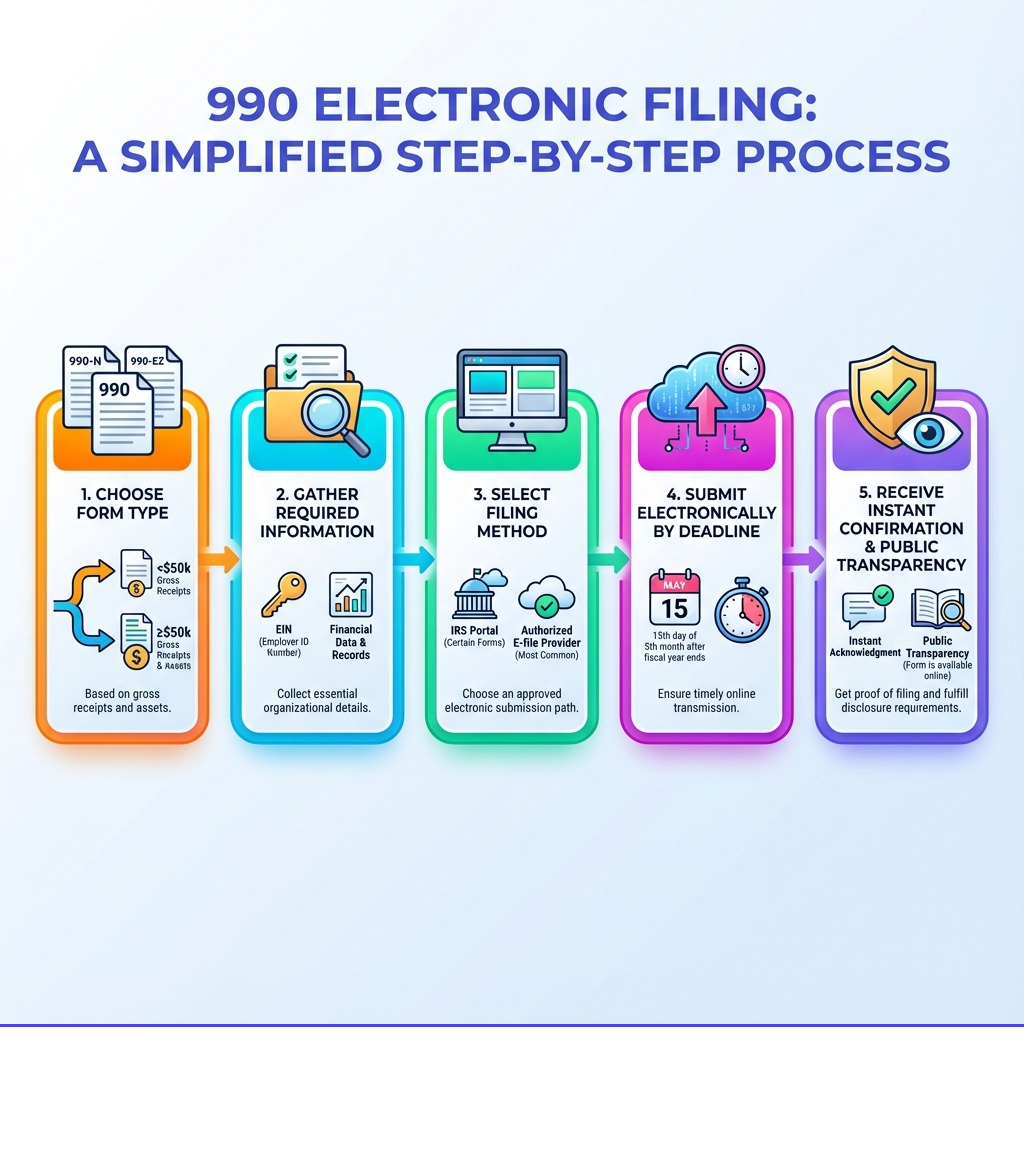
How to E-File Your Form 990: A Step-by-Step Guide
The thought of filing taxes can be daunting, but with 990 electronic filing, the process can be manageable. This section walks you through the general steps involved, focusing on the 990-N e-Postcard as a common example.
Step 1: Choose Your Filing Method
First, you need to decide how you will submit your return. For the simplest form, the 990-N, you can often use the IRS system.
- IRS System (for Form 990-N): Small organizations filing the 990-N (e-Postcard) can submit it directly through the IRS dedicated portal. This is a free option for eligible organizations. You can start this process by going to Submit Form 990-N (e-Postcard).
- IRS-Authorized E-File Provider: For Forms 990-EZ, 990, 990-PF, and 990-T, you will need to use an IRS-authorized e-file provider. These are third-party software companies that are approved by the IRS to transmit returns electronically. They often offer user-friendly interfaces and additional features.
- Tax Professional: Many organizations choose to work with a tax professional, such as an accountant or tax preparer, who uses specialized software to prepare and file their 990 returns. This can be useful for complex filings or if you prefer expert assistance.
Step 2: Gather Your Information (Example: Form 990-N)
Before you log in, gather your information. Preparing the information beforehand makes the 990 electronic filing process smoother. For Form 990-N (e-Postcard), you will need these eight basic pieces of information:
- Employer Identification Number (EIN): Your organization’s unique nine-digit tax ID. This is as crucial for a nonprofit’s 990 as your Taxpayer Identification Number is for a W9 form.
- Tax Year: The year for which you are filing the return.
- Legal Name: Your organization’s full legal name.
- Any Other Names: If your organization uses any other names.
- Mailing Address: Your organization’s current mailing address.
- Principal Officer’s Name and Address: The name and address of your organization’s principal officer (for example, president or treasurer).
- Website Address (Optional): If your organization has a website.
- Confirmation of Gross Receipts: A statement confirming that your gross receipts are normally $50,000 or less.
You cannot file your 990-N until after your tax year ends. For calendar-year filers, this means on or after January 1; for fiscal-year filers, it is the day after your fiscal year closes.
Step 3: The E-Filing Process via IRS Portal
Here are the steps for filing the 990-N using the IRS system. While other forms require third-party software, the 990-N can be filed directly:
- Create or Sign In to Your Account: You will need to use either a Login.gov or ID.me account to access the IRS online services. If you do not have one, you will be prompted to create one. These are secure ways to verify your identity.
- Add Your Organization’s EIN: If you are a preparer helping multiple organizations, you can add multiple EINs to your account. If you are filing for your own organization, select “Exempt Organization” and enter your EIN.
- Enter Information: Follow the prompts to input the required eight pieces of information you gathered in Step 2. The system is designed to guide you.
- Review Submission: Before transmitting, carefully review all the information you have entered. Check for errors or inaccuracies. The IRS has a helpful user guide that provides more detailed instructions.
- Submit Filing: Once everything looks correct, submit your filing.
- Print Confirmation: Immediately after submitting, print a copy of your filing confirmation. This is your proof that the IRS received your return. You will not be able to print it later.
- Check Status: After about seven minutes, refresh the “Manage Form 990-N Submission” page. Your status should update from “Pending” to “Accepted” or “Rejected.” If it is rejected, the system usually provides details so you can correct and resubmit. If you encounter persistent technical issues, contact IRS Customer Account Services at 877-829-5500.
Need to complete your W-9 forms quickly and securely? Start filling your W-9 online now at https://fillablew9.com/apply/.
Choosing the Right E-Filing Software for Your Nonprofit
Once you move beyond the simple 990-N, 990 electronic filing often involves using specialized software from an IRS-authorized e-file provider. Choosing the right software can make a real difference, turning a stressful task into a more streamlined process.
The benefits of using dedicated software include:
- Accuracy checks: Good software has built-in error checks that validate your entries against IRS business rules, helping to prevent common mistakes that lead to rejections.
- Reminders: Software can send automated reminders for filing deadlines, extensions, and other important dates.
- Data import: Many platforms allow you to import data from previous years or spreadsheets, saving time on data entry.
- Security: Reputable providers prioritize the security of your financial information, using encryption and other safeguards.
- Ease of use: Software is designed with user experience in mind, often offering intuitive interfaces or question-and-answer formats to guide you through complex forms.
Just as FillableW9 provides a secure and simple way to handle your W9 form, the right 990 software should offer similar peace of mind for a nonprofit’s compliance.
Key Features to Look for in 990 Electronic Filing Software
When evaluating 990 electronic filing software, it is not just about getting the form submitted. You want a tool that supports your organization over time. Here are some key features to look for:
- IRS authorization: This is essential. Always make sure the provider is an IRS-authorized e-file provider. You can check the IRS database to verify their status. This helps ensure your data goes directly and securely to the IRS.
- Data security: Look for platforms that emphasize strong security measures, such as encryption, secure servers, and adherence to privacy regulations. Your nonprofit’s financial information is sensitive.
- User experience: Consider whether the software is intuitive. Does it offer step-by-step guidance, clear instructions, and possibly an interview-style process to simplify data entry?
- Schedule support: Make sure the software supports all the schedules your organization might need to attach to its Form 990-EZ or 990. Some software automatically includes required schedules based on your input.
- Amendment filing: Mistakes can happen. Look for software that allows you to file amendments to previously submitted returns.
- Component or chapter filing management: If your nonprofit has multiple components or chapters, a robust software solution can be helpful. Features that allow you to import EIN lists and track filing progress in real time can save time.
- Customer service: Responsive and knowledgeable customer support can be important when you encounter questions or technical issues.
You can find more about software features that can simplify your tax compliance.
Frequently Asked Questions about 990 E-Filing
Even with all the information provided, some common questions about 990 electronic filing come up often. This section addresses a few of them.
What happens if I do not file a Form 990 for three consecutive years?
If your organization does not file its required Form 990 series return for three consecutive years, its tax-exempt status is automatically revoked by the IRS. This is not a penalty that can be easily appealed; it is an automatic action.
Once revoked, your organization will be treated as a taxable entity, potentially owing taxes and penalties, and losing its ability to receive tax-deductible donations. Reinstatement is a complex, time-consuming, and often costly process. You can read more about this on the IRS website regarding automatic revocation for non-filing.
Can I get an extension on my Form 990 deadline?
For most Form 990 series returns (990, 990-EZ, 990-PF, 990-T), nonprofits and tax-exempt organizations can request an additional six months to file. To do this, you must file Form 8868, Application for Extension of Time To File an Exempt Organization Return, on or before your original filing deadline. This extension is typically automatic and does not require an explanation.
However, this extension option is not available for Form 990-N (e-Postcard). The 990-N cannot be extended. Always check the official Form 990 filing due dates and plan accordingly. More information is available on the IRS website regarding filing deadlines and extensions.
Where can I get help with my 990 filing?
Help is available from several sources. Navigating tax law or technical e-filing issues can be challenging, but you do not have to do it alone.
- IRS website: The official IRS website offers forms, instructions, publications, and FAQs directly on their website.
- IRS phone support: For tax law questions or technical e-filing issues, you can call the IRS. Their main phone number for tax-exempt organizations is 1-877-829-5500.
- E-file provider support: If you are using IRS-authorized e-file software, their customer support team is often your best resource for technical issues related to their platform or questions about filling out the forms.
- Tax professionals: For complex situations, or if you prefer expert assistance, working with a tax professional who specializes in nonprofit tax law is recommended.
While this guide covers Form 990, if you have questions about your own tax forms, such as the W9 form, we have a solution. Complete your secure W9 online at https://fillablew9.com/apply/.
Conclusion: Take Control of Your Nonprofit’s Compliance
990 electronic filing is no longer just an option; for most tax-exempt organizations, it is a legal requirement. While the Form 990 may be the responsibility of the nonprofits you work with, understanding their compliance challenges offers a fuller picture of the business landscape. Embracing e-filing offers advantages such as faster processing, improved accuracy, and greater transparency.
By understanding the different Form 990 types, following critical deadlines, and using the right tools, a nonprofit can handle its annual reporting requirements with more confidence. This helps ensure its work continues without interruption and that it remains a reliable partner for contractors and small businesses.
While nonprofits handle their 990s, you can take control of your own compliance with the same ease and efficiency. Do not let your W9 form requests become a bottleneck.
Ready to complete your tax forms in minutes? Apply here now.