
Why Every Freelancer and Small Business Owner Needs to Master the W-9 Form

How to complete W9 is a critical skill for anyone working as an independent contractor or small business owner. Here’s the quick answer:
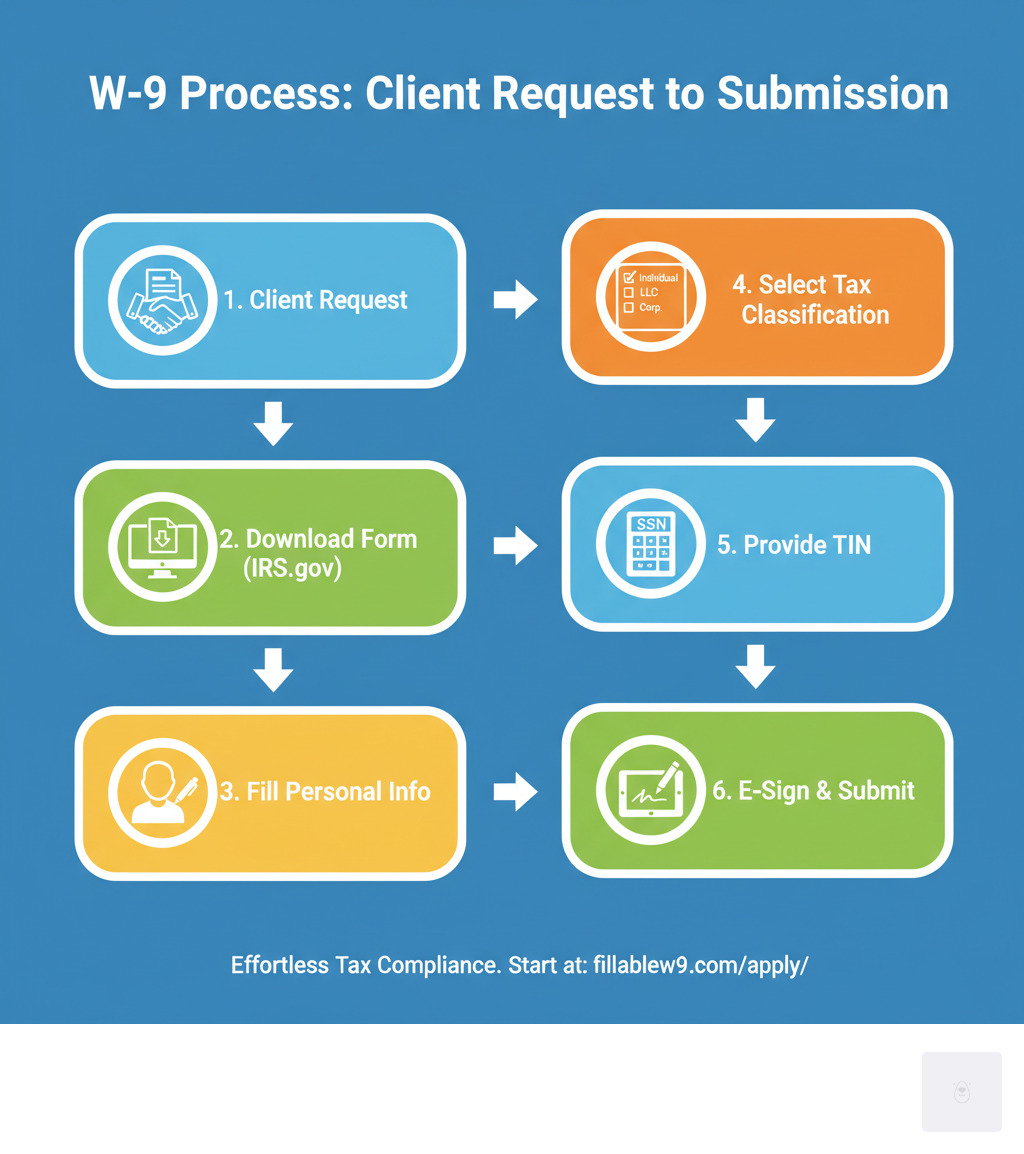
Essential Steps to Complete Your W-9:
- Download the latest March 2024 Form W-9 from IRS.gov
- Enter your legal name on Line 1 (as shown on your tax return)
- Add business name on Line 2 (if different from Line 1)
- Select your tax classification on Line 3a (Individual, LLC, Corporation, etc.)
- Provide your address on Lines 5-6
- Enter your TIN (SSN or EIN) in Part I
- Sign and date Part II to certify the information
If you’re a freelancer, consultant, or small business owner, you’ve likely encountered requests for a W-9 form from clients. This simple-looking document is actually crucial for tax compliance and avoiding penalties that can range from $50 to over a million dollars according to IRS guidelines.
The W-9 form serves as your official way to provide your Taxpayer Identification Number (TIN) to businesses that pay you. When you earn $600 or more from a client during the year, they’re required to report those payments to the IRS using Form 1099-NEC – and they need your accurate W-9 information to do it correctly.
Start filling your W9 now at https://fillablew9.com/apply/
Many people struggle with this form because it seems straightforward but contains important details that can trip you up. Getting your tax classification wrong, using the incorrect TIN, or missing required signatures can lead to backup withholding at 24% of your payments.
Mastering essential processes like how to complete W9 forms is a key part of professional contractor management. For growing companies, proper W-9 completion can save significant time, prevent costly errors, and help maintain strong, professional relationships with clients and vendors.
What is a Form W-9 and Why is it Necessary?
If you’ve ever worked as a freelancer or independent contractor, you’ve probably encountered the Form W-9 – that seemingly simple document that clients always seem to need before they can pay you. But what exactly is this form, and why is it so important?

The Form W-9, officially called “Request for Taxpayer Identification Number and Certification,” is essentially your tax ID card for business relationships. When a company or individual plans to pay you for services, they need your correct tax information to report those payments to the IRS. Think of it as your official introduction that says, “Here’s who I am for tax purposes.”
The main job of the W-9 is to collect your Taxpayer Identification Number (TIN) and confirm that you’re a U.S. person for tax purposes. This information becomes crucial when your client needs to file information returns like the Form 1099-NEC for non-employee compensation. Without an accurate W-9 from you, they can’t properly fulfill their IRS reporting obligations – and that creates problems for everyone involved.
Here’s where it gets important: if you earn $600 or more from a client during the year, they’re required by law to report those payments to the IRS. Your completed W-9 gives them the accurate information they need to do this correctly.
Who needs to fill out a Form W-9? The answer is broader than you might think. Any U.S. person who receives payments from a business and isn’t considered an employee will likely encounter W-9 requests. This includes freelancers and independent contractors who are the bread and butter of the gig economy – consultants, graphic designers, writers, web developers, and virtually anyone providing services under contract.
But it’s not just service providers. You might need to complete a W-9 if you’re receiving royalties from creative work, rental income, prizes or awards, or even certain legal settlement payments. Banks and financial institutions often request W-9s when you open accounts, and real estate transactions frequently involve W-9 exchanges.
The consequences of not providing a W-9 – or providing an incorrect one – can be significant. Penalties for non-compliance can range from $50 to over a million dollars, depending on the situation and how late the filing becomes. That’s why understanding how to complete W9 forms correctly is so crucial for your business relationships.
W-9 vs. W-4 vs. 1099: Key Differences
One of the biggest sources of confusion around tax forms is understanding which form does what. The W-9, W-4, and various 1099 forms all serve different purposes in the tax ecosystem, and mixing them up can cause unnecessary headaches.
| Feature | Form W-9 | Form W-4 | Form 1099 |
|---|---|---|---|
| Purpose | Provide your TIN to a payer for information reporting | Tell an employer how much federal tax to withhold from your pay | Report various types of income paid to a non-employee |
| Who Fills It Out | You (the payee/income recipient) | You (the employee) | The Payer (the business or person who paid you) |
| When It’s Used | Before receiving payments as a non-employee | When starting a new job or when tax situation changes | Annually, by January 31st, to report previous year’s payments |
The W-9 is for non-employees – you fill it out to give your tax information to clients who will pay you as an independent contractor. Your clients then use this information to report payments to the IRS at year-end.
The W-4 is for employees – if you have a traditional job, you fill out a W-4 so your employer knows how much federal income tax to withhold from each paycheck. Employees receive W-2 forms, not 1099s.
1099 forms are for reporting income – these come in several varieties like 1099-NEC for contractor payments or 1099-MISC for other types of income. The important thing to remember is that you don’t fill out 1099 forms – your clients do. They send copies to both you and the IRS to document what they paid you.
Understanding these distinctions helps you steer client relationships more professionally and ensures you’re prepared with the right paperwork when tax season arrives.
How to Complete W9: A Line-by-Line Guide (March 2024 Update)
Learning how to complete W9 forms correctly doesn’t have to be overwhelming. The good news is that once you understand each section, the process becomes straightforward and manageable. The IRS released a revised Form W-9 in March 2024 with important updates that improve clarity and compliance requirements, especially for certain business structures.
Before we dive into the details, here’s what you need to know upfront: always use the most current version of the form, which you can download directly from the IRS website. Using an outdated version can cause delays and complications with your payments.
Accuracy is absolutely critical when completing your W-9. Even small mistakes can trigger backup withholding at 24% of your payments, cause processing delays, or result in penalties. When in doubt, reference the official IRS instructions or consult with a tax professional.

Lines 1-4: Name, Business Structure, and Exemptions
The first section of your W-9 is all about properly identifying who you are and how your business is structured for tax purposes. Getting this right sets the foundation for everything else on the form.
Line 1 requires your name exactly as it appears on your federal income tax return. This isn’t negotiable – it must match perfectly. If you’re an individual, sole proprietor, or single-member LLC owner, enter your personal legal name like “Jane Smith.” For partnerships, corporations, or multi-member LLCs, use the official business entity name such as “Smith Consulting LLC.”
Line 2 is where things get interesting. This line is for your business name or DBA (doing business as) name, but only if it’s different from Line 1. If you’re Jane Smith but your clients know you as “Smith Creative Services,” that DBA name goes on Line 2. However, if you only operate under your legal name, leave this line blank.
Line 3a determines your federal tax classification, and this choice affects how the IRS views your business. You’ll check Individual/sole proprietor or single-member LLC if you’re a freelancer or own a single-member LLC that’s treated as a disregarded entity. C Corporation and S Corporation boxes are for incorporated businesses with those specific tax elections. The Partnership box applies to partnerships or multi-member LLCs taxed as partnerships.
For LLCs that aren’t single-member disregarded entities, check the Limited liability company box and specify your tax classification by entering P for partnership, C for C corporation, or S for S corporation taxation. Understanding the concept of a disregarded entity is crucial here – it means your LLC is treated as part of you for tax purposes rather than as a separate entity.
Line 3b is new with the March 2024 revision and applies specifically to partnerships, trusts, or estates with foreign partners, owners, or beneficiaries. If this describes your situation, check this box to signal that additional reporting requirements may apply. This change helps ensure compliance with the Foreign Account Tax Compliance Act (FATCA).
Line 4 handles exemptions, though most individuals and sole proprietors will leave this blank. This section is primarily for entities exempt from backup withholding or FATCA reporting, such as certain governmental entities or tax-exempt organizations. You can find more information about FATCA exemption codes if you think this might apply to your situation.
Lines 5-7 & Part I: Address and Taxpayer Identification Number (TIN)
This section ensures the payer knows exactly where to send your tax documents and confirms your official tax identification number.
Lines 5 and 6 are straightforward – enter your complete mailing address including street address, city, state, and ZIP code. This address is where you’ll receive your annual information returns like Form 1099-NEC, so make sure it’s current and accurate.
Line 7 is optional and typically provided by the requester. If the business has assigned you a vendor ID or account number, they might ask you to include it here for their internal tracking purposes.
Part I is where you provide your Taxpayer Identification Number (TIN), which is essentially your tax ID for IRS purposes. Your TIN will be either a Social Security Number (SSN), Employer Identification Number (EIN), or Individual Taxpayer Identification Number (ITIN).
As an individual, sole proprietor, or single-member LLC owner with a disregarded entity, you’ll typically use your SSN. If you’re a sole proprietor with employees or have elected corporate taxation for your single-member LLC, you might use an EIN instead. Partnerships, corporations, and multi-member LLCs always use their EIN. ITINs are for individuals who need a U.S. tax ID but aren’t eligible for an SSN.
The key is ensuring your TIN matches the name and tax classification you entered earlier. A mismatch between these elements can trigger backup withholding, which means the payer will automatically deduct 24% from your payments for taxes.
Part II: Certification and Signature – How to complete W9 correctly
The final section is your official certification that everything you’ve provided is accurate and complete. This isn’t just a formality – your signature carries legal weight.
By signing Part II, you’re certifying under penalties of perjury that your TIN is correct, you’re not subject to backup withholding (unless you’ve been notified otherwise by the IRS), you’re a U.S. person, and any FATCA codes you’ve provided are accurate. If the IRS has notified you that you’re subject to backup withholding, you’ll need to cross out the second certification statement.
Your signature and date are required to make the form complete. Without them, the requester may reject your W-9, which could lead to backup withholding on your payments.
The great news is that electronic signatures are perfectly acceptable for W-9 forms. Digital completion and signing is often faster, more secure, and more convenient than printing, signing, and scanning paper copies. Just ensure any electronic system you use meets IRS requirements for verifying signer identity and maintaining document integrity.
When it comes to submitting your completed W-9, security should be your top priority since the form contains sensitive personal information. Avoid sending it through unsecured email. Instead, use secure online portals, encrypted document exchange services, or hand delivery when possible.
Don’t waste time with paper forms — complete your secure W9 online at https://fillablew9.com/apply/.
Common W-9 Scenarios and Potential Pitfalls
Let’s be honest — even with the best instructions, how to complete W9 forms can still throw you curveballs. I’ve seen freelancers lose sleep over whether they checked the right box, and small business owners accidentally trigger backup withholding because of a simple mistake. The good news? Most W-9 problems are completely avoidable once you know what to watch for.

The consequences of W-9 errors aren’t just paperwork headaches — they can hit your wallet hard and strain relationships with clients. Understanding what can go wrong helps you avoid these pitfalls entirely.
What Happens if I Don’t Submit a W-9 or It’s Incorrect?
When W-9 forms go wrong, the financial impact can be immediate and painful. The most common consequence is backup withholding at 24% — meaning your client will automatically deduct nearly a quarter of your payment and send it to the IRS. Imagine expecting a $1,000 payment and only receiving $760 because of a form error!
Payment delays are another frustrating reality. Many businesses have strict policies about not issuing payments until they have a complete and accurate W-9 on file. This isn’t them being difficult — it’s them protecting themselves from IRS penalties that can reach into the millions of dollars.
The IRS doesn’t mess around with incorrect information either. If you fail to provide your correct TIN, you’re looking at a $50 penalty for each failure unless you can prove reasonable cause. While $50 might not sound like much, it adds up quickly if you’re working with multiple clients.
More seriously, willfully falsifying information on your W-9 can lead to criminal penalties, including fines and imprisonment. This might sound extreme, but the IRS takes tax fraud very seriously. Always provide truthful, accurate information — there’s never a good reason to lie on tax forms.
Correcting a mistake is actually straightforward: simply fill out a new, accurate W-9 and submit it to your client as soon as possible. You don’t need to contact the IRS directly — the corrected form will update their records automatically.
Special Considerations: Foreign Persons, Electronic Filing, and Security
One of the biggest misconceptions about W-9 forms is who should fill them out. If you’re not a U.S. person, don’t touch a W-9 form! This is a common mistake that can create serious complications.
U.S. persons include U.S. citizens, resident aliens, and any business entity created or organized in the United States. If you’re a foreign person — meaning you don’t meet these criteria — you’ll need Form W-8BEN instead. This form certifies your foreign status and often qualifies you for reduced withholding rates under tax treaties.
The resident alien rules can be tricky. Generally, you’re considered a resident alien if you pass the green card test or the substantial presence test. If you’re unsure about your status, consult a tax professional rather than guessing.
Electronic filing is not only allowed but often preferred. The IRS fully supports digital W-9 completion and submission, which is usually faster and more secure than paper forms. Many clients actually prefer electronic submissions because they’re easier to process and store.
Security should be your top priority when handling W-9 forms. Your Social Security Number or EIN is incredibly valuable to identity thieves. Always use secure portals when available, encrypt documents if you must email them, and verify the requester is legitimate before sharing your information.
Never send an unprotected W-9 via regular email — it’s like mailing your wallet to a stranger. If a client requests your W-9 via unsecured email, ask them for a secure alternative or use a trusted service that prioritizes data protection.
The IRS will never request your W-9 directly via email or phone. If you receive such a request, it’s likely a scam designed to steal your personal information.
Frequently Asked Questions about How to Complete W9
You’re not alone if you still have questions about how to complete W9 forms correctly. Even with a detailed guide, certain situations can feel tricky, especially with the recent updates to the form. Let’s walk through the most common questions I encounter when helping businesses and freelancers steer their W-9 requirements.
How do I fill out a W-9 as a single-member LLC?
This is probably the question I get asked most often, and it’s understandable why it causes confusion. The key is understanding that most single-member LLCs are “disregarded entities” for tax purposes, which means the IRS treats them as part of the owner rather than as separate businesses.
Here’s exactly what you should do: Enter your individual legal name on Line 1 – for example, “Jane Doe” – exactly as it appears on your personal tax return. Then put your LLC’s name on Line 2, like “Doe Consulting LLC.” For the federal tax classification on Line 3a, check “Individual/sole proprietor or single-member LLC” – don’t check the “Limited liability company” box unless you’ve elected corporate taxation.
The part that trips people up most is the Taxpayer Identification Number in Part I. Use your Social Security Number, not your LLC’s EIN. Even if your LLC has its own EIN, the IRS wants your personal SSN for a disregarded entity unless you’ve specifically elected to be taxed as a corporation.
Can I sign my W-9 electronically?
Absolutely, and I actually recommend it! The IRS fully permits electronic signatures on Form W-9, which is fantastic news for our digital world. Electronic signing is often faster and more secure than the old print-sign-scan-email routine that we’ve all suffered through.
When you use a secure digital platform to complete and sign your W-9, you’re not only saving time but also reducing the risk of your sensitive information getting lost in transit. The electronic systems must verify your identity and maintain the integrity of your information, which actually provides better security than a paper form sitting in someone’s inbox.
Just make sure you’re using a reputable platform that meets IRS requirements for electronic signatures. The days of printing forms and hunting for a scanner are behind us!
What is the main change in the March 2024 Form W-9 revision?
The biggest update in the March 2024 revision is the addition of Line 3b, and it’s specifically designed to help with international compliance requirements. This new line asks flow-through entities – think partnerships, trusts, estates, and LLCs classified as partnerships – to indicate whether they have any foreign partners, owners, or beneficiaries.
If you check this box, you’re essentially giving the requester a heads-up that they might need to file additional schedules (K-2 and K-3) with their tax returns. This change helps everyone stay compliant with the increasingly complex rules around foreign ownership and reporting requirements.
For most individual freelancers and contractors, this change won’t affect you directly. But if you’re part of a partnership or similar entity with international connections, make sure you understand whether this applies to your situation. When in doubt, consult with a tax professional – it’s better to get it right the first time than deal with compliance issues later.
Simplify Your Tax Forms Today
Mastering how to complete W9 forms doesn’t have to be the administrative nightmare that keeps freelancers and small business owners up at night. Throughout this comprehensive guide, we’ve walked you through everything from understanding what a W-9 actually does to navigating every single line of the March 2024 revision.
The reality is that accuracy is absolutely crucial when it comes to W-9 forms. One small mistake–whether it’s using the wrong TIN, selecting an incorrect tax classification, or forgetting to sign–can trigger that dreaded 24% backup withholding or cause painful payment delays. These aren’t just minor inconveniences; they can seriously impact your cash flow and professional relationships.
But here’s the good news: we’re living in an era where digital forms are clearly the future. Gone are the days when you had to print, fill out by hand, sign, scan, and hope your W-9 reaches your client securely. Online solutions don’t just offer convenience–they provide improved security for your sensitive information, built-in error checking, and the peace of mind that comes from knowing you’ve completed everything correctly the first time.
This is exactly why Fillable W9 provides a secure and easy solution for completing and managing your tax forms. Instead of wrestling with PDF readers that won’t let you save, or worrying about whether you’ve interpreted Line 3a correctly, you get a streamlined, user-friendly platform that guides you through each step. The system is designed to catch common mistakes before they happen, ensuring you stay compliant and get paid without unnecessary delays.
Think about it: your time is valuable. Every minute spent struggling with confusing tax forms is a minute you could be spending on billable work or growing your business. When you can complete your W-9 accurately and securely in just a few minutes, that’s not just convenience–that’s smart business.
Ready to complete your W9 in minutes? Apply here now.