
Why Knowing How to Submit W9 Forms Correctly Matters

How to submit W9 forms is simple, but mistakes are common. Here’s the quick answer:
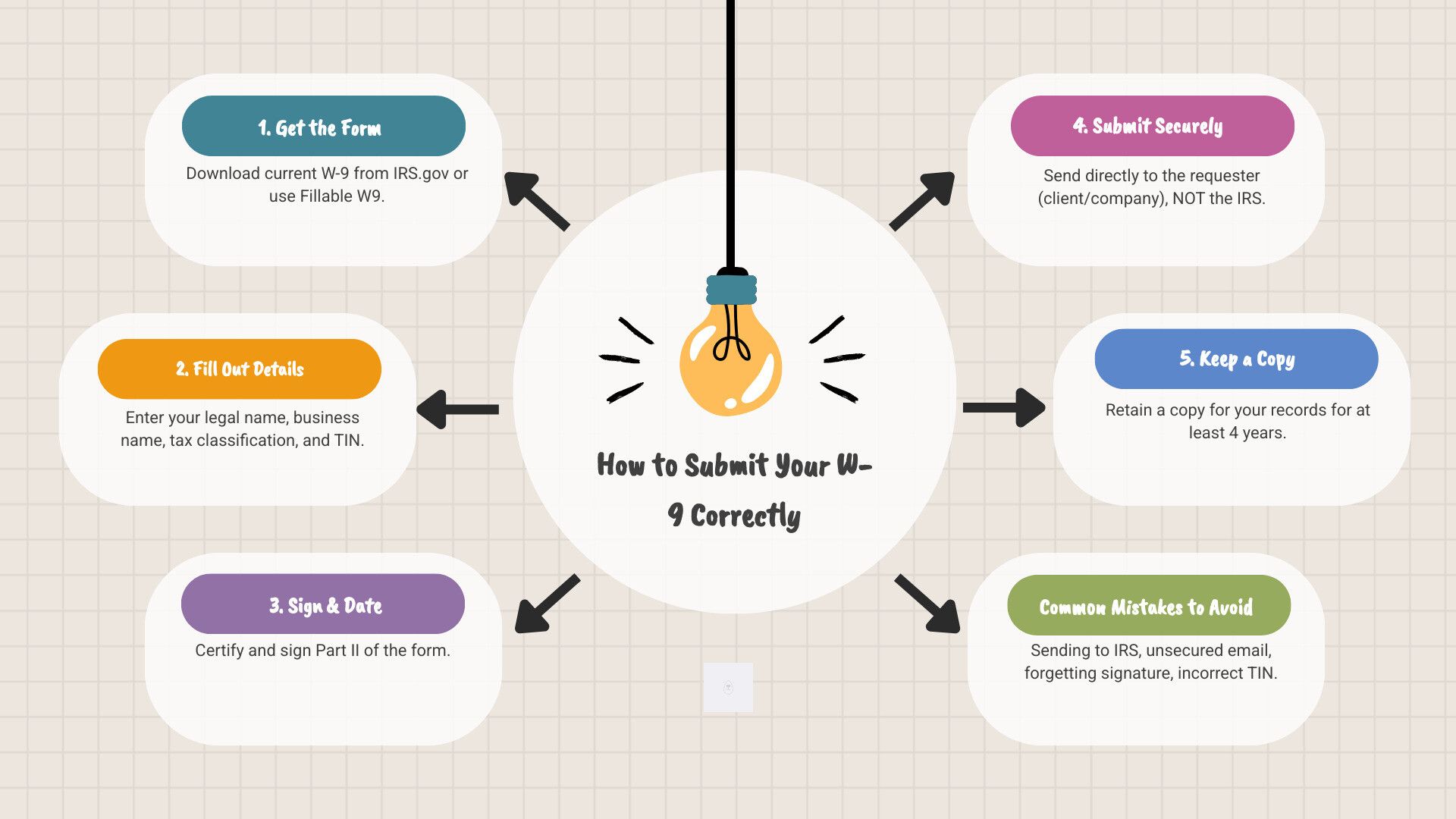
- Fill out the form completely with your legal name, business name (if applicable), tax classification, and Taxpayer Identification Number (TIN)
- Sign and date the certification in Part II
- Submit directly to the requester—the client, company, or financial institution that asked for it
- Use secure methods like encrypted email, secure client portals, or trusted online platforms like Fillable W9
- Keep a copy for your records (retain for 4 years)
If you’re a freelancer or small business owner, you’ve likely been asked for a W-9. This form stays between you and the requester—the IRS never sees it. This simple fact confuses many, leading to payment delays, security risks, and backup withholding of 24% of your income.
Unlike other tax forms, the W-9 is an information collection tool. Businesses use it to gather your tax details so they can report payments made to you on forms like the 1099-NEC.
Getting this right is crucial. Refusing to provide a W-9 can lead to 24% backup withholding and lost business opportunities. I’m Haiko de Poel, and I’ve helped countless freelancers and businesses with tax compliance. Let me show you how to handle your W-9 correctly to get paid faster and avoid mistakes.
What is a W-9 and Why is it Requested?
Form W-9, or the “Request for Taxpayer Identification Number and Certification,” is how businesses collect your tax information. Its main purpose is to gather your Taxpayer Identification Number (TIN)—your Social Security Number (SSN) or Employer Identification Number (EIN)—along with your name and business details. It’s an information collection tool that helps businesses comply with IRS reporting.
Unlike other tax forms, you never send the W-9 to the IRS. The business that pays you keeps it on file and uses the information to prepare forms like the 1099-NEC, which they do send to the IRS.
The W-9 is typically requested from independent contractors, freelancers, and vendors. If you provide services to other businesses as a non-employee, you’ll need to fill one out.

A W-9 is generally required if a business expects to pay you $600 or more in a tax year. This $600 payment threshold triggers their requirement to report payments to independent contractors. The rule also applies to other specific financial transactions.
To clarify the W-9’s role, here’s how it compares to other common tax forms:
| Feature | Form W-9 (Request for TIN and Certification) | Form W-4 (Employee’s Withholding Certificate) | Form 1099-NEC (Nonemployee Compensation) |
|---|---|---|---|
| Purpose | Provides TIN to payer for information reporting | Informs employer how much tax to withhold | Reports nonemployee compensation |
| Who Fills Out | Independent contractors, freelancers, vendors | Employees | Issued by payer to recipient & IRS |
| Who Receives | The business paying you | Your employer | You (the recipient) and the IRS |
| IRS Filing | Never sent to the IRS | Employer sends to IRS with payroll info | Payer sends to you and the IRS |
| Relationship | Payer uses W-9 info to generate 1099s | Determines federal income tax withholding | Reports income based on W-9 info |
The bottom line? The W-9 is the starting point that allows businesses to properly report the money they’ve paid you. Without it, they can’t fulfill their legal obligations—and you might face backup withholding or payment delays.
Step-by-Step Guide: How to Fill Out Your W-9 Form
Filling out a W-9 is straightforward. Before you begin, ensure you have the current version (revised March 2024) to avoid issues. You can download the current version of Form W-9 from the IRS or use a platform like Fillable W9, which is always up-to-date.
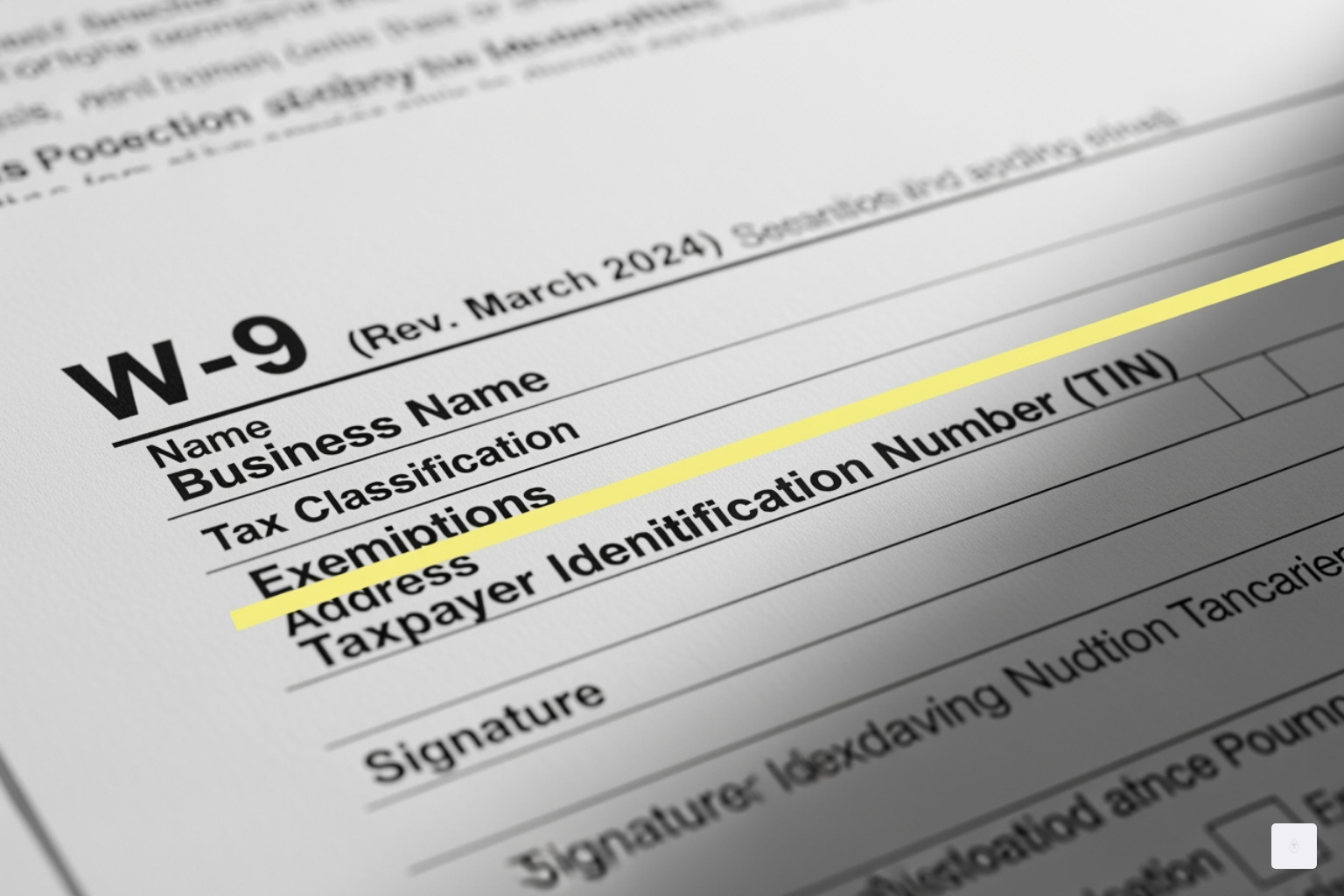
Step 1: Enter your legal name (Line 1)
Use your full legal name as it appears on your tax return. This should match the name on your Social Security card. If you’ve changed your name but haven’t updated it with the Social Security Administration, enter your first name, the last name from your Social Security card, and your new last name.
Step 2: Enter your business name/DBA (Line 2, if applicable)
If you operate under a business name, trade name, or DBA, enter it here. For single-member LLCs that are disregarded entities, put the LLC’s name on this line.
Step 3: Select your federal tax classification (Line 3)
Check one box that matches your business’s tax structure.
- Individual/Sole proprietor or single-member LLC: This is the most common choice for freelancers. It covers individuals and single-member LLCs taxed as disregarded entities.
- C Corporation, S Corporation, Partnership, Trust/estate: Check the box that applies to your business structure.
- Limited liability company: Check this box only if you are an LLC taxed as a C-Corp, S-Corp, or Partnership. Then, enter the appropriate letter (C, S, or P). Do not check this if you are a single-member LLC taxed as a sole proprietorship.
Line 3b is new for 2024 and applies only to specific partnerships, trusts, or estates with foreign partners. If you’re unsure, it likely doesn’t apply, but consult a tax professional if needed.
Step 4: Fill in any exemptions (Line 4, if applicable)
Most freelancers and small businesses can skip this section. It’s mainly for entities exempt from backup withholding or Foreign Account Tax Compliance Act (FATCA) reporting. Corporations may be exempt, but not for all payment types. Consult a tax professional if you believe you qualify for an exemption.
Step 5: Enter your address (Lines 5 & 6)
Enter your complete mailing address. This is where the payer will send your year-end tax forms, like the 1099-NEC or 1099-MISC.
Step 6: Enter your TIN (SSN or EIN) in Part I
Your Taxpayer Identification Number (TIN) is critical.
- Use your Social Security Number (SSN) if you are an individual, sole proprietor, or a single-member LLC (disregarded entity).
- Use your Employer Identification Number (EIN) if you are a corporation, partnership, or an LLC taxed as such.
Sole proprietors can use an EIN for privacy, but be consistent with your tax filings. This number connects payments to your tax return.
Step 7: Certify and sign (Part II)
By signing Part II, you certify that all information is correct, you are a U.S. person, and you are not subject to backup withholding. An unsigned W-9 is invalid. While the IRS doesn’t always require a signature, most requesters do. Always sign and date your form to avoid delays.
Common mistakes to avoid when filling out a W-9:
- Incorrect TIN: A wrong TIN can trigger 24% backup withholding. Double-check your number. If you make a mistake, submit a corrected W-9 immediately.
- Wrong classification: Choosing the wrong business type causes reporting errors. For example, most single-member LLCs should check “Individual/Sole proprietor or single-member LLC.”
- Forgetting to sign: An unsigned W-9 is invalid and will be rejected. Always sign and date Part II.
Start filling your W-9 now at https://fillablew9.com/apply
How to Submit Your W-9 Form Securely
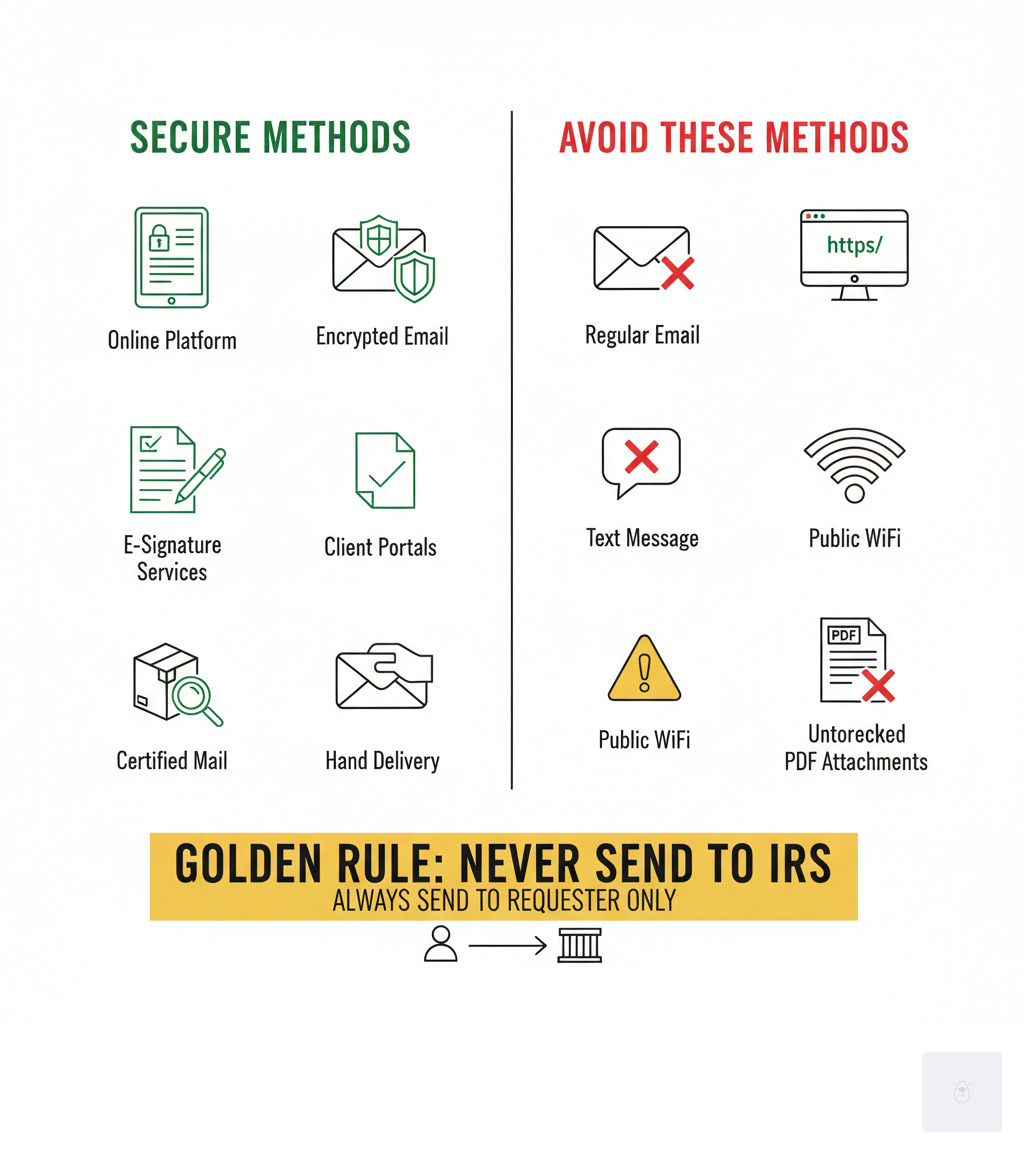
The Golden Rule of W-9 submission is: Never send it to the IRS. Always submit it directly to the requester—the client or company. Your W-9 contains sensitive data like your TIN, so secure submission is vital to protect yourself from identity theft.
Secure Submission Methods:
- Trusted Online Platforms: Using a service like Fillable W9 is the most secure option. These platforms use encryption to protect your data during transmission.
- Secure Client Portals: If your client provides a secure portal for document uploads, use it.
- E-Signature Services: Services like those offered by Fillable W9 allow you to complete, sign, and deliver your form electronically and securely.
- Encrypted Email: This is only secure if both you and the recipient use encryption. At a minimum, password-protect the PDF and send the password separately.
- Physical Delivery: Hand delivery in a sealed envelope or sending via certified mail are secure non-digital options.
Insecure Methods to Avoid:
Never send your W-9 via regular, unencrypted email, text message, or over public Wi-Fi. These methods expose your information to interception.
Failure to submit a W-9 when required has serious consequences, including backup withholding of 24% of your payments, payment delays, and lost business opportunities. Many companies will not issue payment without a valid W-9 on file.
Don’t waste time with paper forms — complete your secure W-9 online at https://fillablew9.com/apply
Checklist: Secure Ways to Submit Your W-9
- Use Fillable W9’s secure online platform
- Password-protect your PDF if emailing
- Confirm recipient’s email address before sending
- Never send via public Wi-Fi or unencrypted email
- Keep a copy for your records
What Happens if You Don’t Submit a W-9?
Ignoring a W-9 request can be costly. Businesses need it to comply with IRS rules, and failing to provide one leads to several negative consequences.
- Backup Withholding: The most immediate impact is that the payer may be required to withhold 24% of your payments and send it to the IRS. While you get credit for this on your tax return, it can severely impact your cash flow.
- Payment Holds: Many companies have a “no W-9, no payment” policy. Your invoices will be held until you submit the required form, delaying your income.
- IRS Penalties: If you deliberately provide false information on a W-9, you could face a civil penalty of $50, which can increase to $500 or more for intentional disregard. You can find more details on the IRS page for Information return penalties.
- Damaged Client Relationships: Refusing to provide a W-9 makes you appear difficult to work with and can damage your professional reputation, potentially costing you future business.
- Inability to Get Paid: For many larger corporations and payment processors, a W-9 is non-negotiable. Without it, you simply won’t get paid, shutting you out of significant opportunities.
These problems are entirely avoidable by submitting your W-9 promptly and correctly.
W-9 Advanced Topics and FAQs
Beyond the basics, here are some advanced W-9 topics and frequently asked questions on how to submit W9 updates.
When to Submit a New W-9
Your W-9 is not a one-time document. You must submit a new form whenever your information changes, such as a:
- Name change (e.g., due to marriage)
- Business structure change (e.g., sole proprietor to LLC)
- TIN change
- Address change
How Often Should You Submit a W-9?
While there’s no official IRS schedule, many businesses request a new W-9 annually. Best practice is to submit an updated W-9 whenever your information changes or at the start of each year to ensure your clients have current records.
How to Correct a Mistake
If you realize you made an error on a submitted W-9, simply fill out a new, correct form and submit it immediately to the requester. This can prevent issues like backup withholding.
Backup Withholding Triggers
Besides failing to provide a W-9, backup withholding can be triggered if:
- You provide an incorrect TIN.
- The IRS notifies the payer that your TIN is incorrect.
- You fail to certify that you are not subject to backup withholding.
Understanding FATCA
The Foreign Account Tax Compliance Act (FATCA) is designed to prevent tax evasion by U.S. taxpayers with foreign accounts. Most U.S.-based freelancers and small businesses are not affected and can leave the FATCA exemption code (Line 4) blank.
When to Consult a Tax Professional
While most people can fill out a W-9 without help, consider consulting a professional if you are:
- Unsure about your federal tax classification (especially for LLCs, partnerships, or trusts).
- Dealing with international clients or entities.
- Unsure if FATCA applies to you.
- Notified by the IRS about an incorrect TIN or backup withholding.
FAQ: How to Submit W-9 Corrections and Updates
When your W-9 information changes, it’s crucial to update your clients. A name change, business entity change, TIN change, or address change all require a new W-9. Forgetting to update your address can mean your 1099s get lost in the mail. Changing from a sole proprietor to an LLC requires a new form with an updated tax classification. Best practice: Submit a new W-9 as soon as any information changes. Being proactive ensures your payers have accurate records and prevents payment delays.
Complete Your W-9 Securely and Confidently
The W-9 form is a key document for any freelancer or small business. By handling it correctly, you ensure compliance and prompt payment.
Here’s a final recap on how to submit W9 forms:
- Submit to the Requester, Not the IRS: Your W-9 always goes to the client or company that pays you.
- Prioritize Security: Use secure digital platforms like Fillable W9 or encrypted methods to protect your sensitive TIN. Avoid regular email and public Wi-Fi.
- Ensure Accuracy: Double-check your TIN, tax classification, and signature to prevent 24% backup withholding and payment delays.
- Keep it Updated: Submit a new W-9 whenever your name, address, business structure, or TIN changes.
Understanding the W-9 process is good business practice. With the right knowledge, you can manage it confidently and focus on your work.
✅ Ready to complete your W-9 in minutes? Apply here now.