
Why You Need the W-9 Form for 2026 Tax Compliance

If you’re searching for a w9 2025 pdf download or getting ready for the upcoming filing season, here’s what you need to know right away:
Quick Answer: The Official W-9 Form
- Current Version Valid for 2025–2026: Form W-9 (Rev. March 2024)
- Official Download: IRS Form W-9 PDF
- Who Needs It: Freelancers, independent contractors, small business owners, and anyone receiving payments that require IRS reporting
- Where to Get It: Only download from IRS.gov to ensure you have the authentic, current form
- Cost: Completely free from the IRS
Every tax season, including 2026, millions of freelancers and small business owners scramble to find the right W-9 form when clients request it. The w9 2025 pdf download is one of the most searched tax forms because it’s required whenever you start working with a new client or business that needs to report payments to the IRS.
Form W-9 is how you provide your correct Taxpayer Identification Number (TIN) to businesses that pay you. Without it, your clients can’t properly report your income on Form 1099-NEC or other information returns. Even more importantly, if you don’t provide a correct W-9, you could face backup withholding — where 24% of your payments are automatically withheld and sent to the IRS.
The current version was revised in March 2024 and is the correct form to use for the 2025 and 2026 tax years unless the IRS releases a newer revision. Using an outdated version can cause delays in getting paid or create compliance issues for both you and your clients.
At Fillable W9, we specialize in simplifying tax compliance. We’ve helped countless freelancers and small businesses steer the w9 2025 pdf download and completion process, ensuring they can get their paperwork done correctly and get paid faster. We know how critical proper tax documentation is for building strong business relationships and fostering growth.
What is the 2025 W-9 Form and Why Do You Need It?
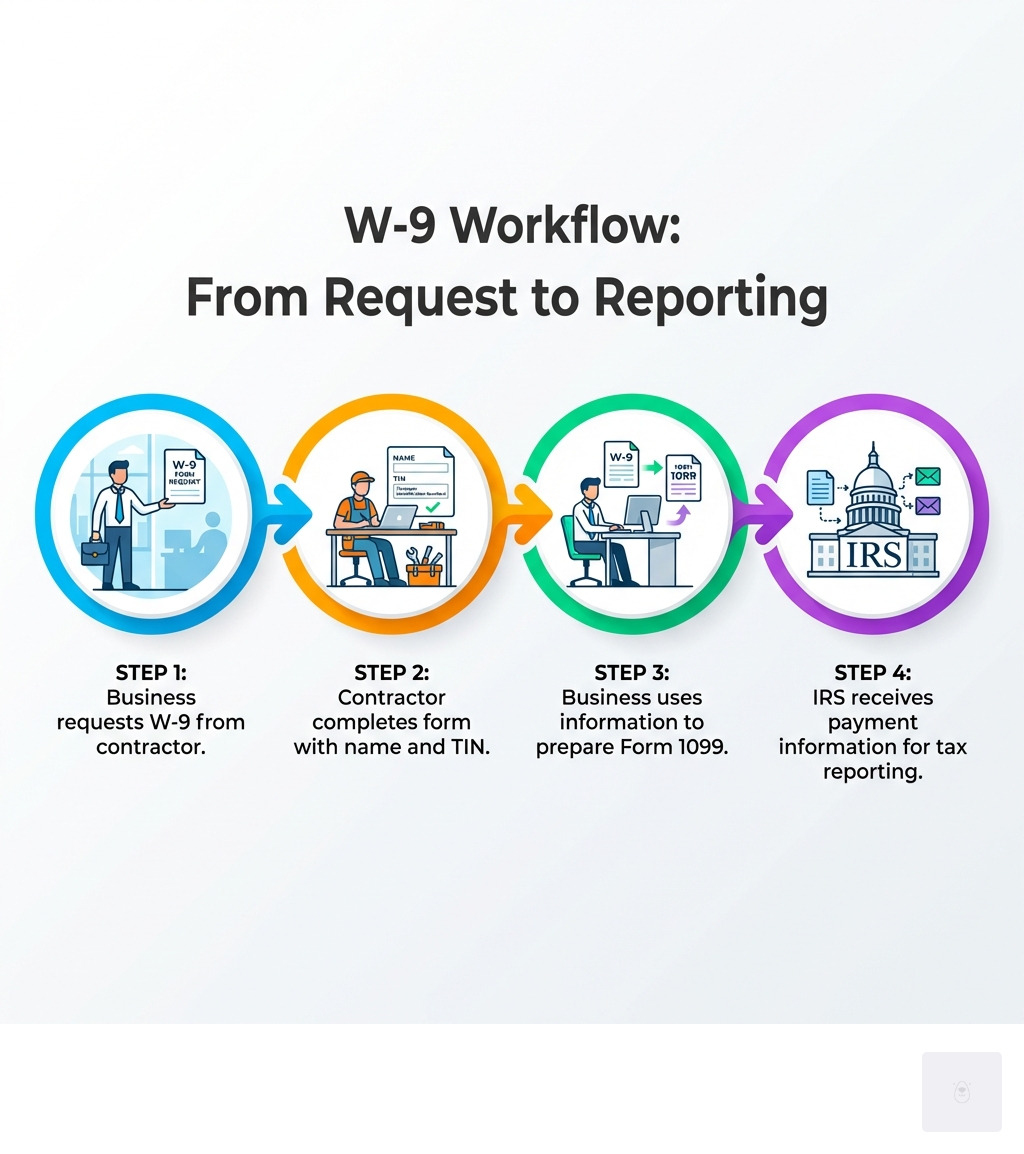
At its heart, the IRS Form W-9, officially titled “Request for Taxpayer Identification Number and Certification,” is a simple yet crucial document. Its primary purpose is to allow you, as a U.S. person, to provide your correct Taxpayer Identification Number (TIN) to an entity that is required to file an information return with the IRS. This could be a client, a bank, an investment firm, or any business that pays you income.
When a business pays you for services, rents, royalties, or other reportable income, they need your TIN to report these payments to the IRS. Forms like the 1099-NEC (for non-employee compensation) or 1099-MISC (for miscellaneous income) rely on the information you provide on your W-9. Without an accurate W-9, your clients or payers cannot properly fulfill their tax reporting obligations.

One of the most significant reasons to ensure your W-9 is correct and up-to-date is to avoid backup withholding. If you fail to provide a correct TIN, or if the IRS notifies the payer that your TIN is incorrect, they may be required to withhold 24% of your payments and send it directly to the IRS. Nobody wants to lose a quarter of their income unexpectedly, so a properly completed W-9 is your first line of defense! You can learn more about the form’s purpose directly from the source: About Form W-9, Request for Taxpayer Identification ….
Who is Required to Fill Out Form W-9?
The W-9 form is specifically for “U.S. persons.” This broad term includes:
- Individuals, such as freelancers, independent contractors, consultants, and sole proprietors.
- Resident aliens.
- Entities organized in the United States, such as:
- Limited Liability Companies (LLCs)
- Partnerships
- C Corporations
- S Corporations
- Trusts
- Estates
Essentially, if you’re an individual or a domestic entity receiving income from another U.S. individual or entity that needs to report payments to the IRS, you’ll likely be asked to complete a W-9. This ensures transparency and compliance with federal tax laws.
Latest Revision Date and Key Updates for the 2025–2026 Tax Years
The most current version of the W-9 form is the “Rev. March 2024.” This is the version you should use for any requests you receive in 2025 and, as of now, for the 2026 tax year as well, unless the IRS issues a newer revision.

While the core purpose of the W-9 remains consistent, recent updates reflect evolving tax landscapes. One notable addition in the March 2024 revision is Line 3b. This new line is specifically for flow-through entities (like partnerships, trusts, or estates) to indicate if they have any direct or indirect foreign partners, owners, or beneficiaries. This is crucial for satisfying applicable reporting requirements, especially concerning Schedules K-2 and K-3.
Another area seeing developments, though more impacting the requester of the W-9, involves digital assets. The IRS has introduced new categories of exempt recipients for sales of digital assets and is providing transitional relief for digital asset brokers. While these specific codes might not directly appear on your W-9 as a payee, they highlight the IRS’s ongoing efforts to adapt to new forms of income and transactions.
Staying current with the latest version of the W-9, even for a w9 2025 pdf download, helps you stay compliant for both the 2025 and 2026 tax years and ensures your financial paperwork is always in order.
Where to Find and Secure Your w9 2025 pdf download
When it comes to downloading any tax form, including your w9 2025 pdf download, security and authenticity are paramount. The internet is full of third-party websites offering tax forms, but not all of them are official or up-to-date. Using an incorrect or fraudulent form can lead to serious tax compliance issues and even identity theft.
We cannot stress this enough: always download your W-9 form directly from the official IRS website. This is the only way to guarantee you are getting the authentic, most current version of the form that is valid for the 2025 and 2026 tax years, unless the IRS publishes a newer revision.
Once you’ve downloaded the PDF, you’ll need a reliable PDF viewer like Adobe Acrobat to open and potentially fill it out. While many browsers can open PDFs, a dedicated PDF reader often offers better functionality for filling out forms and ensuring your entries are saved correctly.
When it comes to submitting your completed W-9, be mindful of security. Sending sensitive information like your TIN via unencrypted email is generally not recommended. Many businesses use secure portals or encrypted document submission methods. If you’re unsure, ask your client or payer about their preferred secure submission method.
For those looking for a seamless and secure way to handle their W-9, our platform at Fillable W9 simplifies the entire process. We focus on providing a secure online experience, taking the guesswork out of where to find the form and how to fill it out correctly. You can explore more about our secure features here: More info about W-9 features.
Ready to simplify your W-9 process for the 2025 and 2026 filing seasons? Don’t waste time with paper forms — complete your secure W-9 online at https://fillablew9.com/apply/.
Direct Links for Your w9 2025 pdf download
To make it as easy and secure as possible for you to get the correct form, here are the direct steps and links:
- Go to IRS.gov/FormW9: We always recommend starting from the main IRS page for Form W-9.
- Verify “Rev. March 2024”: Once on the page, look for the revision date to ensure it says “Rev. March 2024.” This is the version currently applicable for the 2025 and 2026 tax years.
- Click the PDF link: The page will have a direct link to the PDF document.
- Save to your computer: Download the PDF file to a secure location on your device.
Here are the direct official links for your convenience:
- Official Form Link: Form W-9 (Rev. March 2024)
- Official Instructions Link: Instructions for the Requester of Form W-9 (These instructions are primarily for the entity requesting the W-9, but they contain valuable context for understanding the form’s requirements).
How to Fill Out Your W-9 Form: A Line-by-Line Guide
Filling out your W-9 form is typically straightforward, but accuracy is key. Let’s walk through each section to ensure you provide all the necessary information correctly. This form is for the requester’s records, not for you to send to the IRS.
Required Information on Form W-9
The W-9 form primarily asks for your identification and address details. Here’s a quick overview of what you’ll need:
- Name: Your legal name as it appears on your income tax return.
- Business Name (if applicable): If you operate under a business name different from your legal name.
- Address: Your current mailing address.
- Federal Tax Classification: How you are classified for federal tax purposes (e.g., individual, corporation, LLC).
- Taxpayer Identification Number (TIN): This is either your Social Security Number (SSN) or Employer Identification Number (EIN).
Understanding SSN vs. EIN for Form W-9 Purposes
The Taxpayer Identification Number (TIN) is crucial. For individuals, it’s usually your Social Security Number (SSN). For businesses, it’s typically an Employer Identification Number (EIN). Here’s a quick comparison:
| Feature | Social Security Number (SSN) | Employer Identification Number (EIN) |
|---|---|---|
| Who Uses It | Individuals, sole proprietors (can choose SSN or EIN) | Businesses (corporations, partnerships, multi-member LLCs), sole proprietors with employees, or those who elect to use an EIN for business purposes. |
| How to Get It | Issued by the Social Security Administration (SSA) | Issued by the IRS (Form SS-4 application) |
| When to Use | For individual income, or if you’re a sole proprietor without an EIN. | For business income, or if you’re a sole proprietor who has an EIN and prefers to use it for business transactions. |
Line-by-Line Instructions for Your W-9 Form
Let’s go through each line of the w9 2025 pdf download to ensure you fill it out perfectly:
- Line 1: Name
- Enter your name exactly as it appears on your federal income tax return. For individuals, this is typically your legal name.
- Line 2: Business name/Disregarded Entity Name
- If you have a business name (e.g., a DBA or trade name) that is different from the name on Line 1, enter it here. For a disregarded entity, enter the name of the disregarded entity.
- Line 3: Federal Tax Classification
- This is where you check the box that describes your federal tax classification. Options include:
- Individual/Sole proprietor/Single-member LLC
- C Corporation
- S Corporation
- Partnership
- Trust/Estate
- Limited Liability Company (LLC) (You’ll also need to indicate how the LLC is taxed: C=C corporation, S=S corporation, or P=Partnership).
- Other (If your classification doesn’t fit the above, specify it here).
- A new Line 3b has been added for flow-through entities (Partnership, Trust/estate, or LLC taxed as P) to indicate if they have any direct or indirect foreign partners, owners, or beneficiaries. Only check this box if it applies to your entity and if you are providing the form to another entity in which you have an ownership interest.
- Line 4: Exemption Codes
- This line is usually left blank by individuals. If you are an exempt payee (e.g., certain governmental entities, tax-exempt organizations) or exempt from FATCA reporting, you would enter the appropriate code here. Most freelancers and small businesses will not need to fill this out.
- Lines 5 & 6: Address
- Enter your current street address, including your city, state, and ZIP code. This should be the address where you receive mail.
- Part I: Taxpayer Identification Number (TIN)
- This is where you enter your SSN or EIN. If you are a sole proprietor, you can generally use either your SSN or your EIN if you have one. Ensure the TIN you provide matches the name on Line 1.
- Part II: Certification
- By signing this section, you are certifying several things under penalties of perjury:
- The TIN you provided is correct.
- You are not subject to backup withholding, or you are exempt. (You should cross out item 2 if the IRS has notified you that you are currently subject to backup withholding due to underreporting interest or dividends.)
- You are a U.S. citizen or other U.S. person.
- The FATCA codes entered (if any) are correct.
- Signature: Don’t forget to sign and date the form! An unsigned W-9 is invalid.
For more detailed guidance on completing each section, visit our comprehensive guide: More info about how to fill a W-9.
Special Instructions for LLCs and Disregarded Entities
Limited Liability Companies (LLCs) have unique flexibility in how they are taxed, which affects how they complete Form W-9.
- Single-Member LLC (Disregarded Entity): If your LLC has only one owner and you haven’t elected for it to be taxed as a corporation, it’s generally treated as a “disregarded entity.” In this case, you should check the “Individual/Sole proprietor/Single-member LLC” box on Line 3. For the TIN, you’ll typically use the owner’s SSN or EIN. The name on Line 1 should be the owner’s name, and Line 2 can be the LLC’s business name.
- LLC Taxed as a Partnership, S Corporation, or C Corporation: If your LLC has elected to be taxed as a partnership, S corporation, or C corporation, you should check the “Limited liability company” box on Line 3 and then indicate its tax classification (P for partnership, S for S corporation, C for C corporation). In these cases, the LLC’s EIN should be used as the TIN in Part I.
It’s crucial to understand your LLC’s tax classification to complete the W-9 correctly. Mistakes here can lead to incorrect reporting or processing delays.
Avoiding Common W-9 Mistakes and Penalties
Even with clear instructions, common mistakes can occur when filling out your w9 2025 pdf download. These errors can lead to delays in payment, administrative headaches, and even penalties.
One of the most frequent errors we see is simply forgetting to sign and date the form. An unsigned W-9 is invalid, and your client won’t be able to process it. Another common pitfall is using an outdated version of the form. Always ensure you’re using the latest official version, which for the 2025 and 2026 tax years is the “Rev. March 2024” form. Illegible handwriting can also cause issues, as the information needs to be clearly readable for accurate data entry.
Penalties for Incorrect or Missing Information
The IRS takes the accuracy of TINs seriously. If you fail to furnish a correct TIN to a requester, you could face a penalty of $50 for each failure, unless it’s due to reasonable cause and not willful neglect. Providing a false statement with no reasonable basis that results in no backup withholding can incur a civil penalty of $500. Willfully falsifying certifications can even lead to criminal penalties.
How Form W-9 Relates to Backup Withholding
As mentioned earlier, backup withholding is a significant consequence of an incorrect or missing W-9. If you don’t provide your correct TIN, or if the IRS notifies the payer that you’ve underreported interest or dividends, the payer is required to withhold 24% of your payments and send it to the IRS. This 24% is then credited against your eventual tax liability. It’s not an extra tax, but it can severely impact your cash flow.
This withholding continues until the issue is resolved and a correct W-9 is provided. You can find more details on this topic from the IRS directly: Backup Withholding | IRS.
When to Submit a New W-9
You generally don’t need to provide a new W-9 every year if your information hasn’t changed. However, there are specific instances when submitting an updated Form W-9 is necessary:
- Name Change: If your legal name changes (e.g., due to marriage, legal name change).
- Business Structure Change: If your business entity type changes (e.g., from sole proprietor to LLC, or LLC tax election changes).
- TIN Change: If your SSN or EIN changes (though this is rare).
- Address Change: If your mailing address changes.
- Change in Backup Withholding Status: If you become subject to or exempt from backup withholding.
Always keep your W-9 information current with your clients to avoid any disruptions in payments or tax reporting issues.
Common Mistakes on the w9 2025 pdf download
Let’s summarize the most common W-9 mistakes to watch out for:
- Incorrect TIN: The Taxpayer Identification Number doesn’t match IRS records.
- Name/TIN Mismatch: The name on Line 1 doesn’t exactly match the name associated with the TIN provided. This is a common trigger for IRS notices.
- Wrong Tax Classification: Selecting an incorrect federal tax classification for your entity. This is especially tricky for LLCs.
- Forgetting to Sign and Date: The form is not valid without your signature and the date.
Paying attention to these details can save you a lot of trouble down the road, whether you’re preparing for your 2025 filings or staying ready for 2026 requests.
Frequently Asked Questions about the W-9 Form
We understand you might have more questions about the W-9 form. Here are answers to some of the most common ones we encounter. For more FAQs, you can check out our dedicated section: More info about W-9 FAQs.
What is the difference between a W-9 and a W-4?
This is a very common question, and it highlights a key distinction in tax documentation:
- Form W-9 (Request for Taxpayer Identification Number and Certification): This form is used by independent contractors, freelancers, and other non-employees to provide their TIN to clients or payers. It helps the payer report income paid to you on Forms 1099.
- Form W-4 (Employee’s Withholding Certificate): This form is used by employees to tell their employer how much federal income tax to withhold from their paychecks. It is specifically for wage-earners, not independent contractors.
Essentially, a W-9 is for reporting income to non-employees, while a W-4 is for managing tax withholding for employees.
Do I need to send my W-9 to the IRS?
No, absolutely not! This is a critical point to remember. You should never send your completed W-9 form directly to the IRS. The W-9 form is provided to the person or entity (the “requester”) who is paying you. That requester then uses the information you provide on the W-9 to prepare their own information returns (like a Form 1099-NEC or 1099-MISC) which they do send to the IRS. Think of your W-9 as a piece of information for your client’s tax records, not for the IRS’s.
Can I use a digital signature on my W-9 form?
Yes, the IRS generally accepts digital or electronic signatures on forms, including the W-9, as long as certain criteria are met. This means you don’t necessarily need to print, sign, and scan your w9 2025 pdf download if you’re using a secure platform.
Many secure online platforms, including Fillable W9, offer e-signature capabilities that comply with IRS requirements. When using an e-signature, ensure the platform provides adequate authentication and security measures. Always confirm with the requester that they accept electronically signed W-9s, though most businesses are now accustomed to this practice. Using a digital signature can significantly speed up the process and improve efficiency.
Conclusion: Finalize Your W-9 and Get Paid Faster
Navigating tax forms, even something as seemingly simple as the W-9, can feel daunting. But as we’ve explored, understanding the purpose of the w9 2025 pdf download, knowing where to find the official version, and filling it out accurately are crucial steps for any freelancer or small business owner.
Accuracy prevents penalties, avoids backup withholding, and ensures your clients can properly report your income for the 2025 and 2026 tax years, allowing you to get paid without unnecessary delays. Remember to always use the latest revision (Rev. March 2024, unless the IRS releases a newer version) and download it directly from the IRS website to guarantee authenticity.
Pay close attention to each line, especially your name, tax classification, and TIN, and don’t forget to sign and date the form. Keeping your information current now will save you time and stress when tax season arrives.
At Fillable W9, we understand that your time is valuable. Our platform is designed to simplify this process, offering a secure and user-friendly way to complete and manage your fillable W9 form online. We help you avoid common mistakes, ensuring your documentation is always audit-ready.
✅ Ready to complete your W-9 in minutes for your next client request? Apply here now: https://fillablew9.com/apply/