
The Easiest Way to Fill Your W-9: A Free Online Solution
Why Every Freelancer and Contractor Needs a Simple W-9 Solution

Free online W9 filler tools have transformed how independent contractors, freelancers, and small businesses handle tax compliance. If you’re searching for a fast, secure way to complete your W-9 form without the hassle of printing and scanning, here’s what you need to know:
Quick Answer: Best Free Online W9 Fillers
- Fillable W9 – 100% free, IRS-compliant, secure e-signature
- TaxBandits – Free W-9 completion with digital signing
- Jotform – Fillable PDF converter for W-9 forms
- DocuSign – Electronic signature platform with W-9 template
What You Get with Fillable W9:
- No hidden fees or trial periods
- IRS-compliant electronic signatures
- Instant download and secure sharing
- Works on any device (phone, tablet, computer)
- Bank-level encryption for your sensitive data
The W-9 form is one of the most common tax documents in the United States, yet many freelancers and contractors find themselves confused when a client first requests one. The traditional process of downloading a PDF, printing it, filling it out by hand, scanning it, and emailing it back wastes valuable time and often leads to errors.
The problem is simple: As an independent contractor, you need to provide your Taxpayer Identification Number (TIN) to clients who pay you $600 or more annually. They use this information to file 1099 forms with the IRS. If you don’t provide a correct W-9, you could face backup withholding of 24% on your payments, plus potential penalties of up to $50.
According to the IRS, businesses must request W-9 forms from contractors, consultants, freelancers, and any other non-employees who received compensations totaling $600 or more during any given year. For sales professionals, the threshold is $5,000. This means if you’re working independently, you’ll likely need to fill out multiple W-9 forms throughout your career.
The good news? Since April 1998, the IRS has accepted electronically filled and signed W-9 forms, making the entire process faster and more secure. Modern free online W9 filler solutions like Fillable W9 eliminate printing, reduce errors through guided form fields, and protect your sensitive information with encryption.
I’m Haiko de Poel, and through my work helping businesses streamline operations and digital processes, I’ve seen how much time independent contractors waste on administrative tasks like W-9 completion. That’s why I recommend using a free online W9 filler that simplifies compliance while keeping your data secure.

Don’t waste time with paper forms — complete your secure W9 online at Fillable W9 now.
What is a W-9 Form and Who Needs One?

A W-9 form (officially known as a Request for Taxpayer Identification Number and Certification form) is an essential IRS document. Its primary purpose is to allow a business or individual (the “payer”) to collect tax information from someone they will pay (the “payee”). This includes your legal name, address, and most importantly, your Taxpayer Identification Number (TIN).
Unlike some tax forms, a W-9 is not filed with the IRS directly by you. Instead, you provide it to the entity that will be paying you. They use the information you provide to accurately report payments made to you to the IRS, typically on a Form 1099. This ensures proper tax reporting and compliance for both parties. Without a correct W-9, the payer cannot properly report your income, which can lead to problems for everyone involved.
Who is Required to Fill Out a W-9?
If you’re a U.S. person (including a resident alien) and you receive income from a business or individual that isn’t your employer, chances are you’ll need to fill out a W-9. The form is primarily completed by:
- Independent contractors
- Gig workers
- Freelancers
- Consultants
- Sole proprietors
- Partnerships
- Corporations
- LLCs
- Vendors and service providers
Essentially, if you’re not an official full-time employee (who would typically fill out a W-4 form), but you’re receiving payments for services or other reportable income, you’ll likely be asked for a W-9. Businesses generally need to collect a W-9 from any non-employee to whom they pay $600 or more in a calendar year. This threshold is crucial for their own tax reporting obligations.
However, there are situations where you might be exempt from providing a W-9. For instance, if you are a foreign individual or entity, you would typically provide a W-8 form instead. Also, if the payments you receive are not subject to IRS reporting requirements, a W-9 may not be necessary.
W-9 vs. 1099: Understanding the Difference
It’s common to confuse the W-9 and 1099 forms, but they serve distinct purposes in the tax reporting ecosystem:
- W-9: Think of the W-9 as the “information gathering” form. It’s used by the payer to collect your taxpayer information (your TIN, name, and address) from you. You, as the payee, fill it out and give it to the business or individual who will be paying you. You never send a W-9 directly to the IRS.
- 1099: The 1099 is the “reporting” form. It’s used by the payer to report payments made to you to the IRS and to you. Based on the information you provided on your W-9, the payer will issue you a Form 1099 (e.g., 1099-NEC for non-employee compensation, 1099-MISC for miscellaneous income) at the end of the year if they paid you $600 or more. This form is then filed with the IRS and sent to you for your own tax records.
Your completed W-9 provides the necessary data for the payer to generate an accurate 1099, ensuring that your income is correctly reported to the IRS.
Why W-9s Can Be a Hassle (and How Fillable W9 Solves It)
Let’s be honest, dealing with tax forms isn’t anyone’s favorite pastime. The traditional method of handling W-9s can be a real headache, especially for busy freelancers and small business owners. We’ve all been there:
- Errors and missing information: Filling out forms by hand or using generic PDF editors can lead to mistakes, forgotten fields, or illegible handwriting. These errors can cause delays in payment or even trigger backup withholding from the IRS.
- Printing, scanning, and mailing delays: The physical process is cumbersome. You download a PDF, print it, fill it out, scan it back into your computer, and then email it. This cycle is not only time-consuming but also environmentally unfriendly.
- Security concerns with sensitive data: Your Taxpayer Identification Number (TIN) is highly sensitive information. Sending it via unsecured email or relying on physical mail increases the risk of identity theft or data breaches. Protecting this information is paramount.
This is where a dedicated free online W9 filler like Fillable W9 steps in to save the day! We eliminate these headaches by streamlining the entire process. Our solution is designed to:
- Save time: Using our intuitive platform, you can complete and submit your W-9 much faster than with traditional methods. No more printing, scanning, or trips to the post office.
- Reduce errors: Our guided interface highlights required fields and helps prevent common mistakes, ensuring your form is accurate the first time.
- Make the signing process easier: Electronic signatures are not just convenient; they’re legitimate and legally enforceable, recognized by the IRS since 1998. Our system ensures your e-signature meets all compliance requirements.
- Protect sensitive information: We prioritize the security of your data with robust encryption and privacy measures, safeguarding your TIN and other personal details.
Don’t waste time with paper forms — complete your secure W9 online at https://fillablew9.com/apply.
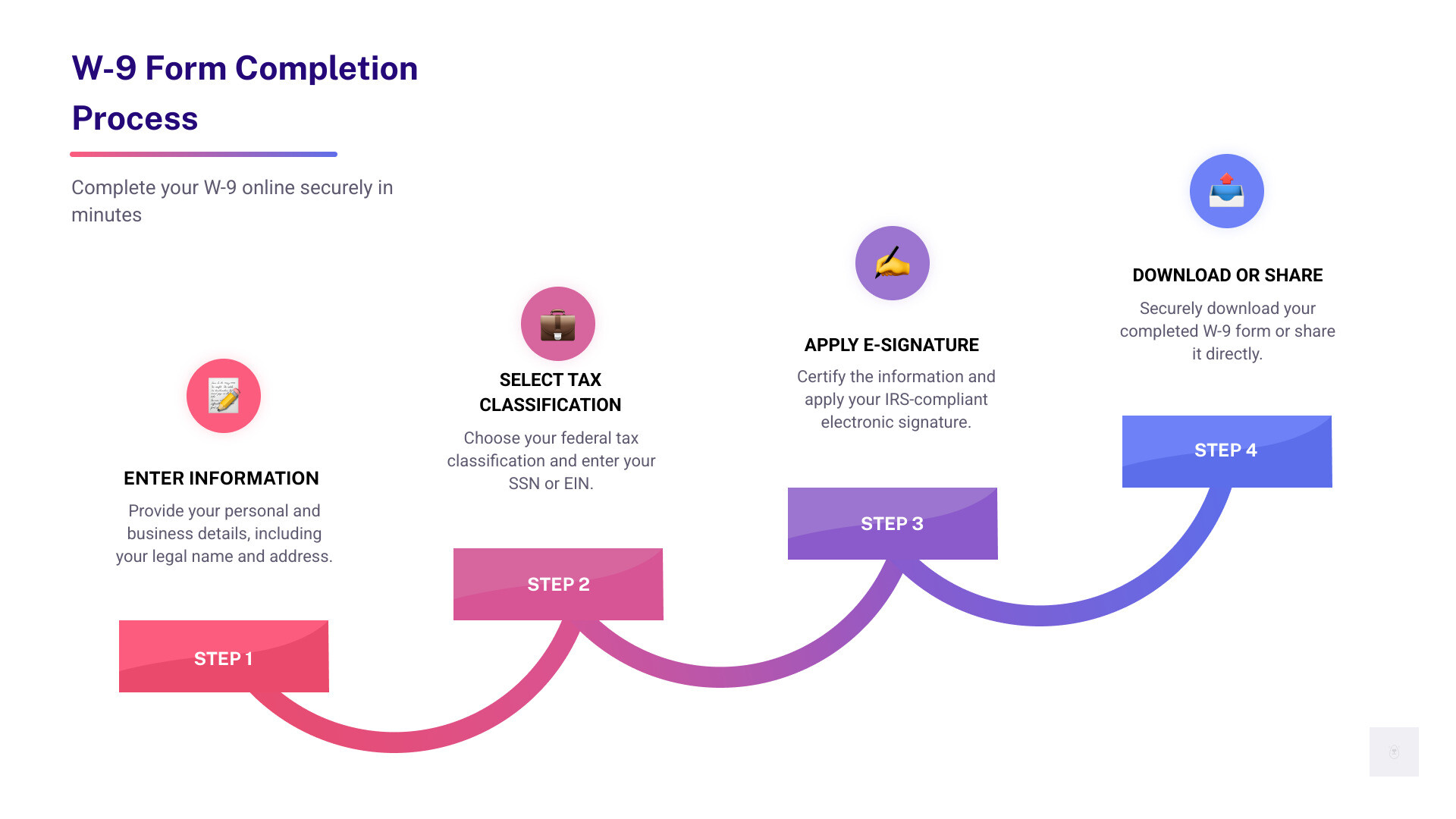
How to Use the Free Online W9 Filler: Step-by-Step Guide
Using an online W-9 filler like Fillable W9 is designed to be straightforward and user-friendly. We guide you through each section, ensuring accuracy and compliance. Here’s a simple, step-by-step guide to filling out your W-9 form online:
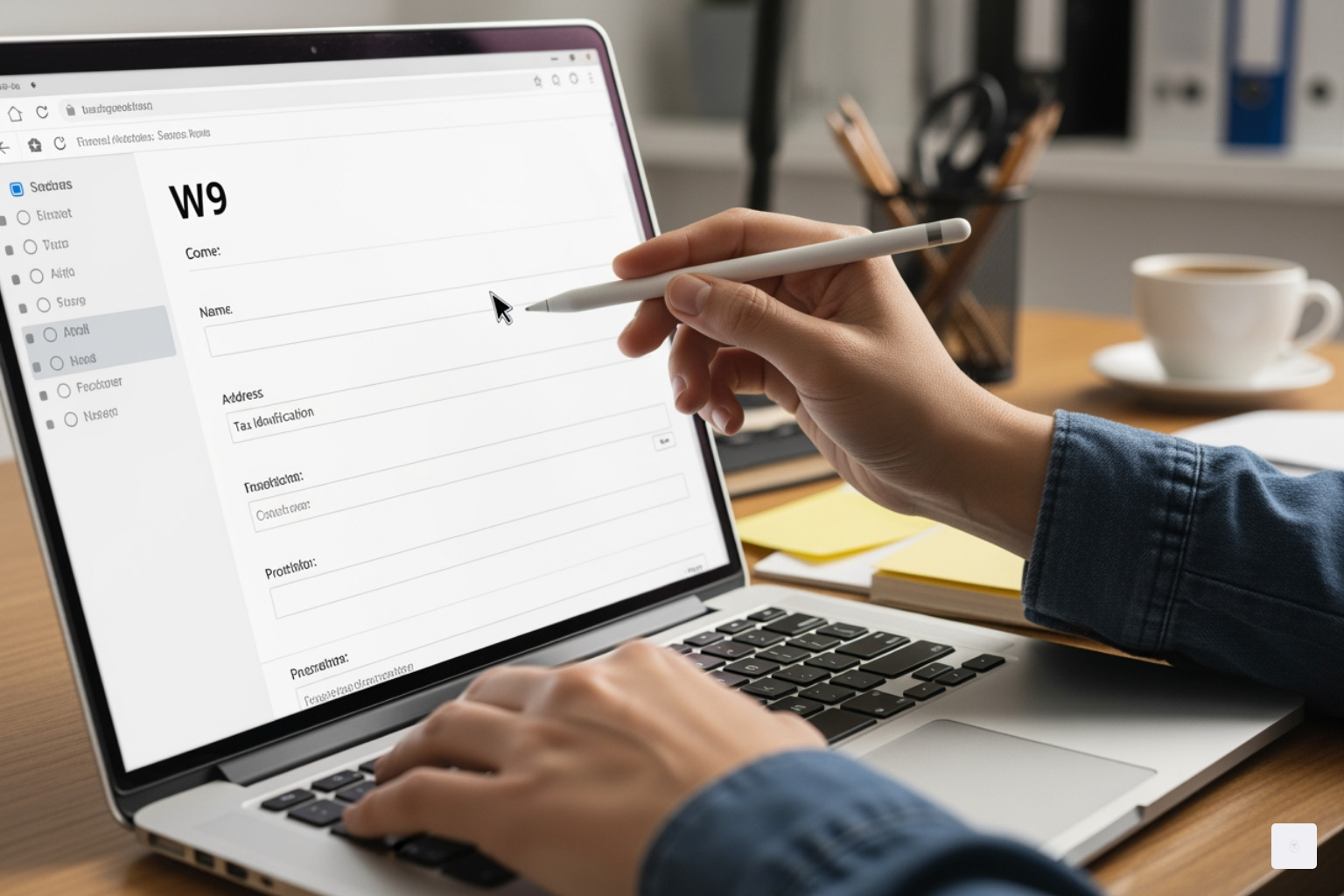
Step 1: Enter Your Personal and Business Information
The first part of the W-9 form focuses on your identity and contact details. It’s crucial to enter this information exactly as it appears on your tax returns to avoid any discrepancies.
- Name (as shown on your tax return): In Box 1, you’ll enter your full legal name. If you file a joint tax return, only your name should be listed here. This is your individual legal name.
- Business name (if different): If you operate under a business name (e.g., a “doing business as” or DBA name) that is different from your legal name, you’ll enter it in Box 2. If you don’t have a separate business name, you can leave this blank.
- Address: Boxes 5 and 6 are for your full mailing address, including your street address, apartment or suite number, city, state, and zip code. This should be the address where you receive tax documents.
Step 2: Select Your Tax Classification and Enter Your TIN
This section is vital for determining how your income will be reported. You’ll need to indicate your federal tax classification and provide your Taxpayer Identification Number (TIN).
- Choose your federal tax classification (Box 3): You’ll select the box that best describes your tax entity. Options include:
- Individual/Sole Proprietor or Single-Member LLC
- C Corporation
- S Corporation
- Partnership
- Trust/Estate
- Limited Liability Company (LLC) – you’ll also specify its tax classification (C=C Corporation, S=S Corporation, P=Partnership). We ensure you select the correct option based on your business structure.
- 2024 Update: The IRS released an updated Form W-9 in March 2024, introducing a new Line 3b. This line should be checked if you indicated “Partnership” or “Trust/estate” on Line 3a (or an LLC taxed as a Partnership) and you are providing this form to another partnership, trust, or estate in which you have an ownership interest. It also applies if there are foreign partners, owners, or beneficiaries. Our free online W9 filler is updated to reflect these latest IRS changes.
- Enter your Taxpayer Identification Number (TIN): In Part I of the form, you’ll provide your TIN. This is either:
- Your Social Security Number (SSN) if you are an individual or a sole proprietor.
- Your Employer Identification Number (EIN) if you are a business entity (like a corporation, partnership, or multi-member LLC). It’s critical that the TIN you provide is correct to avoid backup withholding.
Step 3: Certify and E-Sign Your W-9 Form
The final step is to certify that the information you’ve provided is accurate and to apply your signature.
- Review the perjury statement (Part II): This section requires you to certify, under penalty of perjury, that your TIN is correct, that you are not subject to backup withholding (or that you are exempt), that you are a U.S. person, and that any FATCA codes entered are correct.
- Apply your electronic signature (IRS-compliant): Our platform allows you to apply a legally binding electronic signature. Since April 1998, the IRS has accepted electronic signatures on W-9 forms, provided the system ensures the integrity of the information, matches the paper form content, includes a valid electronic signature that authenticates the submitter, contains a perjury statement, and allows for hard copy retrieval by the payer. Fillable W9 is designed to meet these requirements, ensuring your e-signature is legitimate and legally enforceable.
- Date the form: Your electronic signature will also be dated automatically.
Checklist: What You Need to Fill Out Your W-9 Online
- Legal name and business name (if any)
- Current address
- Correct federal tax classification
- Social Security Number (SSN) or Employer Identification Number (EIN)
- An email address for secure delivery and confirmation
Why Use Fillable W9’s Free Online W9 Filler? Key Benefits & Features
When it comes to handling sensitive tax documents, convenience, security, and compliance are non-negotiable. Our free online W9 filler at Fillable W9 is built with these principles at its core, offering a superior experience compared to traditional methods.
- No hidden charges: We pride ourselves on being a completely free online W9 filler with no hidden fees, no trial periods, and no credit card required. You get a fully functional, IRS-compliant service at absolutely no cost.
- IRS-compliant e-signatures: Our secure e-signature feature ensures that your digital signature is legally valid and compliant with IRS regulations. This means your clients can confidently accept your electronically signed W-9, knowing it meets all legal standards.
- Instant download and secure sharing options: Once completed, you can instantly download your W-9 as a PDF. More importantly, we offer secure sharing options, allowing you to send your form directly to your clients or vendors with peace of mind. No more worrying about unsecured email attachments.
- Cross-device compatibility: Life doesn’t stop for tax forms. Whether you’re on a computer, tablet, or mobile phone, our platform offers seamless compatibility across all devices. This allows you to complete your W-9 forms anytime, anywhere, ensuring you never miss a deadline.
- Data encryption and privacy protection: Your privacy is our priority. We employ robust data encryption to protect your sensitive information from unauthorized access. Our system is designed to safeguard your TIN and personal details, ensuring they remain confidential.
How Fillable W9 Keeps Your Information Secure
We understand that trust is earned, especially when dealing with personal financial data. That’s why Fillable W9 implements stringent security measures to protect your information:
- End-to-end encryption: All data transmitted through our platform is secured with end-to-end encryption, ensuring that your information is unreadable to anyone other than its intended recipient.
- SOC 2 compliant infrastructure: Our systems operate on infrastructure that is SOC 2 compliant, a rigorous auditing standard that ensures service organizations securely manage data to protect the interests of their clients and the privacy of their information.
- Secure sharing protocols: When you share your completed W-9, we use secure protocols to transmit the document, minimizing risks associated with traditional email or physical mail.
- Tips to avoid phishing and keep your data safe: We also empower you with knowledge. The IRS will never initiate contact with you via email, text message, or social media to request personal or financial information. Always be wary of unsolicited requests for your W-9 data. Protect your sensitive information by only using trusted, secure platforms like Fillable W9.
For more details on how we handle your data, you can review our Privacy Policy.
Frequently Asked Questions about W-9 Forms
We know you might have more questions about W-9 forms. Here are some of the most common inquiries we hear, along with clear answers to help you steer your tax obligations. You can also find more information on our dedicated FAQs about W-9s page.
What happens if I don’t provide a W-9 form?
Failing to furnish a W-9 form when requested can lead to significant consequences:
- You may be subject to backup withholding (24% tax rate): If you don’t provide a correct TIN to a payer, they are legally required to withhold 24% of your payments and send it directly to the IRS. This means you’ll receive less money upfront, and you’ll have to wait until tax season to claim it back if it’s an overpayment.
- Possible $50 penalty: The IRS may impose a $50 penalty for each failure to furnish a correct TIN, unless the failure is due to reasonable cause and not willful neglect.
- Payment delays from clients: Many businesses will not issue payments until they have a completed W-9 on file. Without it, your payments could be significantly delayed.
Can I use an electronic signature on a W-9 form?
Yes! The IRS has recognized and accepted electronic signatures on W-9 forms since April 1998. This is thanks to IRS Announcement 98-27, which laid the groundwork for electronic submissions. Furthermore, the Electronic Signatures in Global and National Commerce Act (ESIGN Act) of 2000 solidified the legality of electronic signatures for most transactions, including tax documents, provided they comply with relevant electronic signature laws.
Our free online W9 filler at Fillable W9 ensures that your electronic signature is not only convenient but also fully compliant with IRS regulations, making it legitimate and legally enforceable.
How do I correct an error on a submitted W-9 form?
If you find an error on a W-9 form you’ve already submitted, don’t panic! The process for correction is straightforward:
- Fill out a new W-9 and mark it as “Amended”: Simply complete a fresh W-9 form with all the correct information. While there isn’t an official “amended” checkbox on the W-9 itself, you should clearly communicate to the requesting party that this new form supersedes the previous one due to corrections.
- Notify the requester to update their records: It’s crucial to reach out to the business or individual who requested the original W-9. Inform them of the error and provide them with the newly completed form. This ensures they update their records, which is vital for accurate 1099 reporting at year-end.
It’s always a good practice to keep a copy of all submitted W-9 forms for at least four years for your own records.
Will the W-9 be filed with the IRS?
No, the W-9 form is not a tax form that you file directly with the IRS. It serves as an internal document for the payer. Its sole purpose is to provide your Taxpayer Identification Number (TIN) and other sensitive information to the entity that will be paying you. They then use this information to fulfill their own tax reporting obligations, primarily by issuing you a Form 1099 at the end of the tax year, which they file with the IRS.
When will my W-9 Expire?
There is no specific expiration date for a Form W-9. Unlike some other tax forms, a W-9 doesn’t typically need to be submitted annually. However, if any of the information you provided on the W-9 changes – such as your name, business name, address, or tax classification – you must submit a new W-9 with the updated information to the payer. It’s also a good practice for payers to request updated W-9s periodically or when they notice significant changes in a contractor’s information.
Who is exempt from completing a W-9?
As a contractor or vendor, you are exempt from completing the W-9 form in a few key situations:
- Not a U.S. person: If you are a foreign individual or entity, you should provide a Form W-8BEN or W-8BEN-E instead of a W-9.
- Payments not reportable: If the payments you receive are not subject to IRS reporting requirements (e.g., certain types of payments below the $600 threshold, or payments to certain tax-exempt organizations), the requester may not need a W-9 from you.
- You are an employee: If you are formally an employee of the business (receiving a W-2), you are not required to provide a W-9 to that employer. Instead, you would typically complete a Form W-4 for withholding purposes.
Conclusion: Complete Your W-9 Securely in Minutes
Navigating tax forms doesn’t have to be a daunting task. With Fillable W9, the process of completing your W-9 form is transformed from a paper-laden chore into a quick, secure, and compliant digital experience. We understand the challenges freelancers and small business owners face, and our free online W9 filler is designed to alleviate those pain points.
You can fill, sign, and send your W-9 form online in just a few minutes — no printing, scanning, or mailing required. Enjoy peace of mind knowing that your sensitive information is protected with bank-level encryption and that your electronic signature is fully IRS-compliant. We’re here to help you stay compliant, avoid penalties, and get paid without unnecessary delays.
Ready to complete your W9 in minutes? Apply here now.