
Why W9 Reporting Requirements Matter for Your Business

W9 reporting requirements are the rules businesses must follow when collecting taxpayer information from independent contractors, freelancers, and vendors. At their core, these requirements exist to help the IRS track payments and ensure everyone pays their fair share of taxes.
Here’s what you need to know about W9 reporting requirements:
- Who needs a W9: Businesses must request Form W-9 from U.S. persons (independent contractors, freelancers, vendors) they pay $600 or more annually
- What it collects: Legal name, business name, tax classification, address, and Taxpayer Identification Number (TIN)
- When to request it: Before making the first payment to a new vendor or contractor
- Why it matters: The information supports required IRS Form 1099 filings and helps avoid 24% backup withholding penalties
- Key deadline: You must file information returns (like 1099-NEC) by January 31st for the previous tax year
The W-9 form itself doesn’t get filed with the IRS—you keep it in your records. But the information it contains is essential for preparing the 1099 forms you do send to the IRS. Get it wrong, and you could face penalties ranging from $50 to $500 per form, plus potential criminal charges for intentional falsification.
Many businesses struggle with W9 compliance because the rules seem confusing, vendors forget to submit forms, or paper-based systems create chaos during tax season. As someone who has helped multiple companies streamline their vendor onboarding and payment processes, I’ve seen how proper W9 reporting requirements can prevent costly errors and penalties. I’m Haiko de Poel, and through my work with businesses ranging from startups to established corporations, I’ve developed systems that make W9 collection simple, secure, and automatic.
Start filling your W9 now at https://fillablew9.com/apply
Who Handles the W-9? Requesters and Payees Explained
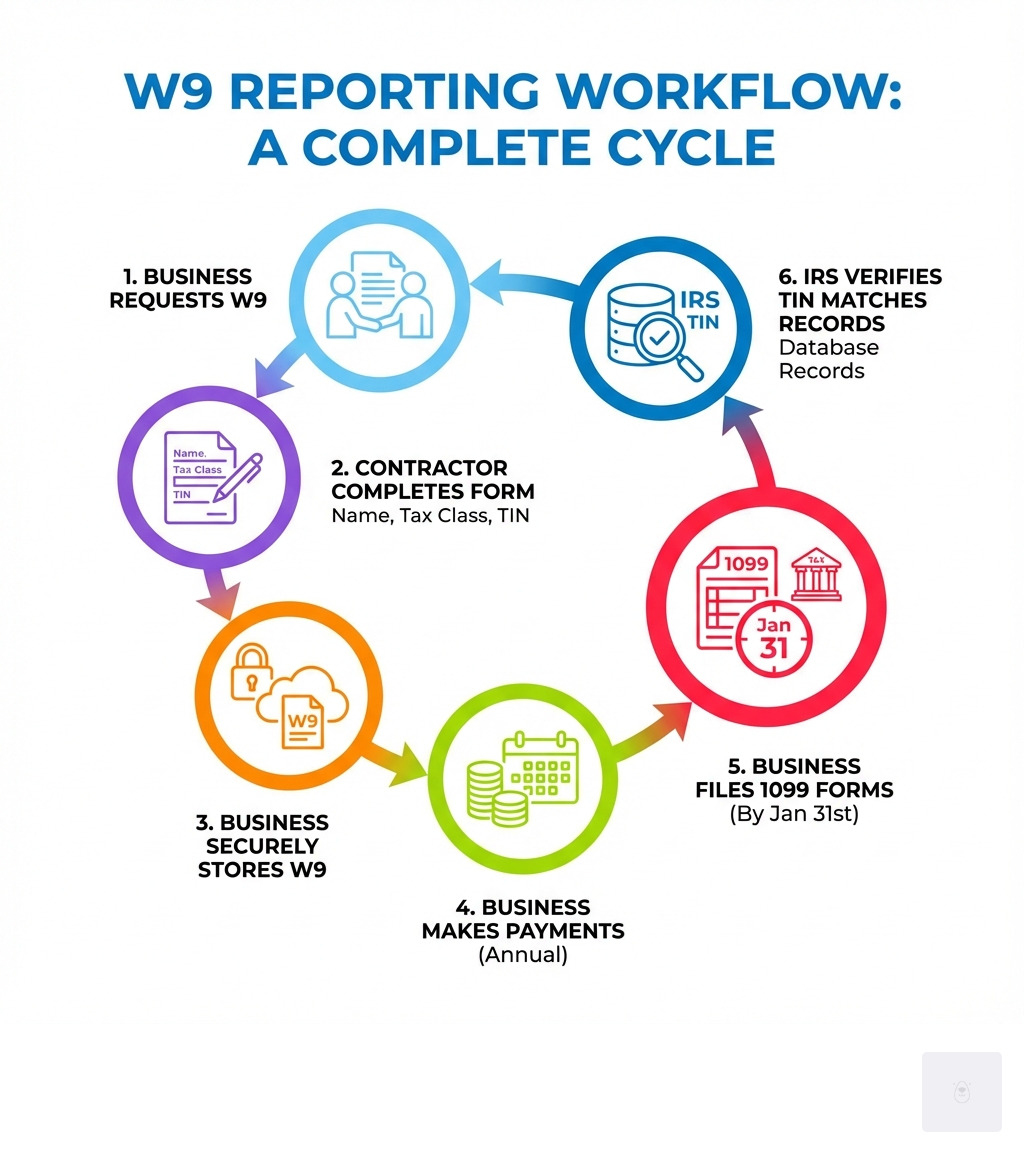
Understanding who needs to request a Form W-9 and who needs to complete it is fundamental to navigating W9 reporting requirements. Simply put, there are two main parties involved: the requester (payer) and the payee.
The requester is typically a business or entity that makes payments to a U.S. person. We are required to request a Form W-9 from any U.S. person to whom we anticipate making reportable payments. This could be for services, interest, dividends, rent, or other types of income. Our responsibility as the payer is to obtain the correct taxpayer identification number (TIN) from the payee so we can accurately file information returns (like Form 1099-NEC or 1099-MISC) with the IRS at the end of the year.
The payee is the individual or entity receiving the payment. If you are a U.S. person—meaning a U.S. citizen or a U.S. resident alien—you are generally required to complete and submit a Form W-9 when requested. This applies whether you’re an independent contractor, a freelancer, a gig worker, or a vendor. Even if you’re a minor, the W-9 should be completed with your name and TIN, as you are the owner of the payment.

The W-9 form is specifically for U.S. persons. If a payee is a foreign person, they should not complete a Form W-9. Instead, they would typically use an appropriate Form W-8 (such as Form W-8BEN or W-8BEN-E) or Form 8233 to certify their foreign status and claim any applicable treaty benefits. We’ll dive deeper into this distinction later.
While a Form W-9 isn’t strictly required if payments will be less than $600 in a calendar year, it’s considered a best practice for businesses to request a W-9 from all vendors. This proactive approach helps us avoid scrambling during tax season if payments unexpectedly exceed the threshold. Payees also have a responsibility to submit updates to the payer whenever their Form W-9 information changes, such as a new name, address, or TIN.
A Deep Dive into W9 Reporting Requirements
The Form W-9, officially titled “Request for Taxpayer Identification Number and Certification,” is a seemingly simple document, but its accurate completion is critical for both payers and payees. It collects essential information that enables businesses to comply with IRS W9 reporting requirements.
Let’s break down the key sections of the Form W-9:
- Line 1: Name You should enter your name exactly as it appears on your income tax return. For sole proprietors, this is your individual name.
- Line 2: Business Name (if different from above) If you operate under a business name, trade name, or as a disregarded entity (like a single-member LLC that is not treated as a corporation), you’d enter that here. For a sole proprietor, you might enter your “doing business as” (DBA) name.
- Line 3: Federal Tax Classification This is where you indicate your tax status. Options include Individual/sole proprietor/single-member LLC, C Corporation, S Corporation, Partnership, or Trust/estate. If you’re an LLC, you’ll also specify how it’s taxed (C=C corporation, S=S corporation, P=Partnership). An important new addition for flow-through entities (partnerships, trusts, estates) is Line 3b, where we indicate if there are foreign partners, owners, or beneficiaries.
- Line 4: Exemptions Most individuals won’t fill this out. This section is primarily for certain entities that are exempt from backup withholding or exempt from FATCA reporting.
- Lines 5 and 6: Address Provide your complete mailing address, including city, state, and ZIP code.
- Part I: Taxpayer Identification Number (TIN) This is a crucial section where you provide your Social Security Number (SSN), Employer Identification Number (EIN), or Individual Taxpayer Identification Number (ITIN).
- Part II: Certification By signing and dating this part, you certify that the TIN provided is correct, that you are a U.S. person, that you are not subject to backup withholding (or that you are exempt), and that any FATCA codes are correct.
A Form W-9 is generally not required from a vendor in a few specific scenarios: when total payments will be less than $600 in a calendar year, for payments made to most corporations (as they are often exempt from 1099 reporting for services), or for payments to employees (who receive a Form W-4 and W-2 instead). However, as we mentioned, it’s often a good idea to collect one anyway.
Key Transactions Triggering W9 Reporting Requirements
The primary purpose of collecting a Form W-9 is to gather the necessary information to report certain types of income and transactions to the IRS. These W9 reporting requirements are triggered by specific payment thresholds and categories.
The most common trigger is the $600 threshold. If we pay a U.S. person $600 or more in a calendar year for services, rent, royalties, or certain other types of income in the course of our trade or business, we are required to file an information return, typically a Form 1099. This includes:
- Nonemployee compensation: This is what most independent contractors, freelancers, and gig workers receive. It’s reported on Form 1099-NEC.
- Rents and royalties: Payments for the use of property or for intellectual property are reported on Form 1099-MISC.
- Other income payments: This can include prizes and awards, medical and health care payments, attorney fees, and more, also reported on Form 1099-MISC.
- Interest and dividends: Reported on Form 1099-INT and 1099-DIV, respectively.
- Real estate transactions: Proceeds from real estate transactions are reported on Form 1099-S.
- Cancellation of debt: If a debt of $600 or more is canceled, it’s typically reported on Form 1099-C.
The information from the W-9 form ensures that when we prepare these 1099 forms, the payee’s name and TIN match IRS records, preventing issues down the line.
Navigating Specific W9 Reporting Requirements and Exemptions
While the $600 threshold is a common guideline, there are nuances to W9 reporting requirements and situations where a W-9 might not be strictly necessary, or where specific exemptions apply.
As we discussed, if payments to a vendor will be less than $600 in a calendar year, a W-9 isn’t technically required for 1099 filing purposes. However, many businesses choose to request W-9s from all vendors regardless of the expected payment amount. Why? Because it’s often easier to collect the W-9 during the initial onboarding process than to chase it down later if payments unexpectedly exceed the threshold. It’s a proactive best practice that saves time and effort during tax season.
Payments to our own employees are another area where W-9s are not used. Employees complete a Form W-4 to determine income tax withholding from their paychecks, and their wages are reported on a Form W-2. The W-9 is specifically for non-employees.
Certain payees are also exempt from backup withholding and, in some cases, from information reporting requirements. These include:
- Most corporations (with some exceptions, such as for medical payments or attorneys’ fees)
- Government agencies
- Tax-exempt organizations (e.g., charities)
- Financial institutions
If an entity claims an exemption, they would typically provide an exempt payee code on Line 4 of the Form W-9. It’s important for us as the payer to refer to the official Instructions for the Requester of Form W-9 to understand these exemptions thoroughly.
The Nuts and Bolts: TINs, Backup Withholding, and Penalties
At the heart of W9 reporting requirements lies the Taxpayer Identification Number (TIN). This unique identifier is what the IRS uses to track income and ensure compliance. Providing a correct TIN is paramount, as failure to do so can lead to a sticky situation known as backup withholding, along with various penalties.
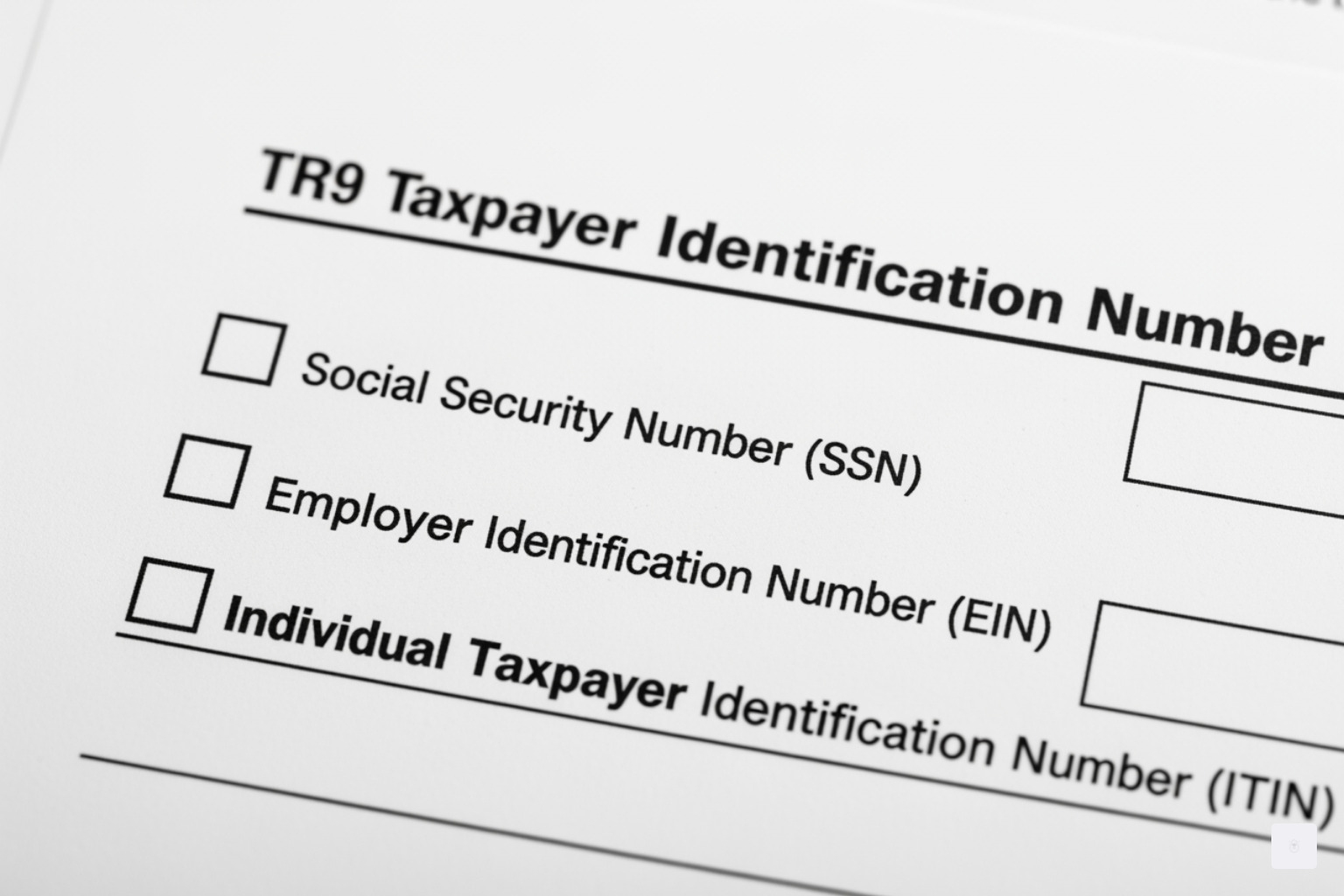
There are three main types of TINs you might encounter on a W-9:
- Social Security Number (SSN): This is typically used by individuals, including sole proprietors and single-member LLCs.
- Employer Identification Number (EIN): Businesses, corporations, partnerships, and multi-member LLCs use an EIN. Sole proprietors can also choose to use an EIN instead of their SSN.
- Individual Taxpayer Identification Number (ITIN): This is issued by the IRS to individuals who are required to have a U.S. taxpayer identification number but do not have, and are not eligible to obtain, an SSN.
If a payee doesn’t have a TIN when you request a W-9, they should apply for one immediately (using Form SS-5 for an SSN, Form W-7 for an ITIN, or Form SS-4 for an EIN). They can write “Applied For” in the TIN space on the W-9 and return it, but this usually only provides a 60-day window for certain payments before backup withholding kicks in.
And that brings us to the dreaded backup withholding. This isn’t a penalty in itself, but rather a mechanism for the IRS to collect taxes on certain payments that might otherwise go unreported. You may be subject to backup withholding at a flat 24% rate (for 2024 and 2025) if any of the following occur:
- You fail to provide your TIN to the payer.
- You provide an incorrect TIN.
- The IRS notifies the payer that the TIN you provided is incorrect.
- The IRS notifies the payer to withhold taxes because you have a history of underreporting interest or dividend income.
- You fail to certify that you’re not subject to backup withholding.
If backup withholding applies, the payer is required to withhold 24% of your reportable income and send it directly to the IRS. This can be a real headache for both parties and is easily avoided by simply providing an accurate W-9.
The penalties for non-compliance with W9 reporting requirements can be significant:
- Failure to furnish TIN: If you fail to provide a correct TIN, you could face a $50 penalty for each instance, unless you can prove reasonable cause.
- Civil penalty for false information: Making a false statement with no reasonable basis that results in no backup withholding can lead to a $500 penalty.
- Criminal penalties: Willfully falsifying certifications or affirmations on a W-9 can result in criminal penalties, including fines and/or imprisonment.
It’s clear that accuracy and timely submission of Form W-9 are not just good practice, but a legal obligation with serious consequences for oversight.
W-9 vs. W-4 and Other Key Distinctions
When navigating tax forms, it’s easy to get confused between similar-sounding documents. Two forms that often cause bewilderment are Form W-9 and Form W-4. While both deal with taxpayer information, their purposes and the relationships they define are fundamentally different.
Here’s a quick comparison:
| Feature | Form W-9 | Form W-4 |
|---|---|---|
| Purpose | Provides TIN for nonemployee compensation. | Determines income tax withholding for employees. |
| Who completes it | Independent contractors, freelancers, vendors. | Employees. |
| Who receives payment | Non-employees. | Employees (wages). |
| Tax reporting by payer | Form 1099-NEC, 1099-MISC, etc. | Form W-2. |
| Tax withholding | Backup withholding (if applicable). | Income tax withholding from paychecks. |
The key distinction lies in the relationship: a Form W-9 is for independent contractors (non-employees) who receive nonemployee compensation, while a Form W-4 is for employees who receive wages. As an independent contractor, you complete a W-9 to provide your personal information and certify whether you are subject to backup withholding. The business typically won’t withhold taxes unless backup withholding is triggered. As an employee, you complete a W-4 to inform your employer how much federal income tax to withhold from your paycheck.
Another important distinction in W9 reporting requirements involves the Foreign Account Tax Compliance Act (FATCA). FATCA is a U.S. law designed to combat tax evasion by U.S. persons holding investments in offshore accounts. While Form W-9 is primarily for U.S. persons, it does include a space for FATCA exemption codes (Line 4) for certain entities.
FATCA reporting is mainly relevant for foreign financial institutions (FFIs) that must report U.S. account holders to the IRS. If you are a U.S. person with a foreign account, that FFI might request a Form W-9 from you to confirm your U.S. person status. However, a W-9 itself isn’t sufficient for FATCA compliance on its own for the FFI, which would typically be dealing with Forms W-8 series for foreign persons. For our purposes, as a U.S. business requesting a W-9, we’re primarily concerned with confirming the payee’s U.S. status and obtaining their TIN for 1099 reporting. If we’re making payments to a foreign person, we would need to use the appropriate W-8 forms and be aware of potential withholding obligations under Chapter 3 or Chapter 4 of the Internal Revenue Code.
Managing W-9s: Best Practices for Modern Businesses
Collecting and managing W-9 forms can feel like a daunting task, especially for businesses working with numerous independent contractors and vendors. However, adopting smart practices and leveraging technology can make meeting W9 reporting requirements much simpler and more efficient.
Here are our best practices for managing W-9s:
- Request Early, Request Often: The golden rule is to request a W-9 from all new vendors during the supplier onboarding process, before making the first payment. This proactive approach saves a lot of time and effort come tax season. We also need to request an updated W-9 whenever a vendor’s information changes (e.g., name, address, or TIN).
- Go Digital, But Do It Right: Forget the days of endless paper forms and overflowing filing cabinets. Digital W-9 collection is efficient and secure. However, it’s crucial to understand the rules regarding electronic signatures. The IRS is specific: electronic font signatures are generally not acceptable. Instead, we need to use validated e-signatures from reputable services like Adobe Acrobat or DocuSign, ensuring the electronic signature validation envelope remains intact.
- Secure Collection Methods: When collecting W-9s electronically, security is paramount. We handle sensitive taxpayer information, so ensuring data integrity and user authentication is non-negotiable. Using a secure online portal, like Fillable W9, provides a safe environment for vendors to submit their information directly, rather than relying on less secure methods like email attachments.
- Leverage AP Automation and Vendor Management Systems: For businesses with a high volume of vendors, Accounts Payable (AP) automation software can be a game-changer. These systems often include self-service supplier onboarding portals where vendors can enter their W-9 information directly. This reduces manual data entry, minimizes errors, and streamlines the entire process of collecting and validating W-9 forms. This integration with our existing ERP system can save significant time and reduce the risk of penalties.
By implementing these best practices, we can transform W-9 management from a year-end scramble into a smooth, continuous process, ensuring compliance with W9 reporting requirements without the stress.
Don’t waste time with paper forms — complete your secure W9 online at https://fillablew9.com/apply
Step-by-Step Guide: How to Fill Out a W9 Form Online
Filling out a W-9 form online doesn’t have to be complicated. Our goal at Fillable W9 is to make this process as straightforward and secure as possible. Here’s a simple, step-by-step guide to completing your W-9 form online:
- Step 1: Access the Latest Fillable W9 Form Online. Always start with the current version of the Form W-9. You can easily download the official Form W-9 directly from the IRS website or use a trusted platform like Fillable W9 that provides the latest version in a user-friendly format.
- Step 2: Enter Your Name and Business Name (if applicable). On Line 1, enter your legal name exactly as it appears on your income tax return. If you have a business name, trade name, or operate as a disregarded entity (like a single-member LLC), enter that on Line 2.
- Step 3: Select Your Federal Tax Classification. Check the box that best describes your tax classification. Options include Individual/sole proprietor/single-member LLC, C Corporation, S Corporation, Partnership, or Trust/estate. Choose only one. If you’re an LLC, also specify how it’s taxed (C=C corporation, S=S corporation, P=Partnership).
- Step 4: Fill in Your Address. Provide your current street address on Line 5 and your city, state, and ZIP code on Line 6. This should be the address where you receive mail.
- Step 5: Provide Your Correct TIN (SSN, EIN, or ITIN). In Part I, enter your Taxpayer Identification Number. For individuals, this is usually your Social Security Number (SSN). For businesses, it’s typically an Employer Identification Number (EIN). If you’re a resident alien without an SSN, use your Individual Taxpayer Identification Number (ITIN). Double-check this number for accuracy to avoid backup withholding!
- Step 6: Certify and Sign the Form (Digital Signature Accepted). In Part II, review the certifications. By signing, you confirm that the TIN is correct, you are a U.S. person, you are not subject to backup withholding, and any FATCA codes are accurate. Platforms like Fillable W9 allow for secure digital signatures, which are valid as long as they meet IRS requirements for authentication and data integrity.
- Step 7: Submit Securely Through Fillable W9’s Online Portal. Once completed and signed, submit your W-9 form through our secure online portal. This ensures your sensitive information is encrypted and delivered safely to the requester, fulfilling your W9 reporting requirements without the hassle of printing, scanning, or mailing.
Frequently Asked Questions about W9 Reporting
We know that W9 reporting requirements can bring up a lot of questions. Here are some of the most common ones we hear:
Do I need a new W9 from a vendor every year?
Not necessarily! A Form W-9 remains valid unless there’s a change in circumstances that makes any information on the form incorrect. For example, a change in address generally doesn’t require a new W-9. However, if there’s a name change, a TIN change, or a change in the business’s legal structure or tax classification, then a new W-9 is definitely needed. As a best practice, businesses should receive a W-9 from vendors when they are new and again whenever the supplier’s Form W-9 information changes. We recommend periodically reviewing our vendor files to ensure all W-9s are current and accurate.
What happens if a vendor refuses to provide a W9?
If a vendor (payee) refuses to provide a correct W-9, or if the TIN they provide is incorrect, we as the payer are legally obligated to begin backup withholding on their payments. This means we must withhold a flat 24% of their reportable payments and send that money directly to the IRS. This is not ideal for anyone involved; the vendor receives less money, and we have the added administrative burden of withholding and reporting these amounts on Form 945. It’s a strong incentive for vendors to provide accurate W-9s promptly.
Can I accept a picture of a signed W9?
While a picture of a signed W-9 might seem convenient, it often doesn’t meet IRS requirements for electronic submissions. The IRS allows for electronic signatures on Form W-9, but there are specific rules. Electronic font signatures (like typing your name) are generally not acceptable. The only allowable digital signatures are validated e-signatures from services like Adobe Acrobat or DocuSign, and they must have the electronic signature validation envelope intact to prove their authenticity and integrity. For secure and compliant submission, we recommend using a dedicated online portal like Fillable W9, which ensures all electronic signatures and data meet IRS standards. This helps us avoid potential compliance issues and protects sensitive taxpayer information.
Conclusion: Streamline Your W9 Compliance Today
Navigating the landscape of W9 reporting requirements is a critical aspect of running a compliant business. From understanding who needs to provide a W-9 to correctly identifying different types of TINs and avoiding backup withholding, accuracy is not just a recommendation—it’s a necessity. We’ve seen how crucial it is to collect correct W-9 forms proactively, manage them efficiently, and stay informed about IRS guidelines to prevent costly penalties and ensure smooth tax season operations.
By embracing best practices, such as requesting W-9s during onboarding and utilizing secure digital solutions, we can transform what might seem like a complex burden into a streamlined process. Tools like Fillable W9 are designed precisely for this purpose: to simplify the collection, completion, and management of W-9 forms, ensuring your business stays compliant and organized. Don’t let tax season catch you unprepared.
✅ Ready to complete your W9 in minutes? Apply here now