
How to Complete Your W9 Form for Contractors in 5 Easy Steps
Why Every Independent Contractor Needs to Understand the W9 Form

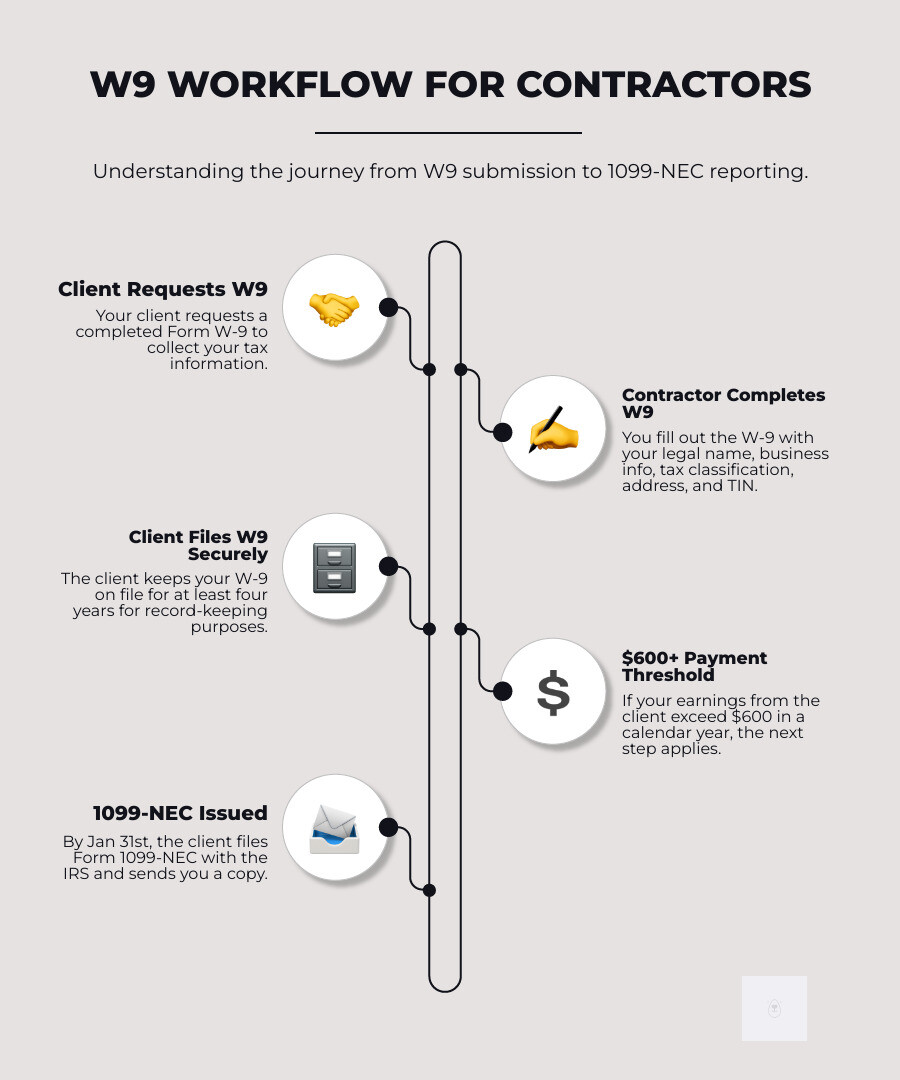
The W9 for contractors is a crucial tax form for any freelancer, gig worker, or independent contractor. You’ll need to provide this form to any client who will pay you over $600 in a year. Officially the IRS Form W-9 (Request for Taxpayer Identification Number and Certification), it collects your legal name, business name, address, tax classification, and Taxpayer Identification Number (TIN).
Start filling your W9 now at https://fillablew9.com/apply
Your client uses this information to file Form 1099-NEC, which reports your earnings to the IRS. The W-9 itself is not sent to the IRS; your client keeps it on file. However, accuracy is critical. Mistakes like name/TIN mismatches or incorrect tax classifications can delay payments or trigger a 24% backup withholding on your earnings.
The IRS released an updated version in March 2024 with clearer instructions, especially for LLCs. Using the correct, current form prevents compliance headaches for everyone.
This guide walks you through completing your W-9, explains how it differs from forms like the 1099 and W-4, and shows you how to avoid costly errors.
I’m Haiko de Poel, and through my work with Mass Impact and multiple startups, I’ve helped hundreds of contractors and small businesses streamline tax compliance. Most W-9 errors stem from confusion about business classifications and TINs—issues we’ll clarify in this guide.
Ready to skip the paperwork headaches? Complete your secure W9 online at https://fillablew9.com/apply
What is a W9 and Why is it Crucial for Contractors?
For independent contractors, the W9 for contractors is the foundation of the tax relationship with a client. Form W-9, or “Request for Taxpayer Identification Number and Certification,” is how your client requests the information needed to report your payments to the IRS. It collects your Taxpayer Identification Number (TIN)—your Social Security Number (SSN) or Employer Identification Number (EIN)—along with your name and address.

Without a completed W-9, your client cannot generate Form 1099-NEC, which reports how much they paid you. This creates compliance problems for both parties.
As the contractor, you fill out the W-9 and return it to your client (the “requester”). They keep it on file and use it to prepare a 1099-NEC if they pay you $600 or more in a tax year. The W-9 itself is not sent to the IRS.
The $600 threshold is key. Once a client expects to pay you this amount, they should request a W-9. Many request it during onboarding before any payments are made. While there’s no firm deadline for you to submit a W-9, clients technically need it on file before paying you to avoid compliance issues.
The IRS released a revised W-9 in March 2024 with clearer instructions for business entities, especially LLCs. Using the current version helps prevent reporting errors and delays. The W-9 is your way of providing your official tax information so your client can report your income correctly.
Get started with your fillable W9 online at https://fillablew9.com/apply
How to Fill Out Your W9 for Contractors: A 5-Step Guide
Completing your W-9 form is a straightforward, five-step process. Accuracy is essential, as even a small mistake can delay payments or trigger a 24% backup withholding.

This form goes to your client, not the IRS. It provides them with the information needed to file your 1099-NEC. Let’s walk through each section to ensure it’s done correctly.
Don’t waste time with paper forms — complete your secure W9 online at https://fillablew9.com/apply
Step 1: Provide Your Name and Business Name
On Line 1, enter your full legal name as it appears on your tax return. For most contractors, this is the name on your Social Security card. If you are a single-member LLC taxed as a “disregarded entity,” use the owner’s legal name, not the LLC’s name.
On Line 2, enter your business name, trade name, or “doing business as” (DBA) name, if you have one. If you operate under your legal name, leave Line 2 blank.
The name on Line 1 must match the name associated with your Taxpayer Identification Number (TIN) in IRS records. A mismatch can trigger backup withholding and other issues.
Step 2: Select Your Federal Tax Classification
This section defines your business’s tax structure. Check only one box.
- Individual/Sole Proprietor: Most freelancers and independent contractors check this box. This also applies to single-member LLCs that are “disregarded entities” (taxed as individuals).
- C Corporation, S Corporation, Partnership, Trust/Estate: Check the box that matches your formal business structure.
The March 2024 W-9 revision clarified the process for LLCs. If you have an LLC that is taxed as a corporation or partnership, check the Limited Liability Company box and enter the appropriate letter for its tax classification (“C” for C corp, “S” for S corp, or “P” for partnership).
For a single-member LLC taxed as a sole proprietorship, you should check the “Individual/sole proprietor” box instead. If you are unsure of your LLC’s tax classification, refer to the official IRS instructions or consult a tax professional.
Step 3: Enter Your Address and Exemptions
On Lines 5 and 6, enter your complete mailing address (street, city, state, ZIP code). This is where your client will send your year-end Form 1099-NEC, so ensure it is current and accurate.
Line 4 is for exemptions. Most independent contractors should leave this section blank. It applies only to specific entities exempt from backup withholding or those with Foreign Account Tax Compliance Act (FATCA) reporting requirements. Do not enter any codes unless you are certain they apply to you.
Step 4: Provide Your Taxpayer Identification Number (TIN)
In Part I, you must provide your correct Taxpayer Identification Number (TIN).
- Social Security Number (SSN): Use your SSN if you are an individual, sole proprietor, or a single-member LLC (disregarded entity).
- Employer Identification Number (EIN): Use your EIN if you operate as a corporation, partnership, or an LLC that has elected corporate or partnership taxation. An EIN is required for these structures.
While a sole proprietor with an EIN can use either number, the IRS generally prefers the SSN for individual income reporting.
If you have applied for a TIN but haven’t received it, you can write “Applied For” in the space. You must provide the number to your client within 60 days to avoid backup withholding.
Step 5: Certify and Sign the Form
In Part II: Certification, you must sign and date the form to certify that the information is accurate. Your signature legally confirms, under penalty of perjury, that:
- The TIN you provided is correct.
- You are not subject to backup withholding.
- You are a U.S. citizen or other U.S. person.
- Any FATCA codes entered are correct.
Intentionally providing false information can lead to serious penalties. An unsigned or undated form is incomplete and can delay payment, so be sure to complete this section.
Electronic signatures are accepted on your W9 at https://fillablew9.com/apply
W9 vs. Other Tax Forms: Clearing Up the Confusion
It’s easy to confuse the various tax forms contractors encounter. The W9 for contractors is just one piece of the puzzle. Understanding its relationship to Form 1099 and Form W-4 is key to managing your tax obligations.
W9 vs. Form 1099
The most common confusion is between the W-9 and the 1099. The simplest distinction is: the W-9 is what you give, and the 1099 is what you get.
You complete a W-9 to give your client your tax information (name, address, TIN). You provide it directly to your client, not the IRS.
Your client then uses your W-9 information to complete Form 1099-NEC (Nonemployee Compensation). This form reports the total amount they paid you during the year. If they paid you $600 or more, they must send you a copy and file one with the IRS by January 31st of the following year.
The W-9 must be completed first, as your client cannot accurately prepare a 1099 without it.
W9 vs. Form W-4
The W-9 and W-4 serve entirely different workers and purposes.
- The W-9 is for independent contractors. It certifies your status as a contractor and confirms that the client will not withhold income taxes from your payments. You are responsible for your own income and self-employment taxes.
- The W-4 is for employees only. An employee fills out a W-4 to tell their employer how much federal income tax to withhold from each paycheck. The employer then remits these taxes to the IRS on the employee’s behalf.
The distinction is critical, as it defines your work classification and tax responsibilities. If a client asks for a W-9, they are classifying you as a contractor. If they ask for a W-4, they are classifying you as an employee.
This table clarifies the differences:
| Feature | Form W-9 | Form W-4 | Form 1099-NEC |
|---|---|---|---|
| Purpose | Collects TIN for reporting non-employee income | Determines employee tax withholding | Reports non-employee compensation to IRS and payee |
| Who Fills It Out | Contractor (Payee) | Employee | Client (Payer) |
| Who It’s For | Independent contractors, freelancers | Employees | Independent contractors, freelancers |
| Submitted To | Client (Payer) | Employer | IRS and Contractor |
| Tax Withholding | No federal income tax withholding by payer | Employer withholds federal income tax | No federal income tax withheld by payer |
| Key Info | Name, Address, TIN, Tax Classification | Withholding allowances, Filing status | Amount paid, Payer/Payee TINs |
| Timing | Before first payment (or when requested) | Upon hiring or when adjustments are needed | By Jan 31st of following year |
Understanding these forms ensures you know what to expect and are prepared for your tax obligations.
Avoiding Common Mistakes and Security Best Practices
A mistake on your W-9 can lead to payment delays and IRS penalties. Because the form contains sensitive data like your Social Security Number, getting it right and sending it securely are essential. Most problems with w9 for contractors submissions are easy to prevent.
Common W9 Mistakes to Avoid
- Using the wrong TIN for an LLC: A single-member LLC taxed as a sole proprietorship (a “disregarded entity”) should typically use the owner’s SSN. An LLC taxed as a corporation or partnership must use its EIN.
- Name/TIN Mismatches: The name on Line 1 must exactly match the name associated with the TIN in IRS records. Any discrepancy can trigger an IRS notice and backup withholding.
- Forgetting to Sign and Date: An unsigned or undated W-9 is invalid. Your signature legally certifies the information, and without it, your client cannot process your payment.
- Using an Outdated Form: The IRS periodically updates the W-9, as it did in March 2024. Always use the latest version from the IRS website or a service like Fillable W9 that provides current forms.
Backup Withholding Explained
Backup withholding is a major consequence of W-9 errors. It requires your client to withhold 24% of your payment and send it directly to the IRS. This is not a tax but a prepayment mandated when your tax information is incorrect or missing.
An incomplete or inaccurate w9 for contractors is a primary trigger for backup withholding. It signals a potential reporting issue to the IRS and severely impacts your cash flow. You can find more details on the IRS backup withholding page.
How to Send Your W9 Securely
Your W-9 contains your name, address, and TIN—prime targets for identity thieves. Protecting this data is critical.
Never send your W-9 via unencrypted email. Standard email is not secure and exposes your information to interception.
If you must use email, send the form as a password-protected or encrypted file attachment. Share the password through a separate, secure channel like a phone call or text message.
The safest method is a secure online portal. Services like Fillable W9 use bank-level encryption to protect your data during transmission and storage. This ensures compliance and gives you peace of mind without the hassle of managing passwords for attachments.
Frequently Asked Questions about the W9 for Contractors
Here are answers to common questions about w9 for contractors obligations.
What happens if a contractor refuses to provide a W9?
Refusing to provide a W-9 creates problems for both you and your client. A client is legally obligated to report payments of $600 or more to the IRS. Without your W-9, they must take action.
The most immediate consequence is backup withholding, where they must withhold 24% of your payments and send it to the IRS. For example, on a $1,000 invoice, you would only receive $760.
Many clients will also choose termination of services rather than risk IRS penalties for non-compliance. Failing to file correct 1099s can result in significant fines for the client. Providing a W-9 ensures IRS compliance and prompt, full payment.
How long does a client need to keep my W9?
A client must keep your W-9 on file for at least four years after the last year they reported payments to you. This is for their records and potential audits. The W-9 is not filed with the IRS; it is an internal document for your client to prove they collected your tax information correctly.
Do I need to fill out a W9 for every client, every year?
You only need to provide one W-9 per client relationship, not one every year. Your client can use the same form as long as your information remains accurate.
However, you must submit a new W-9 if any of your key information changes:
- Name change: Due to marriage, divorce, or a legal name change.
- TIN change: If your SSN or EIN changes.
- Business structure change: If you change from a sole proprietorship to a corporation, for example.
It is also good practice to submit a new W-9 if your address changes to ensure you receive your 1099-NEC form on time.
Conclusion: Simplify Your W9 Process
Navigating the tax landscape as an independent contractor means understanding and accurately completing forms like the W-9. As we’ve explored, the W-9 is a critical document for us, enabling clients to properly report our income to the IRS via Form 1099-NEC. Accuracy and security in handling this form are not just good ideas; they are vital for ensuring smooth payments, avoiding backup withholding, and protecting our sensitive personal information.
From correctly identifying your legal name and tax classification to understanding the nuances between a W-9, 1099, and W-4, each step plays a crucial role in our tax compliance journey. Avoiding common mistakes and adhering to security best practices are essential to prevent unnecessary headaches and potential IRS scrutiny.
We understand that tax forms can be complex and time-consuming. That’s why services like Fillable W9 are designed to simplify this process for w9 for contractors. We help you easily complete your W-9 form online, ensure it’s up-to-date, and provide secure methods for sending it to your clients. By streamlining your W-9 process, we empower you to focus on what you do best: your work, confident that your tax compliance is in order.
✅ Ready to complete your W9 in minutes? Apply here now