
Why Downloading the W-9 Form is Essential for Your Business

Download W9 form 2024 is one of the most common searches for freelancers, independent contractors, and small business owners who need to provide their tax information to clients or collect it from vendors. The W-9 form is a simple IRS document used to request a Taxpayer Identification Number (TIN) and certification—but getting the right version and filling it out correctly can feel confusing.
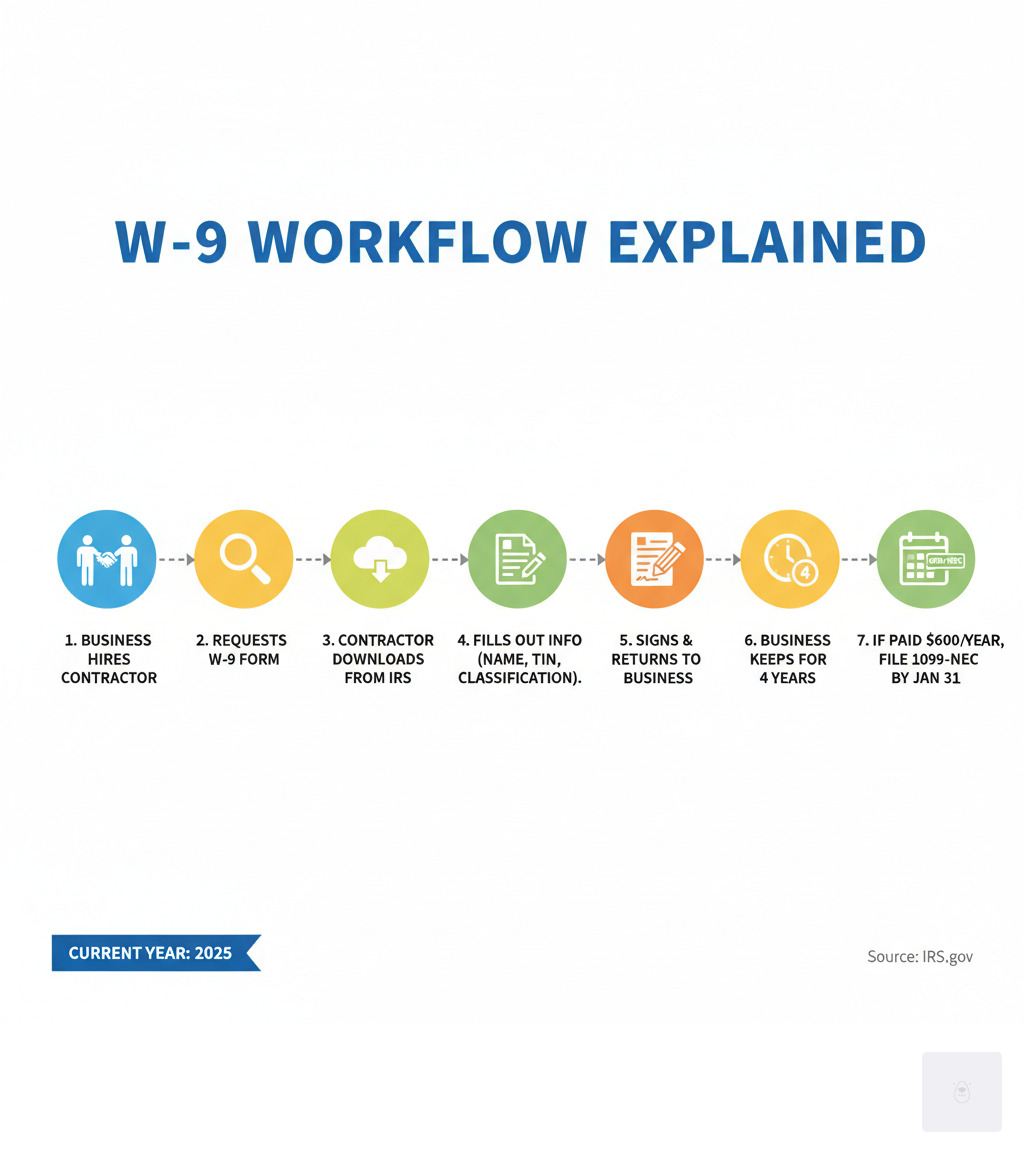
Here’s how to download and complete your W-9 form in 2025:
- Download the official form – Visit the IRS website to get the latest version. As of early 2025, the current version is Rev. March 2024.
- Provide your information – Fill out your name, business name (if applicable), federal tax classification, and address
- Enter your TIN – Include your Social Security Number (SSN) or Employer Identification Number (EIN)
- Sign and certify – Complete Part II to certify your information is correct
- Give it to the requester – Submit the form to whoever requested it (not the IRS)
The March 2024 revision of Form W-9 introduced important changes, including clarifications on Line 3a for disregarded entities and a new Line 3b for flow-through entities with foreign partners. Businesses typically need to collect W-9 forms from contractors they pay $600 or more per year, while contractors need to provide them to avoid backup withholding—a penalty tax of 24% on payments.
For the most accurate and up-to-date information, make sure to Download W9 form 2024 directly from the IRS.
I’m Haiko de Poel, and through my work leading digital change and compliance initiatives at companies like Palmetto Surety Corporation and iGUARANTEE™, I’ve helped thousands of businesses streamline their tax documentation processes. Understanding how to properly download the latest W-9 form and complete it accurately is crucial for maintaining IRS compliance and avoiding costly penalties.
What is a W-9 Form and Who Needs One?
If you’ve ever started freelancing or hired a contractor, you’ve probably encountered the W-9 form. But what exactly is it, and why does everyone keep asking for one?
Form W-9, officially called “Request for Taxpayer Identification Number and Certification,” is essentially the IRS’s way of making sure everyone who gets paid gets properly reported. Think of it as a simple information exchange: you’re telling the person or business paying you, “Here’s my tax information so you can report our transaction to the IRS.”

The form collects your Taxpayer Identification Number (TIN)—whether that’s your Social Security Number (SSN) or Employer Identification Number (EIN)—along with some basic details about you or your business. The requester then uses this information to file information returns like Form 1099-NEC, which reports payments made to independent contractors and freelancers. Without your W-9, they can’t accurately tell the IRS who they paid and how much, which creates problems for everyone.
So who actually needs to fill one out? Any U.S. person who receives reportable income and is asked to provide their TIN. Now, “U.S. person” sounds formal, but it’s broader than you might think. It includes individuals (U.S. citizens and resident aliens), sole proprietors running unincorporated businesses, independent contractors, freelancers, and business entities like LLCs, corporations (both C and S corps), partnerships, trusts, and estates. Basically, if you’re doing business in the U.S. and someone needs to report payments to you, you’ll likely need to provide a W-9.

When is a W-9 Required, and When is it Not?
Understanding when you actually need a W-9 can save you from unnecessary paperwork (and unnecessary worry). The most common situation is when a business pays you $600 or more in a calendar year for services as an independent contractor or freelancer. That’s the threshold that triggers the requirement for them to issue you a Form 1099-NEC—and they need your W-9 information to do it.
But the $600 rule isn’t the only scenario. Rental income situations often require a W-9, with property management companies needing your information to report payments on Form 1099-MISC. Banking and financial transactions like dividends, interest, or capital gains also trigger W-9 requests from financial institutions. Real estate transactions may require one to report sale proceeds on Form 1099-S, and if you receive money from a legal settlement, the payor will likely ask for your W-9 for tax reporting purposes.
Now, here’s where you don’t need to worry about a W-9. If you’re an employee, your employer uses Form W-4 instead to determine your tax withholding—completely different form, completely different purpose. Personal payments between friends and family members for non-business reasons don’t require W-9s either. The IRS isn’t interested in you splitting the dinner bill. Payments to tax-exempt organizations like charities are typically exempt from W-9 requirements as well.
Here’s a critical point that trips people up: foreign persons should not fill out a W-9. If you’re a nonresident alien or a foreign entity, you’ll need to provide a different form—typically a Form W-8 (like W-8BEN or W-8ECI) or Form 8233. Using the wrong form can create serious complications, so if you’re unsure about your status, it’s worth double-checking before you download the latest W-9 form and fill it out.
The bottom line? If you’re a U.S. person receiving business income, investment income, or certain other reportable payments, expect to provide a W-9. And if you’re paying contractors or vendors, you’ll need to collect them. It’s just part of how the tax system keeps track of who’s earning what—ensuring everyone pays their fair share while keeping businesses compliant with IRS requirements.
How to Download the W-9 Form for 2025 and Understand Key Changes
When you’re ready to complete your tax documentation, the first step is making sure you have the right version. To download the W-9 form for 2025, always go directly to the official IRS website. This ensures you’re working with the most current revision and following the latest instructions. The IRS regularly updates forms, so using an outdated version could cause problems.
The latest official revision of Form W-9 is dated March 2024. This is the version you should use throughout 2025 unless the IRS releases a newer one. You can access it here: [PDF] Form W-9 (Rev. March 2024) – IRS. I always recommend bookmarking this link or the main IRS forms page so you can quickly grab the current version whenever you need it.
What’s New: Key Differences in the 2024 Revision
Now, you might be thinking, “Does it really matter if I use the current form?” The short answer: yes, it does. The March 2024 revision includes some important updates that affect how certain businesses and entities complete the form.
The most significant change involves Line 3a clarification for disregarded entities. If you’re a single-member LLC or another type of disregarded entity with a U.S. owner, the instructions now make it crystal clear: you must provide the U.S. owner’s name on Line 1, not the entity’s name. Then you’ll check the box that matches the owner’s tax classification. This might seem like a small detail, but getting it wrong can cause major headaches when your client files their 1099 forms.
There’s also a brand-new Line 3b that didn’t exist on previous versions. This line applies to flow-through entities like partnerships, trusts, estates, or LLCs classified as partnerships. If you’re one of these entities providing a W-9 to another flow-through entity, you’ll need to indicate whether you have any foreign partners, owners, or beneficiaries. This addition helps the IRS improve transparency for FATCA reporting purposes and ensures proper tax compliance when international ownership is involved.
These updates might sound technical, but they reflect the IRS’s ongoing effort to close reporting gaps and make sure everyone’s tax status is properly identified. For most freelancers and sole proprietors, these changes won’t dramatically affect how you fill out your form—but it’s good to be aware of them.
One crucial thing to remember: after you complete your W-9, you don’t send it to the IRS. Instead, you give it directly to whoever requested it—your client, your bank, or whoever is paying you. They’ll use your information to prepare their own information returns (like those 1099 forms we mentioned earlier), which they’ll then file with the IRS. Think of the W-9 as staying between you and your payer, while the 1099 is what the IRS eventually sees.
W-9 vs. W-4: A Quick Comparison
Since we’re talking about tax forms with similar names, let’s clear up a common source of confusion. Many people mix up the W-9 with the W-4, but they serve completely different purposes:
| Feature | Form W-9 (Request for TIN and Certification) | Form W-4 (Employee’s Withholding Certificate) |
|---|---|---|
| Purpose | Provides your TIN to a payer for information reporting (e.g., 1099 forms). | Tells an employer how much federal income tax to withhold from your paycheck. |
| Who Fills Out | Independent contractors, freelancers, vendors, individuals receiving certain income. | Employees. |
| Recipient | The person or entity paying you (the “requester”). | Your employer. |
| IRS Filing | Not sent to the IRS by the individual; kept by the requester. | Kept by the employer; affects what they report to the IRS on W-2 forms. |
| Key Information | Name, address, TIN, federal tax classification, certifications. | Name, address, SSN, marital status, dependents, other adjustments. |
The easiest way to remember the difference: W-9 is for contractors and freelancers who work independently, while W-4 is for traditional employees who receive a regular paycheck with taxes already withheld. If you’re filling out a W-9, it means you’re responsible for tracking and paying your own taxes throughout the year—no one’s doing it for you.
Understanding these distinctions and staying current with the latest form version helps you avoid backup withholding penalties and keeps your business relationships running smoothly. When you’re ready to complete your W-9 quickly and securely, you can streamline the entire process at https://fillablew9.com/apply/.
Step-by-Step Guide to Filling Out Your W-9 Form
Filling out your W-9 doesn’t have to be a daunting task. Think of it as a conversation with the IRS—one where you’re simply introducing yourself and confirming your tax identity. We’ll walk you through each section together, ensuring you have all the information you need to get it right the first time. Accuracy is key to avoiding issues down the line, so let’s take this step by step.

Step 1: Filling Out Lines 1-7 (Your Identifying Information)
Once you download the latest W-9 form (remember, for 2025, you’ll likely be using the March 2024 revision), you’ll start with the identifying information section. This is where you tell the requester who you are and how you’re classified for tax purposes.
Line 1 asks for your name exactly as it appears on your income tax return. If you’re an individual or sole proprietor, use your legal name—the one on your Social Security card. Here’s an important detail: if you’re a disregarded entity (like a single-member LLC), you’ll enter the owner’s name here, not the business name. This trips people up all the time, so take a moment to get it right.
Line 2 is for your business name or DBA (doing business as) if it’s different from your legal name. Let’s say you’re Jane Doe, but your clients know you as “Jane’s Consulting.” Jane Doe goes on Line 1, and Jane’s Consulting goes on Line 2. This helps the requester match their records to your business identity without confusion.
Line 3 is where things get a bit more technical, but stick with me. This is your federal tax classification, and you’ll check only one box. If you’re an individual or sole proprietor, or you have a single-member LLC that’s treated as a disregarded entity, check that first box. If you’re a C Corporation or S Corporation, those are straightforward—check the corresponding box. For partnerships, trusts, or estates, check those boxes as appropriate.
Now, if you’re an LLC, you need to pay extra attention. Check the LLC box, but then you must also enter the tax classification in the space provided: “C” for C corporation, “S” for S corporation, or “P” for partnership. If your LLC is a disregarded entity, don’t check the LLC box—instead, check the “Individual/sole proprietor or single-member LLC” box. Still with me? Good.
The new Line 3b (added in the 2024 revision) applies if you checked “Partnership,” “Trust/estate,” or “LLC” taxed as a partnership, and you’re providing this form to another flow-through entity. If you have any foreign partners, owners, or beneficiaries, check this box. This helps with FATCA reporting and ensures proper tax compliance for international ownership structures.
Line 4 covers exemptions—specifically, exempt payee codes and FATCA reporting codes. Most individuals and sole proprietors will leave this blank. However, if you’re a corporation, tax-exempt organization, or otherwise exempt from backup withholding, you’ll enter the appropriate code here. The FATCA reporting codes can be found in the IRS instructions if you need them.
Lines 5 and 6 are simple: enter your current address—street address, city, state, and ZIP code. Use the address where you receive your tax documents and official correspondence.
Line 7 is optional. This is where you can list any account numbers the requester might use to identify you, like a client ID or vendor number. It’s not required, but it can help the requester match your W-9 to their internal records, making everyone’s life a little easier.
Don’t waste time with paper forms—complete your secure online W9 at https://fillablew9.com/apply.
Step 2: Providing Your Taxpayer Identification Number (TIN) in Part I
Your Taxpayer Identification Number (TIN) is the heart of the W-9 form. It’s how the IRS identifies you, tracks your income, and ensures you’re paying the right amount of tax. Without a correct TIN, the whole system breaks down—and you could end up facing backup withholding, which we definitely want to avoid.
You’ll provide one of three types of TINs. If you’re an individual, sole proprietor, or single-member LLC (treated as a disregarded entity), you’ll use your Social Security Number (SSN). If you’re a corporation, partnership, or multi-member LLC, you’ll use an Employer Identification Number (EIN). And if you’re a resident alien who doesn’t have and isn’t eligible for an SSN, you’ll use an Individual Taxpayer Identification Number (ITIN).
Here’s the critical part: the TIN you provide must match the name on Line 1 exactly as it appears in IRS records. A mismatch between your name and TIN is one of the most common reasons for backup withholding to kick in. So double-check, triple-check, and then check one more time.
If you don’t have a TIN yet, don’t panic—but do act quickly. For an SSN, you’ll apply through the Social Security Administration using Form SS-5. For an EIN, the fastest route is to apply online through the IRS website. You can find detailed guidance at Forms and associated taxes for independent contractors | IRS. For an ITIN, you’ll file Form W-7 with the IRS.
If you’ve applied for a TIN but haven’t received it yet, you can write “Applied For” in the TIN space on your W-9. Just be aware that the requester may subject your payments to backup withholding until you provide your actual TIN. It’s a temporary inconvenience, but it’s better than delaying your payment altogether.
Step 3: Completing Part II (Certification)
Part II is the Certification section, and this is where things get serious. By signing this section, you’re making certain declarations under penalty of perjury. I know that sounds intimidating, but it’s simply the IRS’s way of ensuring everyone takes this form seriously. Read the statements carefully before you sign.
When you sign, you’re certifying four key things. First, that the TIN you provided is correct. Second, that you’re not subject to backup withholding (or that you’re exempt from it). Third, that you’re a U.S. citizen or other U.S. person. And fourth, that any FATCA codes you entered are correct.
Let’s talk about backup withholding for a moment, because this is one of the most important concepts to understand. Backup withholding isn’t a penalty for not having a W-9—it’s a mechanism the IRS uses to collect taxes when there’s a problem with your TIN or when you’ve underreported income. If the IRS has notified you that you’re subject to backup withholding, you must cross out item 2 in the certification section.
So what is backup withholding exactly? It’s a federal tax withheld at a rate of 24% from certain payments if you fail to furnish a correct TIN, fail to certify your TIN, or if the IRS has determined you’re subject to it for other reasons. Instead of receiving your full payment, the payer will send 24% directly to the IRS on your behalf. You can learn more about this at Backup withholding | IRS.
Providing incorrect information or deliberately falsifying your W-9 can lead to serious penalties. If you fail to furnish a correct TIN, you could face a $50 penalty for each failure, unless you can show reasonable cause. If you make a false statement with no reasonable basis that results in no backup withholding, you could face a $500 civil penalty. And if you willfully falsify certifications or commit fraud? That can lead to criminal penalties, including fines and imprisonment. The bottom line: honesty and accuracy are non-negotiable here.
Now, here’s some good news. The IRS generally accepts electronic signatures on Form W-9, as long as certain requirements are met to ensure authenticity and integrity. This means you don’t need to print, sign, scan, and email—you can complete the entire process digitally. The IRS provided guidance on this in Electronic Submission of Forms W-9 and W-9S | IRS. Many online platforms, including ours, offer secure electronic signature capabilities that are fully compliant with IRS regulations, making the whole process faster and more convenient.

✅ Ready to complete your W9 in minutes? Don’t waste time with paper forms—complete your secure online W9 at https://fillablew9.com/apply.
Frequently Asked Questions about the W-9 Form
We know you might have more questions, so we’ve compiled some of the most common ones to help you steer W-9s with ease.
Can a W-9 be signed electronically?
Yes, absolutely! As we mentioned, the IRS permits the use of electronic signatures on Form W-9. This means you can digitally sign, date, and send your form without needing to print, sign by hand, and scan. This is a game-changer for efficiency, especially for freelancers and businesses who handle many forms. Our platform, Fillable W9, specializes in providing secure digital tools for this very purpose, ensuring your electronic submission is compliant and safe. Always ensure the platform you use adheres to IRS guidelines for Electronic Submission of Forms W-9 and W-9S | IRS.
What happens if a contractor refuses to provide a W-9?
This is a scenario that can cause significant headaches for the business requesting the W-9. If a contractor refuses to provide a correctly completed W-9, the payer (the business) is generally required to initiate backup withholding. This means they must withhold 24% of all payments made to that contractor and send it directly to the IRS.
Beyond backup withholding, refusing to provide a W-9 creates compliance issues for the payer. The payer might also face penalties from the IRS for failing to file accurate information returns if they don’t have the contractor’s TIN. In some cases, if the refusal persists, the business may choose to terminate services with the contractor. For more on information return penalties, you can refer to the IRS page on Information return penalties | IRS.
How long should a business keep a completed W-9?
Businesses that request and receive W-9 forms should retain them for a specific period for documentation and audit purposes. The general rule of thumb is to keep completed W-9 forms for four years after the later of the date the tax is due or paid for the tax year to which the information return relates. This retention period aligns with the statute of limitations for the IRS to audit the related tax returns. Maintaining these records is crucial for demonstrating compliance and providing proof of due diligence if questioned by the IRS. For further details, the Instructions for the Requester of Form W-9 | IRS provides comprehensive guidance.
Conclusion: Securely Complete and Send Your W-9
Navigating tax forms doesn’t have to feel overwhelming. Throughout this guide, we’ve walked through everything you need to know about the W-9 form—from understanding its purpose to filling it out correctly and staying compliant with the latest IRS requirements for 2025.
The most important thing to remember? Accuracy matters. When you take the time to ensure your name, business name, federal tax classification, and TIN are exactly as they appear on your IRS records, you’re protecting yourself from unnecessary headaches down the road. A simple mismatch can trigger backup withholding—that dreaded 24% automatic deduction from your payments—or delay your ability to get paid at all.
The March 2024 revision brought meaningful updates to the W-9 form, especially the new Line 3b that affects flow-through entities with foreign partners or owners. Using the current version isn’t just about following rules—it’s about making sure your information is processed correctly and your business relationships run smoothly. Always download the latest W-9 form directly from the official IRS source to ensure you’re working with the right document.
We’ve also seen that the days of printing, signing, and scanning forms are behind us. Electronic signatures are fully accepted by the IRS, making it easier than ever to complete and submit your W-9 quickly and securely. This is especially valuable for freelancers and contractors who need to respond to client requests promptly, or for businesses collecting forms from multiple vendors.
At Fillable W9, we’ve built our platform specifically to take the stress out of this process. Whether you’re a freelancer sending your first W-9 to a new client, or a business owner collecting forms from dozens of contractors, we make it simple, secure, and fast. Our online tool guides you through each step, helps you avoid common mistakes, and ensures your information is transmitted safely.
You’ve got the knowledge. Now it’s time to put it into action.
✅ Ready to complete your W9 in minutes? Skip the confusion and paperwork—complete your secure online W9 at https://fillablew9.com/apply.