
Why Understanding the W-9 Form Matters for Your Business

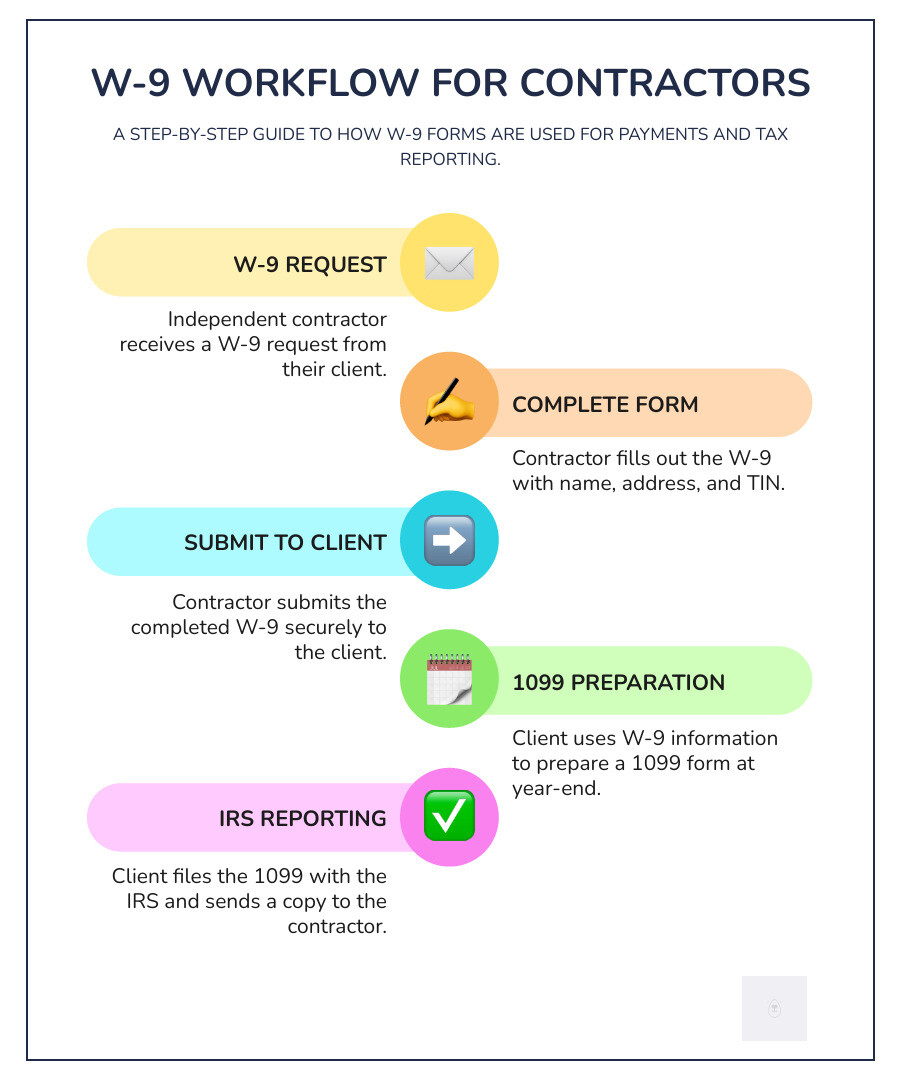
What is W9? Form W-9, officially the “Request for Taxpayer Identification Number and Certification,” is an IRS form used to gather information from independent contractors, freelancers, and vendors. If you’re a freelancer or a business hiring contractors, understanding this form is crucial.
Here’s what you need to know:
- Purpose: Provides your name, address, and Taxpayer Identification Number (TIN) to businesses that pay you.
- Who uses it: Independent contractors, freelancers, gig workers, and vendors.
- Not filed with IRS: You give it to the business paying you, which keeps it for their records.
- Leads to 1099 forms: The payer uses your W-9 to prepare 1099-NEC or other 1099 forms.
- Avoids backup withholding: An accurate W-9 prevents a 24% tax withholding from your payments.
Getting the W-9 wrong—or skipping it—can lead to backup withholding or delayed payments. Businesses that pay you $600 or more in a year must report those payments to the IRS using a 1099 form, and they need your W-9 to do so. Without it, they must withhold 24% of your payment for the IRS.
The good news is that filling out a W-9 is fast and simple. Unlike most tax forms, the W-9 stays with the requester and is never sent to the IRS by you.
Don’t waste time with paper forms—complete your secure W9 online at https://fillablew9.com/apply.
What is a W-9 Form and Why is it Necessary?
The W-9 form, or “Request for Taxpayer Identification Number and Certification,” is a one-page IRS document that serves a simple purpose: to provide your tax information to businesses that pay you. When a client requests a W-9, they are fulfilling a legal obligation to report payments to the IRS.
The form collects your taxpayer information—name, address, and Taxpayer Identification Number (TIN)—to ensure year-end tax documents are accurate. It’s used for various reportable payments, including non-employee compensation, interest income, dividends, and real estate transactions. This process ensures accurate tax compliance for both parties. You can learn more by reviewing The Purpose Of The W-9 Form.
What is a W9 used for by the requester?
For a business, the W-9 is essential for tax compliance. Its primary uses include:

- Collecting information for 1099 forms: If a business pays you $600 or more for services in a tax year, they must file a Form 1099-NEC. The W-9 provides the necessary data.
- Reporting payments to non-employees: This applies to independent contractors, vendors, and other service providers for income like rent, royalties, and consulting fees.
- Maintaining accurate records: Completed W-9s serve as proof of due diligence if the IRS questions payment reporting.
What is a W9’s role in avoiding backup withholding?
Submitting a W-9 is critical for receiving your full payment. By signing the form, you are certifying your taxpayer status and TIN, confirming that you are not subject to backup withholding.
Without a correct W-9, a payer is legally required to implement backup withholding, sending 24% of your payment directly to the IRS. Providing an accurate W-9 ensures you receive full payment upfront, though you are still responsible for paying taxes on that income later. Backup withholding can also be triggered if the IRS determines your TIN is incorrect or if you have underreported income previously. The IRS offers more details on Backup withholding.
Don’t waste time with paper forms—complete your secure W9 online at https://fillablew9.com/apply.
Who Uses a W-9 and in What Scenarios?
The W-9 form is used across many industries in the United States for tax reporting. Common users include independent contractors, freelancers, gig workers, and vendors. Businesses and financial institutions also rely on the form to stay compliant with IRS reporting requirements for non-employee payments.
For Independent Contractors and Businesses
A W-9 is typically requested when a business pays a non-employee. Common scenarios include:
- Payments of $600 or more: If you’re an independent contractor earning $600+ from a client in a year, they will need your W-9 to file a Form 1099-NEC.
- Real estate transactions: A closing agent may request a W-9 to report proceeds from a property sale on Form 1099-S.
- Legal settlements: Payouts from legal settlements are often reported on a 1099-MISC, requiring a W-9.
- Other vendor payments: Businesses collect W-9s from vendors for services like IT support, marketing, or consulting before issuing payment.
For Financial Institutions and Other Scenarios
The W-9 is also used in situations beyond contract work:
- Banks and brokerage firms request W-9 information to report interest (Form 1099-INT) or dividends (Form 1099-DIV).
- Cancellation of debt: A creditor may ask for a W-9 to report forgiven debt as taxable income.
- IRA contributions: Financial institutions need your TIN for reporting on your Individual Retirement Arrangement (IRA).
Who Should NOT Use a W-9?
It’s just as important to know when not to use a W-9.
- Employees: If you are an employee, you must fill out Form W-4, not a W-9. Your employer uses the W-4 to determine tax withholding for your W-2 wages.
- Foreign individuals and entities: Non-resident aliens receiving U.S. source income should use a Form W-8 (e.g., W-8BEN) to certify their foreign status.
The IRS provides clear guidance on worker classification to determine if you are an employee or an independent contractor. Misclassifying a worker can lead to significant tax issues.
How to Fill Out a W-9 Form: A Step-by-Step Guide
Filling out a W-9 form is a straightforward process that takes only a few minutes. While the official form includes several pages of instructions, you only need to complete the first page.

You can download the Fillable PDF version of IRS W-9 Form from the IRS website or use a secure online tool.
Checklist: How to Fill Out Your W-9 Form
- Line 1: Enter your full legal name as it appears on your tax return.
- Line 2: Enter your business name or “doing business as” (DBA) name, if you have one.
- Line 3: Check the box for your federal tax classification (e.g., Individual/sole proprietor, C Corporation, S Corporation, Partnership, LLC).
- Line 4: Enter exemption codes only if applicable. Most individuals leave this blank.
- Lines 5 & 6: Provide your complete mailing address.
- Part I: Enter your Taxpayer Identification Number (SSN or EIN).
- Part II: Sign and date the form to certify the information.
Don’t waste time with paper forms — complete your secure W9 online at https://fillablew9.com/apply.
Part I: Providing Your Taxpayer Information
This section identifies you for tax purposes.
- Name and Business Name (Lines 1-2): For sole proprietors, Line 1 is your legal name. Line 2 is for your business name if it’s different.
- Tax Classification (Line 3): Select the box that describes your tax status. If you are an LLC, you must also indicate if you are taxed as a C corporation, S corporation, or partnership.
- Exemptions (Line 4): This is for specific entities like government agencies or tax-exempt organizations. Most freelancers and contractors will leave this blank.
- Address (Lines 5-6): Use the address where you want to receive tax documents.
- Taxpayer Identification Number (TIN): This is the most critical field. For individuals and most sole proprietors, this is your Social Security Number (SSN). For corporations, partnerships, and some LLCs, it is your Employer Identification Number (EIN).
Part II: Certification, Signature, and Submission
Your signature in this section certifies that the information you provided is correct under penalty of perjury.
- Certification: By signing, you confirm your TIN is correct, you are a U.S. person, and you are not subject to backup withholding.
- Signature: Sign and date the form. Validated electronic signatures are widely accepted. Simply typing your name is not a valid e-signature.
- Submission: Securely submit the completed form to the person or business who requested it. Never send your W-9 to the IRS. Because it contains sensitive data, avoid sending it via standard email. Use an encrypted service or a secure online portal.
Understanding Backup Withholding, Deadlines, and Penalties
Ignoring a W-9 request can be costly. Failing to provide a complete and accurate W-9 form can trigger backup withholding, where the payer must send 24% of your payment directly to the IRS. This is completely avoidable by submitting your form correctly and on time.

In addition to withholding, there is a $50 penalty per instance for failing to provide a correct TIN. The IRS details these consequences in its guidance on Information return penalties.
What is Backup Withholding?
Backup withholding is an IRS-mandated deduction of 24% from payments when a payee fails to provide a correct TIN. It acts as an insurance policy for the IRS to ensure taxes are collected. Besides a missing or incorrect W-9, it can also be triggered if the IRS notifies a payer that you have previously underreported income.
While the withheld amount is credited to you when you file your tax return, it can create a significant cash flow problem for freelancers and small businesses. For more details, see this overview of What Is IRS Form W-9?.
Consequences of an Incorrect or Missing W-9
Failing to submit a proper W-9 has consequences for both the payee and the payer.
- For the Payee: You can expect payment delays, as many businesses will not issue payment without a W-9. When payment is made, 24% will be withheld. You may also face a $50 penalty for not providing a correct TIN, or a $500 penalty for knowingly providing false information.
- For the Payer: A business that fails to collect a W-9 and does not perform backup withholding when required can be held liable for the uncollected tax amount, plus penalties.
Submitting an accurate W-9 promptly ensures you get paid in full and on time, while the business remains compliant.
Don’t risk payment delays or backup withholding—complete your secure W9 online at https://fillablew9.com/apply.
Form W-9 vs. Form W-4: What’s the Difference?
Though their names are similar, Form W-9 and Form W-4 serve entirely different functions and are used for different types of workers. Confusing them can lead to tax complications.
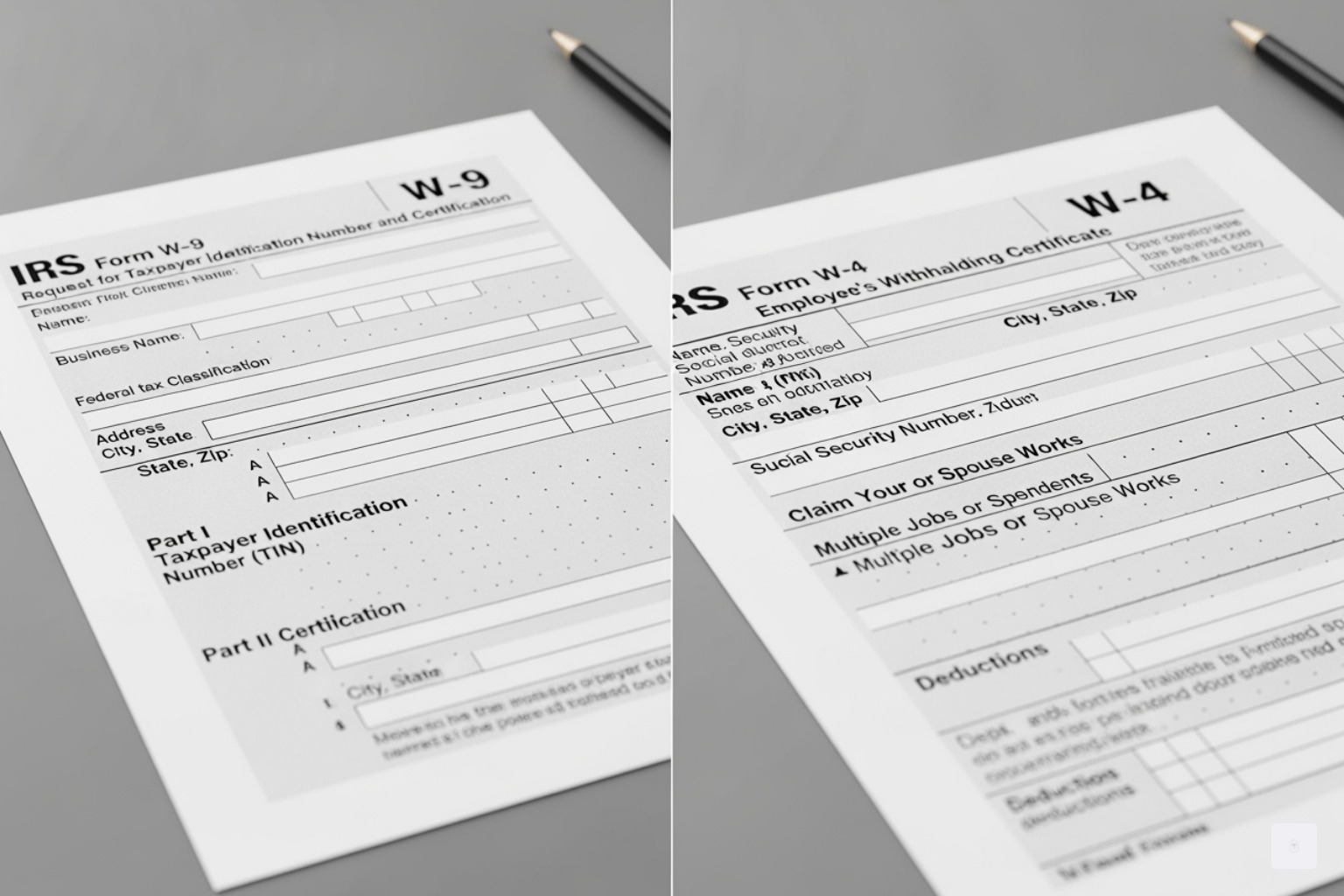
The simplest distinction is: Form W-9 is for independent contractors, while Form W-4 is for employees.
A W-9 provides your TIN to a client for year-end 1099 reporting, and no taxes are withheld from your payments. In contrast, a W-4 instructs your employer on how much tax to withhold from your paycheck, which is reported on a W-2.
The IRS provides more information on the purpose of a Form W-9 and the purpose of a Form W-2 (which is associated with the W-4).
| Feature | Form W-9 | Form W-4 |
|---|---|---|
| Official Name | Request for Taxpayer Identification Number and Certification | Employee’s Withholding Certificate |
| Who Fills It Out | Independent contractors, freelancers, vendors | Employees |
| Purpose | Provides TIN for 1099 reporting; avoids backup withholding | Instructs employer on tax withholding for payroll |
| Given To | The business or entity paying you | Your employer |
| Leads To | Form 1099-NEC (or other 1099s) | Form W-2 |
| Tax Withholding | No withholding (unless backup withholding applies) | Federal income tax is withheld from each paycheck |
| IRS Filing | Kept by the payer; not filed with the IRS by the payee | Kept by the employer to calculate withholding |
If you are unsure of your status, the IRS offers guidance on worker classification to help determine if you should be treated as an employee or an independent contractor.
Best Practices for Managing and Submitting Your W-9
Following best practices for managing your W-9 forms protects your sensitive information and ensures timely payments. Key practices include using secure submission methods, keeping your information current, and submitting the form proactively.
How and When to Submit Your W-9
The security of your Taxpayer Identification Number (TIN) is paramount when submitting a W-9.
- Secure Online Portal (Recommended): Using a service like Fillable W9 encrypts your data and provides instant delivery to the requester.
- Paper Submission: Mailing a physical form is slower and less secure. If you must use this method, consider certified mail for tracking.
- Avoid Standard Email: Never email a completed W-9 as a regular attachment. Standard email is not encrypted and leaves your personal data vulnerable.
For timing, always submit your W-9 before your first payment is due. This prevents payment delays and helps you avoid backup withholding.
How Often Should a W-9 Be Updated?
A W-9 form does not expire, but you must submit a new one if your key information changes. This includes:
- A change to your legal name (e.g., due to marriage).
- A change in your business structure or tax classification (e.g., a sole proprietorship becomes an LLC).
- A change to your TIN (e.g., you obtain an EIN for your business).
While not required by the IRS, it is also a good practice to submit an updated W-9 if your address changes to ensure you receive year-end tax forms without issue. As tax experts advise, it’s best to “Collect Form W-9 Now!” and keep the information current.
Don’t waste time with paper forms — complete your secure W9 online at https://fillablew9.com/apply.
Frequently Asked Questions about the W-9 Form
Here are answers to some of the most common questions about the W-9 form.
Do I send my completed W-9 form to the IRS?
No. You should never send a W-9 to the IRS. You provide it only to the business or person who requested it (the payer). They use it for their records and to prepare your year-end 1099 form.
What happens if I don’t fill out a W-9 when requested?
Failing to provide a W-9 can lead to several negative consequences:
- Backup Withholding: The payer is required to withhold 24% of your payment and send it to the IRS.
- Payment Delays: Many companies will not issue payment until a completed W-9 is on file.
- IRS Penalties: You could face a $50 penalty for each failure to provide a correct TIN. Knowingly providing false information can lead to a $500 penalty or more.
Can I use an EIN instead of my SSN on a W-9?
Yes. If you are a sole proprietor with an Employer Identification Number (EIN), you can use it instead of your Social Security Number (SSN). Many freelancers obtain an EIN for their business to protect the privacy of their SSN. For other business entities like corporations and partnerships, using an EIN is required.
Complete Your W-9 Form Securely and Effortlessly
You’ve made it through the maze of what is W9 forms, and hopefully, it all feels a lot less intimidating now. The truth is, the W-9 isn’t some arcane IRS puzzle—it’s simply a straightforward way to share your taxpayer information with businesses that pay you. But as simple as it is, getting it right matters. A lot.
When you understand the purpose of the W-9 and complete it accurately, you’re protecting yourself from backup withholding that could take 24% of your hard-earned payments. You’re ensuring your income gets reported correctly to the IRS. And you’re making life easier for the businesses you work with, which means smoother, faster payments for you.
We’ve walked through every aspect of this form together: its purpose in tax compliance, who needs to use it (and who shouldn’t), how to fill out each line without second-guessing yourself, and the real consequences of skipping it or making mistakes. We’ve also covered the key differences between a W-9 and a W-4, so you’ll never confuse the two again.
Here’s what matters most: you don’t have to wrestle with paper forms, worry about them getting lost in the mail, or stress about whether your sensitive information is secure. The days of printing, scanning, and hoping your Social Security Number doesn’t end up in the wrong hands are over.
At Fillable W9, we’ve built a platform specifically designed to make this process effortless and secure. You can complete your W-9 online in just a few minutes, with the confidence that your taxpayer information is protected by industry-standard encryption. No more delays in getting paid. No more confusion about whether you filled it out correctly. Just a simple, secure way to handle an essential business task.
Whether you’re a freelancer landing your first client, a small business owner managing multiple contractors, or someone who just needs to get this done quickly and correctly, we’re here to help you steer tax compliance without the headache.
✅ Ready to complete your W9 in minutes? Apply here now.