
Your One-Stop Shop for a W9 Form 2026 PDF Download
The Fastest Way to Get Your W9 Form PDF Download Done Right

The w9 form 2021 pdf download is still one of the most searched tax topics for freelancers and contractors – and for good reason. Even in 2026, many people search for older W-9 revisions when a client asks for a prior-year copy or when they want to compare versions before submitting a current form. Every client who pays you $600 or more generally needs your W-9 on file before they can report that income to the IRS.
Here’s the quick answer if that’s all you need:
How to get the W-9 form PDF (official sources):
- Official IRS PDF (current version): www.irs.gov/pub/irs-pdf/fw9.pdf
- Prior revisions (including 2021): www.irs.gov/prior-year-forms-and-instructions
- Fill online instantly: fillablew9.com/apply
Important: Give your completed W-9 to the requester (your client or payer). Do not send it to the IRS.
The W-9 is a short IRS form – officially titled “Request for Taxpayer Identification Number and Certification” – that lets payers collect your Tax Identification Number (TIN) so they can file accurate information returns like the 1099-NEC or 1099-MISC. If you don’t submit one, your payer may be required to withhold 24% of your payments as backup withholding and send it directly to the IRS.
That’s a painful chunk of your income to lose over a missing form.
Whether you’re a freelancer landing your first client, a sole proprietor juggling multiple contracts, or an accountant helping clients stay compliant – getting this form right matters.
I’m Haiko de Poel, a digital marketing strategist with deep experience helping businesses simplify complex compliance processes, including guiding contractors and small businesses through the nuances of the w9 form 2021 pdf download and how it compares with the latest W9 form requirements. In this guide, I’ll walk you through everything you need – from downloading the right version to filling it out correctly and avoiding costly mistakes.
Start filling your W9 now at https://fillablew9.com/apply.

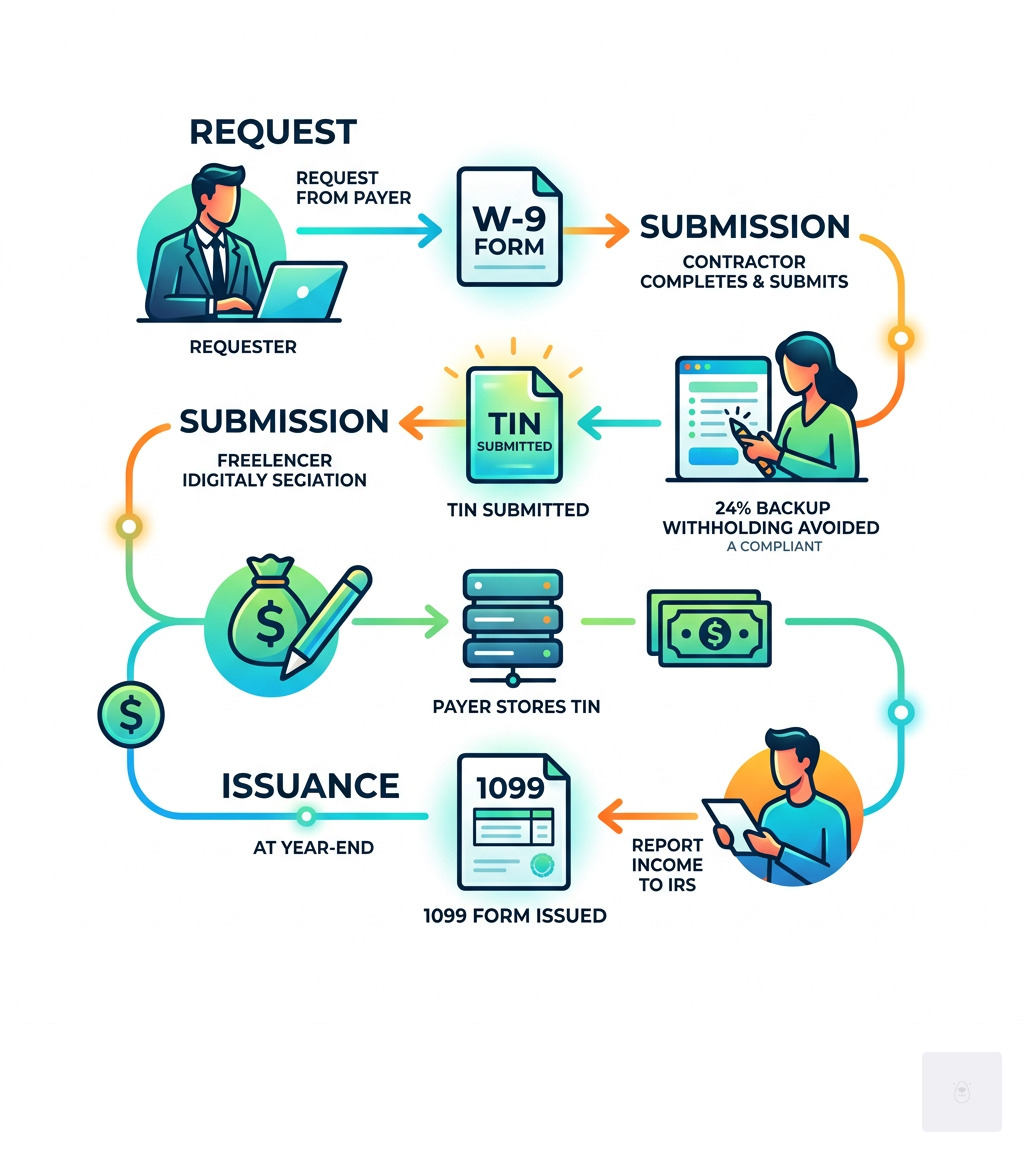
W9 form 2021 pdf download terminology:
Understanding the W9 Form 2021 PDF Download and Its Purpose
At its core, the w9 form 2021 pdf download acts as a formal handshake between you and the person paying you. When we talk about “tax compliance,” we often think of the big end-of-year tax return, but the W-9 is the foundational document that makes those returns possible. Its primary purpose is to provide your correct Taxpayer Identification Number (TIN) to a requester who is required to file an information return with the IRS.
Why does this matter? The IRS uses the information on your W-9 to track various types of income and transactions. While most people associate it with “nonemployee compensation” (the money you earn as a freelancer), it is also used for:
- Reporting interest earned on bank accounts (Form 1099-INT).
- Dividends from stocks or mutual funds (Form 1099-DIV).
- Real estate transactions (Form 1099-S).
- Mortgage interest you paid (Form 1098).
- Cancellation of debt or abandonment of secured property.
By providing a completed W-9, you are also certifying three critical things: that the TIN you provided is correct, that you are a U.S. person (including resident aliens), and that you are not subject to backup withholding. You can explore more info about W9 features to see how digital tools make this certification process seamless.
Who is Required to Submit a W-9?
If you are a “U.S. person” and a business asks you for your tax information, you likely need to fill out this form. In the eyes of the IRS, a U.S. person isn’t just a citizen; it includes:
- Individuals: Freelancers, gig workers, and independent contractors.
- Entities: Domestic partnerships, corporations, companies, or associations created in the United States.
- Estates and Trusts: Domestic estates and certain trusts.
- Resident Aliens: If you reside in the U.S. and meet the substantial presence test, you use a W-9 rather than a W-8.
If you are a sole proprietor or a single-member LLC, you are still required to provide this form to your clients. Essentially, if you aren’t an “employee” receiving a W-2, but you’re providing services for pay, keep a w9 form 2021 pdf download ready.
Where to Securely Access the w9 form 2021 pdf download
Finding the right form shouldn’t feel like a scavenger hunt. While the IRS website hosts the official revisions, many users find the standard government PDF difficult to edit without specialized software.
When you access a w9 form 2021 pdf download, you want to ensure it is the revision requested by your client. While the 2018 revision was standard for several years, the 2021 and 2024 updates introduced minor but important clarifications. We recommend using a secure, fillable platform to avoid the “print-scan-email” loop, which can expose your Social Security Number to security risks. You can find more info about our pricing to see how we provide a secure environment for your sensitive tax data.
Start filling your W9 now at https://fillablew9.com/apply.
Step-by-Step Guide: How to Fill Out Your W-9 Correctly
Filling out the form may seem straightforward, but one small error can lead to a “TIN Mismatch” notice from the IRS, which is a headache for both you and your client. Let’s break it down line by line.
- Line 1 (Name): This is the most important line. You must enter the name as shown on your income tax return. If you are an individual, enter your first and last name. If you are a sole proprietor, do not put your business name here; put your personal name.
- Line 2 (Business Name): This is where your “Doing Business As” (DBA) name or disregarded entity name goes. If you don’t have one, leave it blank.
- Line 3 (Federal Tax Classification): Check only one box.
- Individual/Sole Proprietor/Single-Member LLC: Check this if you are a one-person show.
- LLC: If you check this, you must also enter the tax classification (C = C Corporation, S = S Corporation, P = Partnership).
- Lines 5 & 6 (Address): Provide the address where you want your 1099 forms mailed. If you’ve moved recently, mark this as your “NEW” address to help the requester update their records.
If you’re feeling overwhelmed, you can learn how to use our platform to walk through these steps with guided prompts that prevent common errors.
Completing the w9 form 2021 pdf download for Freelancers
As a freelancer, your Taxpayer Identification Number (TIN) is your golden ticket to getting paid without deductions. Depending on how you’ve set up your business, you will use one of three numbers:
| Business Structure | Recommended TIN | Why? |
|---|---|---|
| Individual / Freelancer | SSN | Standard for personal tax returns. |
| Sole Proprietor | SSN or EIN | SSN is preferred by the IRS for sole props. |
| Single-Member LLC | Owner’s SSN/EIN | The LLC is “disregarded” for tax purposes. |
| Corporation / Partnership | EIN | Required for separate legal entities. |
If you are a resident alien who does not have (and is not eligible for) an SSN, you will use your ITIN (Individual Taxpayer Identification Number).
Avoiding Backup Withholding on your w9 form 2021 pdf download
Part II of the form is the Certification. By signing this, you are testifying under penalties of perjury that your TIN is correct and you aren’t subject to backup withholding.
What is backup withholding? If the IRS determines you haven’t reported all your interest or dividends in the past, they may notify your payers to withhold 24% of your future payments. If you have been notified by the IRS that you are currently subject to backup withholding, you must cross out item 2 in the certification section before signing.
Line 4 is often left blank by individuals, but it’s where “Exempt Payees” (like corporations or tax-exempt organizations) enter codes to prove they shouldn’t have taxes withheld. For most freelancers and small businesses, you’ll leave the exemption boxes empty. If you have specific edge cases, you can find more info about common questions on our FAQ page.
Don’t waste time with paper forms — complete your secure W9 online at https://fillablew9.com/apply.
Key Differences Between Form W-9 Revisions (2021 vs. Current Versions)
While many clients still accept a w9 form 2021 pdf download for reference or legacy records, the IRS released a significant update in March 2024 that remains important for current compliance. If you are a “flow-through” entity such as a partnership or a trust, you should be aware of Line 3b on the newer revision.
This line requires partnerships and trusts to indicate whether they have foreign partners, owners, or beneficiaries. The change helps support reporting requirements under Section 1446(f), which relates to withholding on the transfer of partnership interests.
Additionally, the newer instructions provide updated guidance for:
- Digital Asset Brokers: New rules for those involved in cryptocurrency and digital asset transactions.
- ITIN Expiration: Reminders that an ITIN expires if it hasn’t been used on a federal tax return at least once in the last three consecutive years.
- Section 1446(f) Withholding: Clarifying that a 10% withholding may apply to the “amount realized” on certain partnership transfers if a valid W-9 isn’t provided.
If you’re searching for a w9 form 2021 pdf download, make sure you also confirm whether your requester wants an older revision for documentation purposes or the latest IRS version for active use. Using the most current acceptable form helps prevent delays and keeps your W9 process compliant in 2026. You can check more info about our services to ensure you are always using the most recent, IRS-compliant templates.
Common Mistakes and Penalties to Avoid
We’ve seen it all when it comes to W-9 errors. Here are the “deadly sins” of tax form completion that you should avoid at all costs:
- The Name/TIN Mismatch: Entering your business name on Line 1 instead of your legal name (for sole proprietors). This is the #1 cause of IRS flags.
- Sending to the IRS: We cannot stress this enough—do not mail your W-9 to the IRS. It contains your SSN; sending it to the wrong place is a major security risk and serves no purpose for your taxes.
- Forgetting the Signature: A W-9 is not valid without a signature and date. If you submit it unsigned, the requester must treat it as if you never sent it and may start backup withholding.
- Using the Wrong Form: If you are a foreign person, do not use a W-9. You must use the appropriate W-8 form.
The Cost of Errors:
- Failure to Furnish TIN: The IRS can fine you $50 for every time you fail to provide a correct TIN to a requester.
- Civil Penalty: If you make a false statement with no reasonable basis that results in no backup withholding, you could face a $500 penalty.
- Criminal Penalty: Willfully falsifying certifications can lead to fines or even imprisonment.
Always keep a copy of your completed W-9 for at least four years. This is your proof that you provided the correct information should the IRS ever question a 1099 you received.
Frequently Asked Questions about Form W-9
Do I need to send my completed W-9 to the IRS?
No, you must provide the completed form only to the person or entity who requested it. The requester (your client, bank, or broker) uses the information to file “information returns” like the 1099-NEC. The IRS receives the data from the payer, not from your W-9 directly.
What happens if I refuse to provide a W-9 to a client?
If you fail to provide a correct TIN, you may be subject to backup withholding. This means the payer is legally required to withhold 24% of your payments and send that money to the IRS. Additionally, you may be subject to a $50 penalty from the IRS for each failure to provide your TIN.
Can I sign and submit a W-9 form electronically?
Yes! Electronic signatures are perfectly acceptable. In fact, using a secure platform like ours is often safer than printing and mailing a form. The IRS allows electronic submission as long as the system ensures the person signing is who they say they are and the signature is legally binding under the Electronic Signatures in Global and National Commerce (ESIGN) Act.
Conclusion
Navigating tax forms doesn’t have to be a nightmare. Whether you are looking for a w9 form 2021 pdf download for a specific legacy contract or you need the latest 2024 version for a new client, the goal is always the same: accuracy and security.
Before you hit “send” on your next W-9, run through this final checklist:
- Does the name on Line 1 match your tax return exactly?
- Did you check the correct tax classification box?
- Is your SSN or EIN written clearly and correctly?
- Have you signed and dated the form?
- Are you sending it through a secure, encrypted channel?
By taking these small steps, you protect your income from unnecessary withholding and keep your professional reputation spotless.
✅ Ready to complete your W9 in minutes? Apply here now